NPC Map Locations
🟡 Updated this year⚠️ Install Order · 3 steps
Install in this order, then this mod last — most mods fail to load without their framework and dependencies in place.
Preview
🔍 Analysis
- 👍 2.4% endorsement rate — high engagement, a strong quality signal
- 🏆 #1 of 179 User Interface mods in this game by downloads
📋 About This Mod
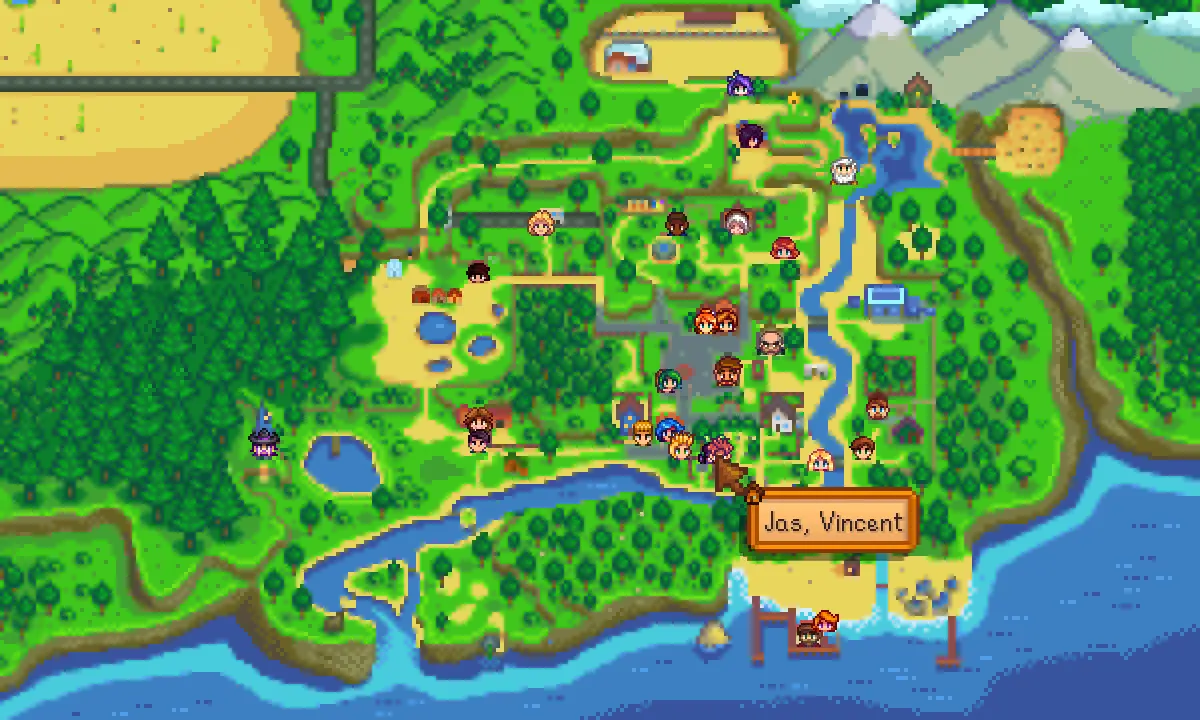
See NPC and players on the map with live real-time positioning and an optional minimap.
For non-English players, translations are included in the base mod. Contributions are welcome!
Install
-
[]Install the latest version of SMAPI.
[
](Optional) Install Generic Mod Config Menu to configure the mod.[]Unzip the mod folder into Stardew Valley/Mods.
[]Run the game using SMAPI.
How to use
See how to use NPC Map Locations in the readme!
You can install Generic Mod Config Menu to configure the mod.
Compatibility
-
[]Compatible with...
[
]Stardew Valley 1. 6. 9 or later;[]Linux, macOS, and Windows;
[]single-player and multiplayer (must be installed by the host player, and also by any farmhand who wants to see NPCs on the map).
[]No known mod conflicts.
See also
-
[]Release notes
[]Source code
[]My other mods
Tiny reminder: endorse the mod if you like it. It means more people will see it, and it makes the author happy. :)
-
[]Release notes
-
[]Compatible with...
NPC Map Locations is a highly popular Stardew Valley UI mod that displays NPCs and players on the map, with an optional minimap. It has 333,380 endorsements and 14.1 million downloads, last updated in April 2026, making it a must-have for players who want to track character positions easily.
✨ Key Features
📊 Pros & Cons
✅ Pros
- Massive community trust: 333,380 endorsements and 14.1 million downloads.
- Essential for tracking NPC schedules and finding characters fast.
- Active development, updated recently (April 2026).
⚠️ Cons
- Requires SMAPI to run, so you'll need to set that up first.
- May conflict with other map mods if you use them.
For Stardew Valley players who constantly lose track of NPCs and want to know where everyone is at a glance. Perfect for completionists and efficiency-focused farmers. Skip if you prefer to discover NPC locations organically without UI help.
💡 Beginner Tips
- Install SMAPI first, then drop the mod folder into your Stardew Valley Mods directory.
- Use the config file to toggle the minimap and adjust its position to your liking.
- If you use other map mods, check for compatibility patches to avoid overlaps.
📊 Mod Details
- Game
- Stardew Valley Mods
- Author
- Bouhm and Pathoschild
- Version
- 3.5.2
- Downloads
- 14,055,715
- Endorsements
- 333,380
- Category
- User Interface
- Created
- 4/2/2016
- Updated
- 4/25/2026
🔗 Required By 7 Mods
These mods list this mod as a dependency.
🧩 Commonly Used Together
Users add these mods to the same collections — a real compatibility signal, not an AI guess.
🔧 How to Install Stardew Valley Mods
Download from Nexus.
📖 Full step-by-step install guide for Stardew Valley →
Visit the official mod page for specific installation instructions for this mod.
🎮 Need cheat codes or console commands? Check ur gaming wiki for Stardew Valley commands, item IDs, and more.
Keep browsing — more Stardew Valley mods await