Lookup Anything
🟡 Updated this year⚠️ Install Order · 3 steps
Install in this order, then this mod last — most mods fail to load without their framework and dependencies in place.
Preview
🔍 Analysis
- 👍 2.0% endorsement rate — high engagement, a strong quality signal
- 🏆 #2 of 179 User Interface mods in this game by downloads
📋 About This Mod
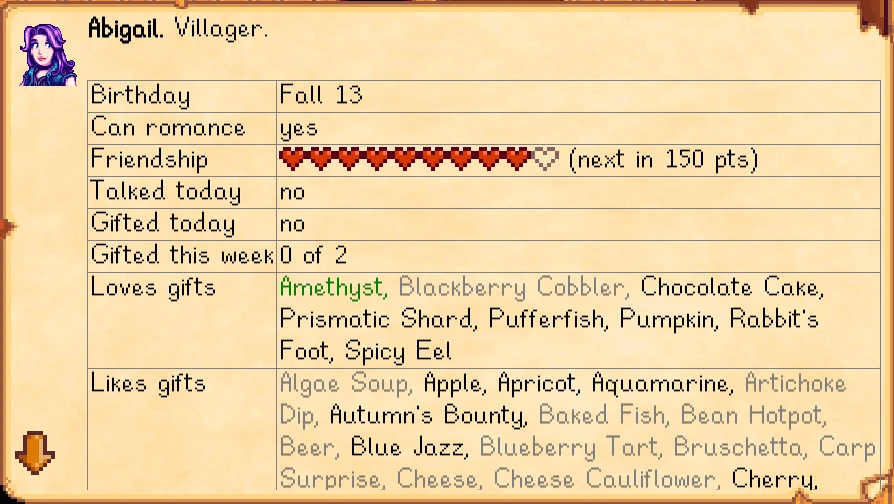
See live info about whatever's under your cursor when you press F1. Learn a villager's favourite gifts, when a crop will be ready to harvest, how long a fence will last, why your farm animals are unhappy, and more (see showcase). Works on things in the world, your inventory, the calendar, game menus, shops, and more.
For non-English players, translations are included in the base mod. Contributions are welcome!
Install
-
[]Install the latest version of SMAPI.
[
]Unzip the mod folder into Stardew Valley/Mods.[]Run the game using SMAPI.
How to use
Just press F1 to view info about something under your cursor, or press left shift + F1 to search. (On laptops or macOS, you may need to press FN + F1 instead. You can also set it to a different button using Generic Mod Config Menu.)
If there's no cursor (e.g. when playing with a controller or on mobile), the most relevant subject is shown instead. That may be something in front of the player, the player on the skills menu, the NPC on their profile page, etc.
See the showcase page for many examples and explanations of what the mod does. You can optionally customise the mod settings (including button mappings and optional data mining fields).
Compatibility
-
[]Compatible with...
[]Stardew Valley 1. 6. 15 or later;
[]Linux, macOS, and Windows;
[]single-player and multiplayer (even if other players don't have it). In multiplayer mode, NPC schedules aren't visible to farmhands due to game limitations.
[]Mod conflicts:
-
[]Custom Ore Nodes: both mods will work fine, but you can't look up custom ore nodes yet.
Other useful mods that complement Lookup Anything:
- [
[]Fish Info Overlays.
See also
- []Release notes
[]Source code
[]My other mods
Tiny reminder: endorse the mod if you like it. It means more people will see it, and it makes the author happy. :)
-
[]Custom Ore Nodes: both mods will work fine, but you can't look up custom ore nodes yet.
-
[]Compatible with...
Lookup Anything is a Stardew Valley mod that shows detailed information about whatever's under your cursor when you press F1. It covers villager gift preferences, crop harvest times, fence durability, and animal happiness, making it a must-have for players who want to optimize their farm and relationships.
✨ Key Features
📊 Pros & Cons
✅ Pros
- Massive community trust with 197,509 endorsements and 9.7M downloads.
- Saves time by giving instant answers without alt-tabbing to a wiki.
- Actively maintained—last updated March 2026.
⚠️ Cons
- Requires SMAPI to run, so you'll need to set that up first.
- No in-game configuration options mentioned—you get what you get.
- Only works when you press F1, so it's not always-on info.
For Stardew Valley players who want to min-max their farm and relationships without constantly checking the wiki. If you're a completionist or just want to know why your chickens are grumpy, this is for you. Skip if you prefer to discover everything through trial and error.
💡 Beginner Tips
- Install SMAPI first—Lookup Anything won't work without it.
- Use F1 on a villager to see their loved gifts, then plan your gifts accordingly.
- Check your animals' happiness with F1 to quickly diagnose any issues.
📊 Mod Details
- Game
- Stardew Valley Mods
- Author
- Pathoschild
- Version
- 1.55.0
- Downloads
- 9,680,961
- Endorsements
- 197,509
- Category
- User Interface
- Created
- 9/19/2016
- Updated
- 3/15/2026
🔗 Required By 4 Mods
These mods list this mod as a dependency.
🧩 Commonly Used Together
Users add these mods to the same collections — a real compatibility signal, not an AI guess.
🔧 How to Install Stardew Valley Mods
Download from Nexus.
📖 Full step-by-step install guide for Stardew Valley →
Visit the official mod page for specific installation instructions for this mod.
🎮 Need cheat codes or console commands? Check ur gaming wiki for Stardew Valley commands, item IDs, and more.
Keep browsing — more Stardew Valley mods await