Chests Anywhere
🟡 Updated this year⚠️ Install Order · 3 steps
Install in this order, then this mod last — most mods fail to load without their framework and dependencies in place.
Preview
🔍 Analysis
- 👍 2.0% endorsement rate — high engagement, a strong quality signal
- 🏆 #3 of 179 User Interface mods in this game by downloads
📋 About This Mod
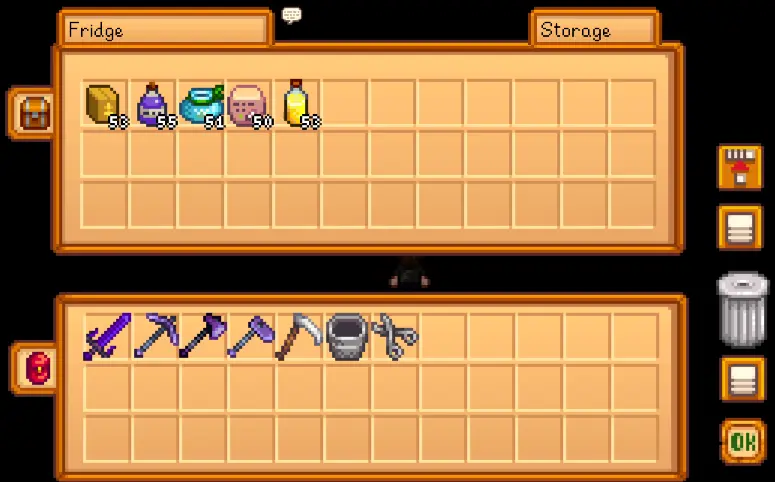
Access your chests, dressers, fridge, shipping bin, and Junimo huts from anywhere by pressing B. Transfer items without having to run around, from the comfort of your bed to the deepest mine level.
For non-English players, translations are included in the base mod. Contributions are welcome!
Install
-
[]Download the version you want: unlimited (access all your chests from anywhere) or balanced (access chests in your current world area).
[
]Install the latest version of SMAPI.[]Unzip the mod folder into Stardew Valley/Mods.
[]Run the game using SMAPI.
How to use
-
[]Access chests by pressing B. This will show your chests grouped by category. Navigate by clicking the top dropdowns, or by pressing the arrow keys.
[
]Edit chests by clicking the edit icon after opening a chest (see example). This will show a form where you can...[]set the chest name;
[]set a category (which defaults to its location);
[]set the sort order in the chest list;
[]or hide the chest from the chest list.
[]Point at a chest in the world to see its name in a tooltip (if it has one).
[]Open the shipping bin as if it were a chest to take items back out before they're shipped.
You can optionally customise the mod settings (including keyboard/controller mappings).
Common questions
Is the mod still compatible?
- []The mod is compatible with Stardew Valley 1. 6. 15 or later on Linux/macOS/Windows, both single-player and multiplayer.
Does the mod work in multiplayer?
- [
The mod is local, so it's fine if only some players have it (whether they're the host or farmhands) and it'll only work for those who do.
Does the mod conflict with any others?
- []There's one known conflict:
■ Joys of Efficiency may cause errors when opening the shipping bin.
This seems overpowered. Is there a balanced version?[]Yep, you can download settings for a balanced mode on the files tab. You can also install Generic Mod Config Menu
- []The mod is compatible with Stardew Valley 1. 6. 15 or later on Linux/macOS/Windows, both single-player and multiplayer.
-
[]Access chests by pressing B. This will show your chests grouped by category. Navigate by clicking the top dropdowns, or by pressing the arrow keys.
Chests Anywhere lets Stardew Valley players access all storage containers from any location, eliminating the need to travel back and forth. It includes an optional balanced mode and has massive community support with over 83,000 endorsements and 4.2 million downloads.
✨ Key Features
📊 Pros & Cons
✅ Pros
- Huge community favorite with 83,016 endorsements and 4.2M downloads.
- Saves tons of time by letting you manage all storage from anywhere.
- Optional balanced mode keeps the game challenging if you want it.
⚠️ Cons
- May make the game too easy if you don't use the balanced mode.
- Requires SMAPI to install, which adds an extra step.
For Stardew Valley players who hate running back and forth to manage storage. Perfect for farmers who want to organize their loot without leaving the mine or their bed. Skip if you prefer the challenge of limited inventory access.
💡 Beginner Tips
- Install SMAPI first, then drop the mod folder into your Stardew Valley Mods folder.
- Use the optional balanced mode if you want to keep the game's challenge intact.
- Check the in-game config menu to customize which containers are accessible.
📊 Mod Details
- Game
- Stardew Valley Mods
- Author
- Pathoschild
- Version
- 1.30.1
- Downloads
- 4,229,237
- Endorsements
- 83,016
- Category
- User Interface
- Created
- 8/17/2016
- Updated
- 3/15/2026
🔗 Required By 2 Mods
These mods list this mod as a dependency.
🧩 Commonly Used Together
Users add these mods to the same collections — a real compatibility signal, not an AI guess.
🔧 How to Install Stardew Valley Mods
Download from Nexus.
📖 Full step-by-step install guide for Stardew Valley →
Visit the official mod page for specific installation instructions for this mod.
🎮 Need cheat codes or console commands? Check ur gaming wiki for Stardew Valley commands, item IDs, and more.
Keep browsing — more Stardew Valley mods await