NPC Location Compass
🟡 Updated this year⚠️ Install Order · 2 steps
Install in this order, then this mod last — most mods fail to load without their framework and dependencies in place.
Preview
🔍 Analysis
- 👍 2.7% endorsement rate — high engagement, a strong quality signal
- 🏆 #97 of 179 User Interface mods in this game by downloads
📋 About This Mod
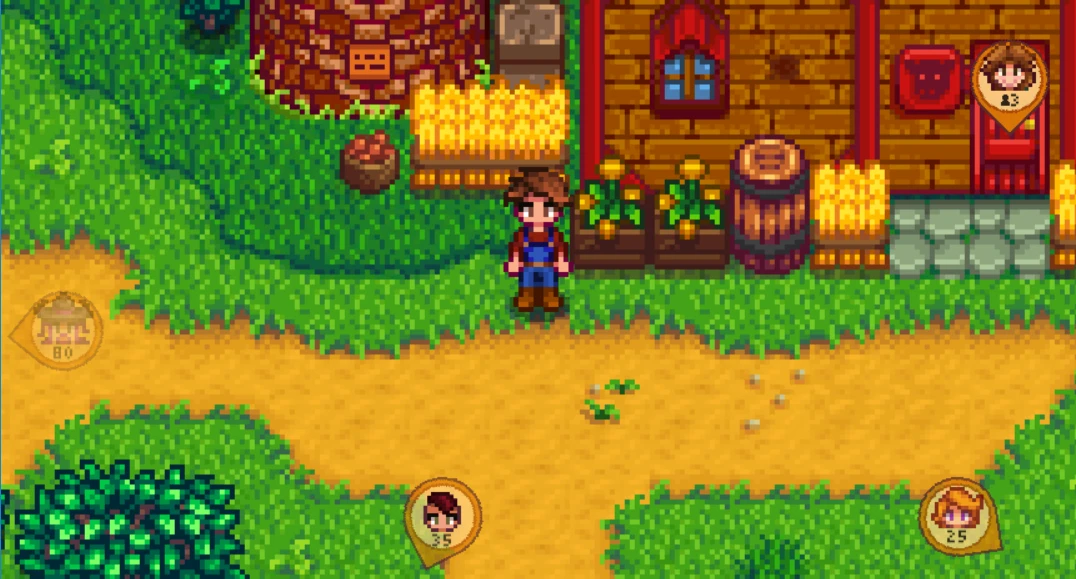
NPC Location Compass shows NPCs and players on-screen, with compass needles that show the direction and distance from the player's current position in the map.
For non-English players, translations are included in the base mod. Contributions are welcome!
Install
-
[]Install the latest version of SMAPI.
[
]Unzip the mod folder into Stardew Valley/Mods.[]Run the game using SMAPI.
How to use
Hold the ALT button (configurable) to show the compass needles:
To scroll through multiple characters indoors, right-click the compass needle.
Compatibility
-
[]Compatible with...
[]Stardew Valley 1. 6. 9 or later;
[]Linux, macOS, and Windows;
[]single-player and multiplayer (must be installed by the host player).
[]No known mod conflicts.
-
[]In multiplayer, it must be installed by the host player too.
[
]It only shows characters in the player's location by default.Configure
You can install Generic Mod Config Menu to configure the mod:
See also
-
[]Release notes
[
]Source code - My other mods
Tiny reminder: endorse the mod if you like it. It means more people will see it, and it makes the author happy. :)
-
[]Release notes
-
[]In multiplayer, it must be installed by the host player too.
-
[]Compatible with...
NPC Location Compass is a user interface mod that displays NPCs and players on-screen with compass needles indicating direction and distance. It has 1,629 endorsements and 60,891 downloads, last updated in March 2026. Ideal for players who want to track characters easily.
✨ Key Features
📊 Pros & Cons
✅ Pros
- Community favorite with 1,629 endorsements and 60k+ downloads.
- Simple UI addition that makes tracking NPCs a breeze.
- Actively maintained—last updated March 2026.
⚠️ Cons
- May clutter the screen if many NPCs are nearby.
- No mention of configuration options—could be limited in customization.
For Stardew Valley players who constantly lose track of villagers and want a quick glance at their locations. Also great for multiplayer hosts who need to keep an eye on friends. Skip if you prefer a minimalist UI or want deep customization.
💡 Beginner Tips
- If you're using SMAPI, just drop the mod folder into your Mods directory—no extra setup needed.
- Check the in-game settings to see if you can toggle the compass on/off or adjust its opacity.
- Pair with a map mod for even better navigation—this compass is a great complement.
📊 Mod Details
- Game
- Stardew Valley Mods
- Author
- Bouhm and Pathoschild
- Version
- 1.5.3
- Downloads
- 60,891
- Endorsements
- 1,629
- Category
- User Interface
- Created
- 11/9/2018
- Updated
- 3/15/2026
🧩 Commonly Used Together
Users add these mods to the same collections — a real compatibility signal, not an AI guess.
🔧 How to Install Stardew Valley Mods
Download from Nexus.
📖 Full step-by-step install guide for Stardew Valley →
Visit the official mod page for specific installation instructions for this mod.
🎮 Need cheat codes or console commands? Check ur gaming wiki for Stardew Valley commands, item IDs, and more.
Keep browsing — more Stardew Valley mods await