Additional Vintage v2 Compatibility
🟠 Updated over a year ago⚠️ Install Order · 2 steps
Install in this order, then this mod last — most mods fail to load without their framework and dependencies in place.
Preview
🔍 Analysis
- 👍 0.3% endorsement rate
- 🏆 #48 of 179 User Interface mods in this game by downloads
📋 About This Mod
Information:
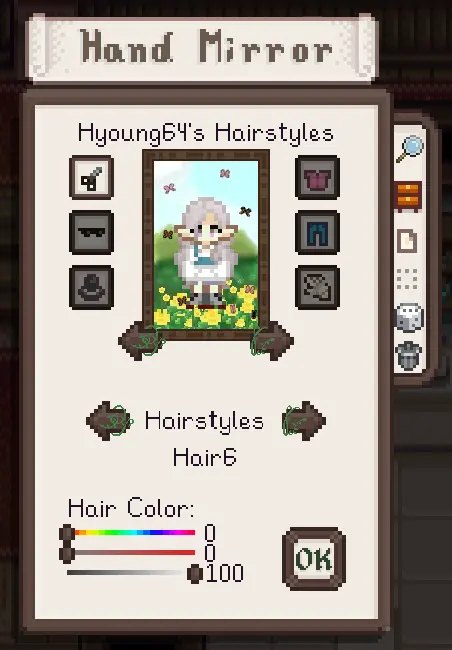
This mod is a collection of edits that I made for other mods that add their own additions to the interface so that they match the theme of Vintage Interface v2. It is somewhat jarring to be suddenly hit with bright orange after all!
-
[]Abilities Experience Bar
[
]Animal Husbandry Mod[]Better Jukebox
[]Better Shop Menu
[]Crafting Collections Page
[]Customize Dresser
[]Deluxe Journal
[]Event Lookup
[]Fashion Sense
[]Font Settings
[]Happy Birthday
[]Mod Update Menu
[]Quality Smash
[]Shop Tabs
[]Show Birthdays
[]Skill Prestige
[]Smart Building
[]Social Page Order Button
[]Stardew and Chill
[]Survivalistic
[]Sword and Sorcery
[]The Love of Cooking
[]Unlockable Bundles
- Expanded Storage
Installation:
1. Install the latest version of the required mod (listed in the Requirement tab or as the name for the separated files)
3. Install the mod
4. Unzip the file, place the folder in your Mods folder, and overwrite the original mod's assets
5. Launch your game and enjoy!
A compatibility patch that edits various mods to match the Vintage Interface v2 theme. With 495 endorsements and 152,776 downloads, it's a popular choice for players who want a cohesive UI. Last updated April 2025, it remains relevant for current game versions.
✨ Key Features
📊 Pros & Cons
✅ Pros
- Community-approved with 495 endorsements
- High download count (152,776) shows it's widely used
- Recently updated (April 2025) so likely works with current game version
⚠️ Cons
- No specific list of which mods are edited
For players who use Vintage Interface v2 and want other mods to match its aesthetic. If you're not using that UI theme, this mod isn't for you. Skip if you prefer a different UI style or don't care about visual consistency.
💡 Beginner Tips
- Make sure you have Vintage Interface v2 installed first, as this patch is designed for it.
- Check the mod's posts or comments for a list of compatible mods, since the description doesn't specify.
- If you use a mod manager, install this patch after the mods it edits to ensure proper overwrite.
📊 Mod Details
- Game
- Stardew Valley Mods
- Author
- RedxMoonxRose
- Version
- 1.3
- Downloads
- 152,776
- Endorsements
- 495
- Category
- User Interface
- Created
- 6/7/2022
- Updated
- 4/21/2025
🧩 Commonly Used Together
Users add these mods to the same collections — a real compatibility signal, not an AI guess.
🔧 How to Install Stardew Valley Mods
Download from Nexus.
📖 Full step-by-step install guide for Stardew Valley →
Visit the official mod page for specific installation instructions for this mod.
🎮 Need cheat codes or console commands? Check ur gaming wiki for Stardew Valley commands, item IDs, and more.
Keep browsing — more Stardew Valley mods await