Elle's New Barn Animals
⚪ Last updated 2021⚠️ Install Order · 3 steps
Install in this order, then this mod last — most mods fail to load without their framework and dependencies in place.
Preview
🔍 Analysis
- 👍 3.0% endorsement rate — high engagement, a strong quality signal
- 🏆 #2 of 95 Livestock and Animals mods in this game by downloads
📋 About This Mod
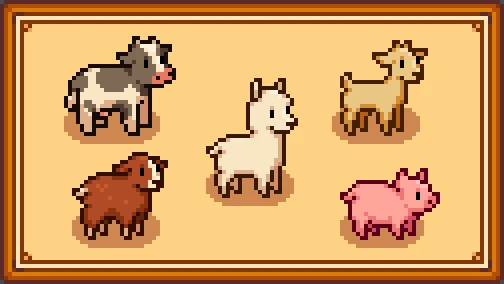
- Several different skins for each barn animal to choose from!
- 22 skins for brown and white cows (including deer)
- 18 skins for goats (including deer)
- 14 skins for sheep (including alpacas)
- 18 skins for pigs (including deer)
- 4 skins for ostriches
- Replacement of the icons in Marnie's shop
- Wool and cloth item recolors (note that these are the same items you get from your rabbits, but change with your sheep color)
- The ability to disable any animal replacement in the config.json for compatibility with other mods
1. Install the latest version of SMAPI.
2. Install the latest version of Content Patcher.
3. Extract into your \Stardew Valley\Mods\ folder.
4. Run the game through SMAPI to generate a config.json, then close.
5. Open the config.json and use the images in the References folder to change each animal to the texture name you prefer! To disable a retexture, change its value to "False"
6. Run the game using SMAP!
To uninstall, just delete the folder you put in your Mods directory.
Optional: I have also included an optional folder of skins for use with the Adopt 'n Skin mod! This will let you use more variants of animals on your farm, including cats and dogs. Note that if you use A&S, you should only use the skins, not the main download.
To use, extract the skins folder into Adopt 'n Skin's assets folder and merge it. I have included all skins shown here; simply delete the ones you don't want to use! Deer are included as skins for cows, pigs, and goats.
1. 1. 3 - Fixed misnamed file
- Fixed reference image typos
1. 1. 2 - Added Ostrich replacements
- Added optional wool and cloth recolors (enabled by default, change with your Sheep config)
- Changed solid white variants to be whiter. Old "white" is now called "cream"
- Made reference images a bit clearer
1. 1. 1 - Added the ability to disable any animal retexture by changing its config to "False"
- Added deer as options for the goat and pig
1. 1. 0 - Brought back some old favorites: alpaca as sheep and deer as cows!
- Replaced the animal icons in Marnie's shop menu. This will not change based on your options. (Optional, enabled by default)
- Removed the nested folders options
- New Coop Animals
- New Horses
ed4f-4dd8-bbaed11efe84
Elle's New Barn Animals is a cosmetic mod for Stardew Valley that replaces the default barn animals with new and improved textures. It requires Content Patcher and also includes skins for Adopt n' Skin. With over 44,000 endorsements and 1.5 million downloads, it's a highly popular choice for players wanting to customize their farm animals.
✨ Key Features
📊 Pros & Cons
✅ Pros
- Huge community trust with 44,569 endorsements and 1.5M downloads.
- Simple cosmetic upgrade that refreshes the look of your barn animals.
- Works with Adopt n' Skin for even more customization.
⚠️ Cons
- Last updated in 2021 — may not be compatible with the latest Stardew Valley updates.
- Requires Content Patcher, so you'll need to install that first.
For Stardew Valley players who want a fresh look for their barn animals without changing gameplay. If you're already using Content Patcher and enjoy visual overhauls, this is a must-have. Skip if you're looking for new animals or gameplay mechanics.
💡 Beginner Tips
- Make sure you have Content Patcher installed and up to date before adding this mod.
- If you use Adopt n' Skin, install that mod as well to get the extra skins.
- Check the mod's page for any compatibility notes with the latest Stardew Valley version.
📊 Mod Details
- Game
- Stardew Valley Mods
- Author
- Elle
- Version
- 1.1.3
- Downloads
- 1,480,122
- Endorsements
- 44,569
- Category
- Livestock and Animals
- Created
- 12/30/2018
- Updated
- 1/1/2021
🧩 Commonly Used Together
Users add these mods to the same collections — a real compatibility signal, not an AI guess.
🔧 How to Install Stardew Valley Mods
Download from Nexus.
📖 Full step-by-step install guide for Stardew Valley →
Visit the official mod page for specific installation instructions for this mod.
🎮 Need cheat codes or console commands? Check ur gaming wiki for Stardew Valley commands, item IDs, and more.
Keep browsing — more Stardew Valley mods await