Custom Crosshair
⚪ Last updated 2021🖼️ Gallery (2 images)

🔍 Analysis
- 👍 3.0% endorsement rate — high engagement, a strong quality signal
- 🏆 #40 of 116 User Interface mods in this game by downloads
📋 About This Mod
⚠ Before Installing ⚠
CustomCrosshair mod need a fresh SWF named HUDMenu.swf inside the BA2 file from this mod.
Archive2 from Creation Kit of Fallout 4 can be used BUT don't play with Archive2 settings. Leave Keretus BA2 settings like it is.
You can use any other compatible HUDMenu mods from Keretus for the BA2.
Perk Loadout Manager
Improved Health Bars
Event Notifications
+ Mod ability
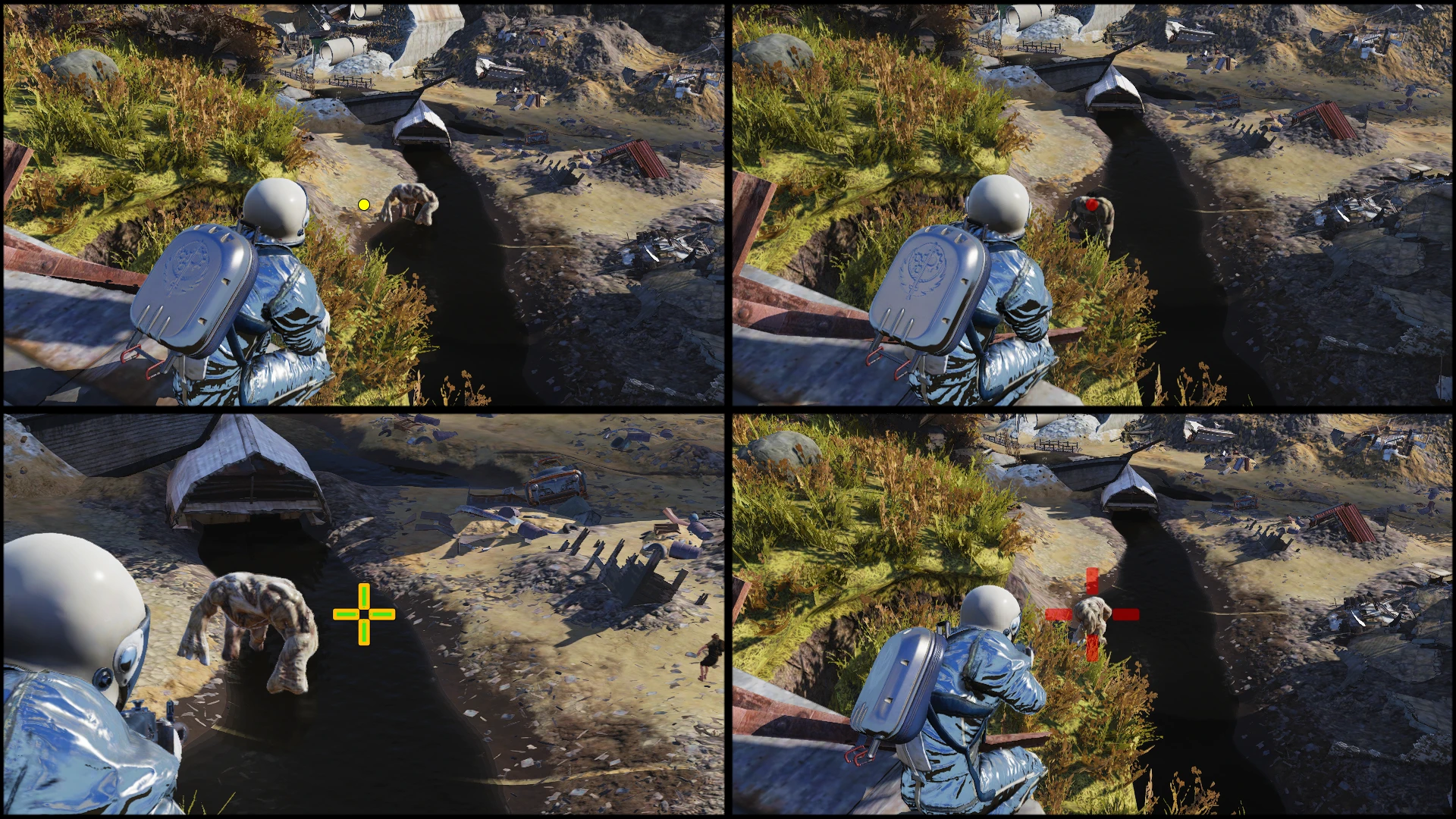
● Add a dot, circle and static cross.
● Display it when using melee, guns or aim down sight.
● Glowing effect radius, strength and color.
● Change size, length, thickness and radius of dot/circle/crosshair.
● Chose your color for on target and off target.
● Remove the default dynamic crosshair.
● Toggle inner and outer shadow effect.
? Installation and configuration
⇨ Manual installation guide:
↳https://www.nexusmods.com/fallout76/articles/42
⇨ How to use xml configuration:
↳https://www.nexusmods.com/fallout76/articles/46
⇨ Old version configuration:
↳https://www.nexusmods.com/fallout76/articles/49
⇨ Optional tool, Notepad++ for better read of xml:
↳https://notepad-plus-plus.org/
⇨ My load order with other HUDMenu mods:
ImprovedHealthBars.ba2, EventNotifications.ba2, CustomCrosshair.ba2, PerkLoadoutManager.ba2, ShowHealth.ba2
⇨ For compatibility with ChatMod, load ChatMod after CustomCrosshair.
⇨ ShowHealth and ChatMod are not yet compatible together I belive.
⇨ If you have trouble with any mods not applying or still applying:
1. Check load order inside Fallout76Custom.ini
2. Check if Xml is from latest version
3. Do a scan and repair in the launcher.
↑ New potential features and ideas
□ In the long run, outside the game interface or in game. Less likely in game and would take longer for me.
· Crosshair
○ Different color for when using melee, guns, aiming down sight or aiming objects/allies.
○ Animated crosshair based on ammo spent per second, movement or mouse click.
○ More xml configuration options.
· HUD interface
◊ Move compass, sneak meter, enemy health bars, and ally health bars to the bottom or top.
◊ Move player status icons somewhere more visible. The one bottom right.
◊ Change color or glow indicator when meter is low. Meters: player health, target health, thirst or hunger.
◊ Always show thirst or hunger meter.
· Completed
√ Different crosshair for when interacting, melee, guns and iron sigh
√ Compatibility with major HUD interface mods.
√ Configurable mod.
⟳ Versioning
· How to read versioning after 2. 0. 0
X = Major update. When a lot of stuff change to my interpretation.
Y = Feature update. You need to update your XML configuration.
Z = Compatibility and bug fixes update. No need to update XML configuration.
Each letter gets incremented once per update.
Versioning is currently inconsistent in the nexus changelog before 2. 0. 0
? Recommended mods
→ Perk Loadout Manager (PLM)
↳https://www.nexusmods.com/fallout76/mods/124
→ Improved Health Bars
↳https://www.nexusmods.com/fallout76/mods/368
→ Text Chat
↳https://www.nexusmods.com/fallout76/mods/151
→ Better Inventory
↳https://www.nexusmods.com/fallout76/mods/32
→ Save everything
↳https://www.nexusmods.com/fallout76/mods/148
→ Inventory Plus
↳https://www.nexusmods.com/fallout76/mods/125
♠ Creation of this mod
Custom Crosshair is a Fallout 76 UI mod that replaces the default crosshair with customizable dot, circle, or static cross options. It offers extensive visual customization including color, size, and glow effects, and requires manual installation with a fresh SWF file. With 437 endorsements and 14,642 downloads, it's a niche but popular choice for players seeking precise aiming visuals.
✨ Key Features
📊 Pros & Cons
✅ Pros
- Community-approved with 437 endorsements and over 14k downloads
- Deep customization lets you fine-tune every aspect of the crosshair
- Compatible with other HUDMenu mods like Improved Health Bars and Event Notifications
⚠️ Cons
- Manual installation requires creating a fresh SWF file and using Archive2, which can be tricky
- Last updated in January 2021 — may have compatibility issues with current game patches
- No in-game configuration; you'll need to edit XML files manually
For Fallout 76 players who want a more precise or personalized crosshair, especially those who dislike the default dynamic one. It's ideal for modders comfortable with manual file editing and XML tweaks. Skip if you prefer simple plug-and-play mods or don't want to fiddle with configuration files.
💡 Beginner Tips
- Follow the manual installation guide linked in the description to ensure you create the SWF correctly.
- Use Notepad++ for editing XML files to avoid formatting issues.
- Check your load order in Fallout76Custom.ini if mods aren't applying — the author lists this as a troubleshooting step.
📊 Mod Details
- Game
- Fallout 76 Mods
- Author
- SkyOps117
- Version
- 2.3.7
- Downloads
- 14,642
- Endorsements
- 437
- Category
- User Interface
- Created
- 4/15/2020
- Updated
- 1/5/2021
🧩 Commonly Used Together
Users add these mods to the same collections — a real compatibility signal, not an AI guess.
🔧 How to Install Fallout 76 Mods
Use Vortex. Place .ba2 files in Data folder. Use cautiously online.
📖 Full step-by-step install guide for Fallout 76 →
Visit the official mod page for specific installation instructions for this mod.
🎮 Need cheat codes or console commands? Check ur gaming wiki for Fallout 76 commands, item IDs, and more.
Keep browsing — more Fallout 76 mods await