Recipes and Plans Glow
⚪ Last updated 2018This mod may not work until the author updates it. Check for an update, or see the rollback guide.
Preview
🔍 Analysis
- 👍 3.3% endorsement rate — high engagement, a strong quality signal
- 🏆 #1 of 247 Models and Textures mods in this game by downloads
📋 About This Mod
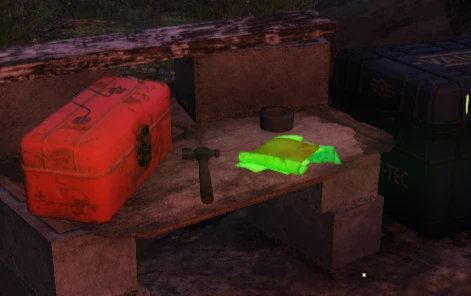
Dont you just hate missing plans and recipes when you're out exploring, well no more! Recipe books and Plans now glow a beautiful green. Due to demand, i have added a purple glow option for users that are colourblind!
Update V1. 5
-
[]Due to a messed up texture in the main, delberts was defaulting to ANOTHER texture instead, Delberts has now been fixed! so all recipes and plans now glow!
Installation
- [
[]Add Glow.ba2 to your archive load list in Fallout76Custom.ini.
[]Launch the game.
Baka File Tool Users
Under optional files, there is a loose copy of the files needed for the mod. Just extract this to your \Bethesda.net Launcher\games\Fallout76\Data
directory and run the baka file tool. The main Glow.ba2 is not needed for Baka File Tool users.
Installation for first timers
-
[]Create or edit the following file: \My Games\Fallout 76\Fallout76Custom.ini
[
]Copy and paste the following lines into Fallout76Custom.ini:sResourceArchive2List = SeventySix - ATX_Main.ba2, SeventySix - ATX_Textures.ba2, Glow.ba2
- Save your file and you're good to go.
Entries are separated by a comma.
Whenever you want to add an archive to your load list, simply append the archive name to the end of this list. To stop loading the archive, remove it from the list.
Recipes and Plans Glow makes recipe books and plans in Fallout 76 emit a green glow, with a purple option for colorblind players. It has 5,983 endorsements and 182,947 downloads, last updated December 2018. The mod requires manual installation via the Fallout76Custom.ini file.
✨ Key Features
📊 Pros & Cons
✅ Pros
- Huge community trust with 5,983 endorsements and 182,947 downloads.
- Solves a real exploration pain point—no more squinting at containers.
- Colorblind-friendly purple variant shows the author listens to feedback.
⚠️ Cons
- Last updated in 2018—may not work with current game patches.
- Manual INI editing required, which can intimidate modding newcomers.
- No uninstall instructions provided; removing the mod may require manual cleanup.
For Fallout 76 explorers who hate missing rare plans and recipes while scavenging. Perfect for players who want a simple quality-of-life visual tweak without gameplay changes. Skip if you prefer a vanilla look or want more complex mod features.
💡 Beginner Tips
- Make sure to edit Fallout76Custom.ini in your My Games folder, not the game's default ini.
- If you use Baka File Tool, grab the loose files version instead of the main ba2.
- After installing, test in a known recipe location to confirm the glow appears.
📊 Mod Details
- Game
- Fallout 76 Mods
- Author
- runew0lf
- Version
- 1.5
- Downloads
- 182,947
- Endorsements
- 5,983
- Category
- Models and Textures
- Created
- 11/21/2018
- Updated
- 12/5/2018
🧩 Commonly Used Together
Users add these mods to the same collections — a real compatibility signal, not an AI guess.
🔧 How to Install Fallout 76 Mods
Use Vortex. Place .ba2 files in Data folder. Use cautiously online.
📖 Full step-by-step install guide for Fallout 76 →
Visit the official mod page for specific installation instructions for this mod.
🎮 Need cheat codes or console commands? Check ur gaming wiki for Fallout 76 commands, item IDs, and more.
Keep browsing — more Fallout 76 mods await