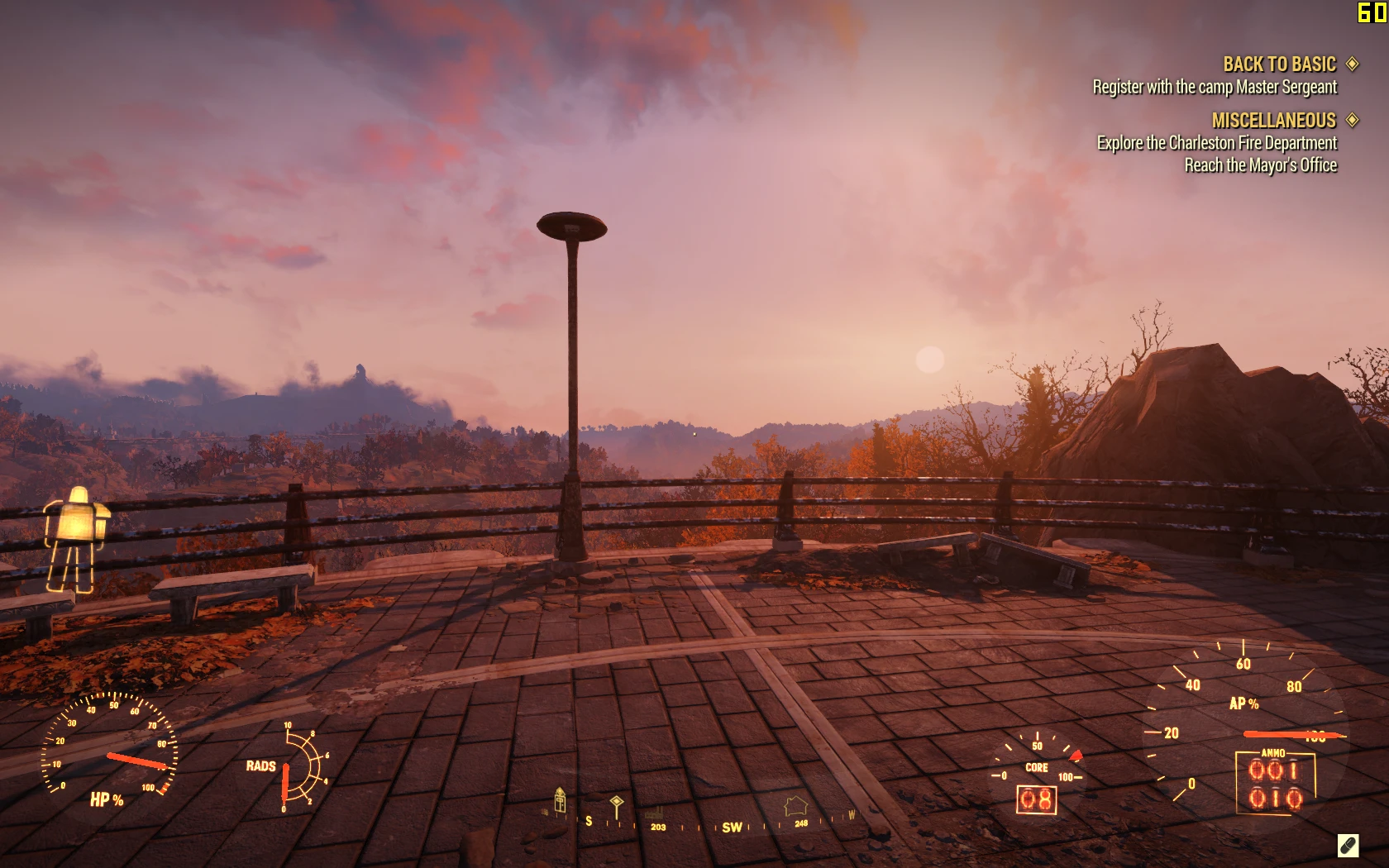
Power Armor Clean HUD
⚪ Last updated 2019This mod may not work until the author updates it. Check for an update, or see the rollback guide.
Preview
🔍 Analysis
- 👍 2.7% endorsement rate — high engagement, a strong quality signal
- 🏆 #11 of 116 User Interface mods in this game by downloads
📋 About This Mod
Installion use bethesda's Archive2 or Baka File Tool from nexus mods and load the mod 'textures' folder
installion with archive2:
1. use Archive2 and open Textures05.ba2 (games\Fallout76\Data\SeventySix-Textures05.ba2)
2. import 'texture' folder from power armor clean hud by erfet
3. click save and rebuild the archive
.ba2 install version by Manic0220
Power Armor Clean HUD is a UI mod for Fallout 76 that removes the power armor HUD overlay for a cleaner look. It has 1,394 endorsements and 52,488 downloads, last updated in January 2019. Installation requires manual archive editing with Archive2 or Baka File Tool.
✨ Key Features
📊 Pros & Cons
✅ Pros
- Popular with the community (1,394 endorsements)
- High download count (52,488) shows real demand
- Offers two installation methods: Archive2 or Baka File Tool
⚠️ Cons
- Last updated in 2019 — may not work with current game patches
- Installation is manual and requires editing game archives, which can be intimidating
For Fallout 76 players who find the power armor HUD cluttered and want a cleaner screen. If you're comfortable with manual file editing and don't mind a mod that hasn't been updated in years, this is for you. Skip if you prefer simple mod-manager installs or want active support.
💡 Beginner Tips
- Use Baka File Tool if you're not familiar with Archive2 — it's more user-friendly for this kind of edit.
- Back up your original Textures05.ba2 file before editing so you can revert if something goes wrong.
- Check the mod's comments section on Nexus for any compatibility notes with recent game updates.
📊 Mod Details
- Game
- Fallout 76 Mods
- Author
- erfet
- Version
- 1.0
- Downloads
- 52,488
- Endorsements
- 1,394
- Category
- User Interface
- Created
- 11/17/2018
- Updated
- 1/1/2019
🧩 Commonly Used Together
Users add these mods to the same collections — a real compatibility signal, not an AI guess.
🔧 How to Install Fallout 76 Mods
Use Vortex. Place .ba2 files in Data folder. Use cautiously online.
📖 Full step-by-step install guide for Fallout 76 →
Visit the official mod page for specific installation instructions for this mod.
🎮 Need cheat codes or console commands? Check ur gaming wiki for Fallout 76 commands, item IDs, and more.
Keep browsing — more Fallout 76 mods await