Seasonal Colored Seeds
⚪ Last updated 2024⚠️ Install Order · 2 steps
Install in this order, then this mod last — most mods fail to load without their framework and dependencies in place.
Preview
🔍 Analysis
- 👍 0.9% endorsement rate
- 🏆 #35 of 179 User Interface mods in this game by downloads
📋 About This Mod
Colored Seeds
· - = | Description | = - ·
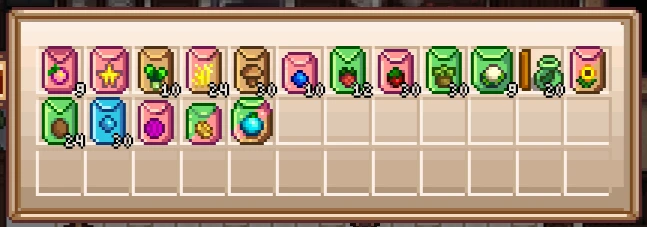
This mod changes the color of seeds according to the season in which they grow.
Spring seeds are light green.
Summer seeds are pink.
Autumn seeds are brown.
Winter seeds are blue.
Seeds that grow in several seasons have mixed colors.
Seeds that have no seed packages, but are only the produce (like rice or sunflower seeds) have optional new sprites, matching the rest. Replacing them is turned on by default.
A config file will be created after you've run the game the first time with this mod installed.
There you can turn off the changes to seeds that use altered sprites.
You can also turn on changes to Cactus Seeds (makes them yellow in 1. 5 to stand out more from the ones that can grow outside).
· - = | Requirements | = - ·
Requires the latest versions of SMAPI and Content Patcher.
· - = | Installation | = - ·
Drop the Colored Seeds folder into your Stardew Valley/Mods directory.
There are patches available for multiple other mods, check out Kazuakisama's page here.
· - = | Uninstallation | = - ·
Remove the Colored Seeds folder.
A simple UI mod that recolors seeds based on their growing season, making inventory management clearer. With 2,584 endorsements and nearly 300k downloads, it's a popular quality-of-life tweak for players who want visual distinction at a glance.
✨ Key Features
📊 Pros & Cons
✅ Pros
- Huge community trust (2,584 endorsements, 296k downloads)
- Instant visual clarity for inventory sorting
- Zero impact on gameplay balance
⚠️ Cons
- Only affects seed colors—no other UI improvements
- May not suit players who prefer vanilla aesthetics
- No explicit compatibility notes for other UI mods
For farmers who juggle multiple crops and want to spot seasonal seeds instantly. Skip if you're happy with vanilla colors or use a comprehensive UI overhaul.
💡 Beginner Tips
- Place the mod files directly into your game's mod folder—no extra tools needed.
- If you use other UI mods, test load order to ensure this recoloring doesn't conflict.
- Check the mod page for any optional files that might tweak color intensity.
📊 Mod Details
- Game
- Stardew Valley Mods
- Author
- Laulajatar
- Version
- 1.6
- Downloads
- 296,908
- Endorsements
- 2,584
- Category
- User Interface
- Created
- 4/13/2019
- Updated
- 5/2/2024
🧩 Commonly Used Together
Users add these mods to the same collections — a real compatibility signal, not an AI guess.
🔧 How to Install Stardew Valley Mods
Download from Nexus.
📖 Full step-by-step install guide for Stardew Valley →
Visit the official mod page for specific installation instructions for this mod.
🎮 Need cheat codes or console commands? Check ur gaming wiki for Stardew Valley commands, item IDs, and more.
Keep browsing — more Stardew Valley mods await