Predict Reaction To Gift
🟠 Updated over a year ago⚠️ Install Order · 3 steps
Install in this order, then this mod last — most mods fail to load without their framework and dependencies in place.
Preview
🔍 Analysis
- 👍 1.5% endorsement rate — high engagement, a strong quality signal
- 🏆 #62 of 179 User Interface mods in this game by downloads
📋 About This Mod
Description
-
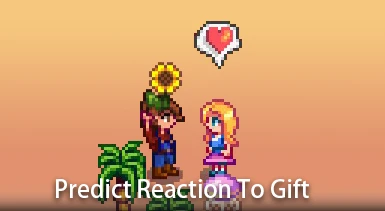
[]Predict the NPC's reaction to the gift and display it with an emote bubble.
[
]You can anticipate the NPC's thoughts on the gift, avoiding giving a terrible present that would upset them.Configs
-
[]You can customize this mod using Generic Mod Config Menu.
[
]If you think unconditional prediction of gift reactions is a form of cheating, enable "RequireGiftLog" in GMCM to only show reactions for gifts that have already been given. - If you are using other mods to modify the NPC weekly gift limit, please make the corresponding adjustments in "GiftWeekLimit" in GMCM .
↘↓↓↓↓↓↓↓↓↓↓↓↓↓↓↙
→ My other Mods ←
↗↑↑↑↑↑↑↑↑↑↑↑↑↑↑↖
-
[]You can customize this mod using Generic Mod Config Menu.
This UI mod for Stardew Valley shows an emote bubble predicting an NPC's reaction to a gift before you give it. With 1,638 endorsements and 109,337 downloads, it's a popular quality-of-life tool for players who want to avoid giving disliked gifts. Last updated November 2024, it remains actively maintained.
✨ Key Features
📊 Pros & Cons
✅ Pros
- Huge community trust (1,638 endorsements) — this is a must-have for gift-giving.
- Saves you from awkward moments of giving a hated gift — no more reloading saves.
- Lightweight UI addition that doesn't overhaul the game, just adds a helpful bubble.
⚠️ Cons
- Only works if you know the NPC's preferences — it doesn't teach you them, just predicts.
- May feel like a spoiler for players who enjoy discovering likes/dislikes organically.
- Requires SMAPI to run, so console players are out of luck.
For Stardew Valley players who want to maximize friendship points without trial and error. Perfect for completionists and efficiency-focused farmers. Skip if you prefer discovering NPC preferences on your own.
💡 Beginner Tips
- Install SMAPI first, then drop the mod folder into your Stardew Valley Mods directory.
- Launch the game via SMAPI to ensure the mod loads correctly.
- Check the emote bubble before gifting — a heart means they'll love it, a frown means they won't.
📊 Mod Details
- Game
- Stardew Valley Mods
- Author
- YunHikari
- Version
- 1.0.5
- Downloads
- 109,337
- Endorsements
- 1,638
- Category
- User Interface
- Created
- 10/14/2024
- Updated
- 11/5/2024
🧩 Commonly Used Together
Users add these mods to the same collections — a real compatibility signal, not an AI guess.
🔧 How to Install Stardew Valley Mods
Download from Nexus.
📖 Full step-by-step install guide for Stardew Valley →
Visit the official mod page for specific installation instructions for this mod.
🎮 Need cheat codes or console commands? Check ur gaming wiki for Stardew Valley commands, item IDs, and more.
Keep browsing — more Stardew Valley mods await