ImagEd
⚪ Last updated 2022⚠️ Install Order · 3 steps
Install in this order, then this mod last — most mods fail to load without their framework and dependencies in place.
Preview
🔍 Analysis
- 👍 4.9% endorsement rate — high engagement, a strong quality signal
- 🏆 #49 of 227 Visuals and Graphics mods in this game by downloads
📋 About This Mod
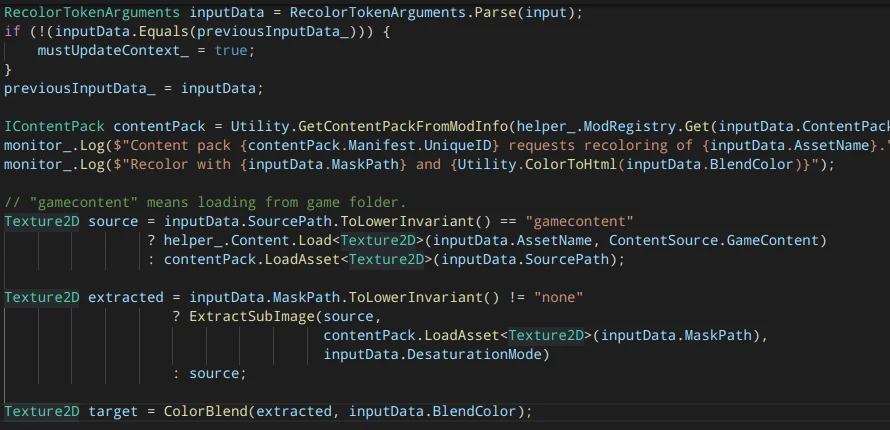
Provides the token ImageEd/Recolor which takes an image to recolor and optionally a mask and a desaturation mode. The final image loaded by ContentPatcher is created as following:
-
[]The source image is loaded, either from content pack or from game content.
[
]A sub image of the source image is extracted using the given mask. If no mask is given, a copy is created.[]The extracted sub image is optionally desaturized using the given mode (HSV, HSL, HSI or Luma, see HSL_and_HSV for details on the algorithms).
[]The desaturized image is multiplied with the given color.
[]The result is written to disk so it can loaded by ContentPatcher.
ImagEd/Recolor takes up to 8 arguments:
-
[]Content pack that uses recoloring. This is usually the content pack that contains the current config.json but a custom CP token doesn't have that information so we must provide it.
[]Asset name.
[]Source image or "gamecontent" to load a vanilla asset.
[]Mask image or "none". Mask is supposed to be a grayscale image so we always desaturate it (mode is DesaturateLuma).
[]Blend color in #RRGGBB format ((https://en.wikipedia.org/wiki/Web_colors#Hex_triplet)). The non-standard format #RRGGBBAA is supported to set an alpha value.
[]Desaturation mode: DesaturateHSV, DesaturateHSL, DesaturateHSI, DesaturateLuma or None. This is an optional argument, default is None.
[]Flip mode: FlipHorizontally, FlipVertically, FlipBoth or None. This is an optional argument, default is None. Attention: This feature is not useful in most cases, especially not for NPCs. The whole image is flipped so if you flip a sprite sheet all sprite indexes are wrong afterwards. Also keep in mind that the flipped image is always a combination of base image and overlay because flipping an overlay without its base image wouldn't make sense. Nonetheless you can do cool things with flipping. You have been warned :-)
- Brightness: Float value that will be multiplied with the extracted image before color blending. Use a value bigger than 1. 0 to brighten the image. This is an optional argument, default is 1. 0.
Source code and examples on GitHub
For a mod that actually uses this, see Random Flower Queen
-
[]Content pack that uses recoloring. This is usually the content pack that contains the current config.json but a custom CP token doesn't have that information so we must provide it.
ImagEd is a visual mod for Stardew Valley that provides non-interactive image recoloring, allowing players to change the appearance of in-game images. It requires ContentPatcher and has a strong following with over 6,400 endorsements. Last updated in September 2022, it remains a popular choice for players seeking simple visual tweaks.
✨ Key Features
📊 Pros & Cons
✅ Pros
- Community-approved with over 6,400 endorsements and 132k downloads.
- Simple concept: recolor images without any gameplay interaction.
- Works with ContentPatcher, a standard framework for modding Stardew Valley.
⚠️ Cons
- Last updated in September 2022 — may not be compatible with the latest game version.
- Non-interactive means it only changes images, not gameplay mechanics.
For Stardew Valley players who want to customize the look of in-game images without affecting gameplay. If you're into visual tweaks and already use ContentPatcher, this is a no-brainer. Skip if you're looking for gameplay changes or interactive features.
💡 Beginner Tips
- Make sure you have ContentPatcher installed and up to date before adding ImagEd.
- Check the mod's files to see which images it recolors, as the description doesn't specify.
- If you're using a mod manager like Vortex, let it handle the installation to avoid conflicts.
📊 Mod Details
- Game
- Stardew Valley Mods
- Author
- Candidus42
- Version
- 1.4.0
- Downloads
- 132,542
- Endorsements
- 6,453
- Category
- Visuals and Graphics
- Created
- 11/30/2020
- Updated
- 9/15/2022
🧩 Commonly Used Together
Users add these mods to the same collections — a real compatibility signal, not an AI guess.
🔧 How to Install Stardew Valley Mods
Download from Nexus.
📖 Full step-by-step install guide for Stardew Valley →
Visit the official mod page for specific installation instructions for this mod.
🎮 Need cheat codes or console commands? Check ur gaming wiki for Stardew Valley commands, item IDs, and more.
Keep browsing — more Stardew Valley mods await