Experience Bars
🟡 Updated this year⚠️ Install Order · 2 steps
Install in this order, then this mod last — most mods fail to load without their framework and dependencies in place.
Preview
🔍 Analysis
- 👍 2.6% endorsement rate — high engagement, a strong quality signal
- 🏆 #7 of 179 User Interface mods in this game by downloads
📋 About This Mod
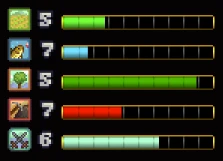
Experience Bars adds experience bars for your skill levels, so you can see how far you are from leveling.
Install
-
[]Install the latest version of SMAPI.
[
]Unzip the mod folder into Stardew Valley/Mods.[]Run the game using SMAPI.
Use
Press X to toggle the display. Move the display with Shift + X. You can optionally configure the mod.
Compatibility
Compatible with Stardew Valley 1. 5. 5+ on Linux/macOS/Windows, both single-player and multiplayer.
See also
- []Release notes
- Source code
Experience Bars by spacechase0 adds visible experience bars for your skill levels, showing exactly how far you are from leveling up. With 42,858 endorsements and 1.7 million downloads, it's a highly popular UI mod for players who want to track progress at a glance. Last updated October 2025, it remains actively maintained.
✨ Key Features
📊 Pros & Cons
✅ Pros
- Massive community trust — 42,858 endorsements and 1.7M downloads prove it's a must-have for UI tweakers.
- Simple, clean addition: no clutter, just the info you need to see how close you are to leveling.
- Actively updated (October 2025), so it's likely compatible with current game versions.
⚠️ Cons
- Description is bare-bones — no screenshots or detailed feature list, so you're flying blind on visuals.
- No mention of compatibility with other UI mods, which could cause overlap or conflicts.
- Requires SMAPI (likely, but not stated) — if you're new to modding, you'll need to set that up first.
For Stardew Valley players who want to track skill progression without opening the menu constantly. If you're a completionist aiming for max level in every skill, this is a no-brainer. Skip if you prefer a minimalist UI or don't care about leveling progress.
💡 Beginner Tips
- Since this is a Stardew Valley mod, make sure you have SMAPI installed and launch the game through it.
- If you use other UI mods, test them together to ensure no overlapping elements.
- Check the mod's page for any optional config files to adjust bar position or appearance.
📊 Mod Details
- Game
- Stardew Valley Mods
- Author
- spacechase0
- Version
- 1.4.6
- Downloads
- 1,668,454
- Endorsements
- 42,858
- Category
- User Interface
- Created
- 8/4/2016
- Updated
- 10/18/2025
🔗 Required By 2 Mods
These mods list this mod as a dependency.
🧩 Commonly Used Together
Users add these mods to the same collections — a real compatibility signal, not an AI guess.
🔧 How to Install Stardew Valley Mods
Download from Nexus.
📖 Full step-by-step install guide for Stardew Valley →
Visit the official mod page for specific installation instructions for this mod.
🎮 Need cheat codes or console commands? Check ur gaming wiki for Stardew Valley commands, item IDs, and more.
Keep browsing — more Stardew Valley mods await