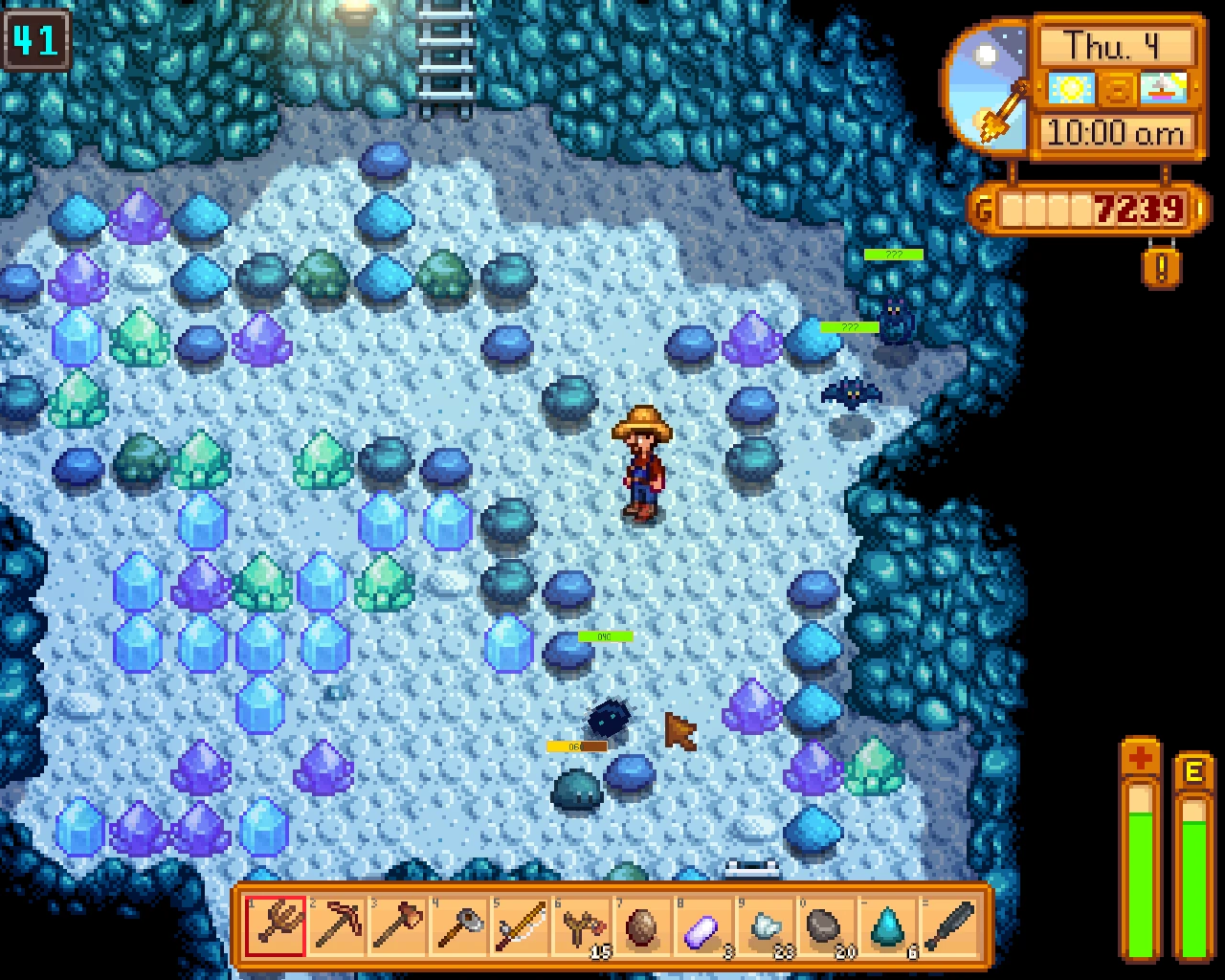
Enemy Health Bars (SMAPI)
⚪ Last updated 2019⚠️ Install Order · 2 steps
Install in this order, then this mod last — most mods fail to load without their framework and dependencies in place.
Preview
🔍 Analysis
- 👍 3.1% endorsement rate — high engagement, a strong quality signal
- 🏆 #26 of 179 User Interface mods in this game by downloads
📋 About This Mod
Current version is 1. 7 for SMAPI 0. 39. 2 <br /> <br />Features: <br /> <br />
- <br />[]Non-cheaty, to see more precise information you need more combat skill, or kill more of the enemy type. <br />[]Hand-crafted position for the bars, they should be in the right place for most enemies. <br />[]Can handle 1. 05 zoom properly. <br />[]Bar can get bigger or smaller to reflect enemy size or power. <br />[](1. 5) Show numeric value of enemy health. <br />[](1. 5) Configurable colour scheme. <br />
- (1. 6) Enemies that rely on you not noticing them on the screen need to be hit once to show the health bar (example: shadow enemies, that rely on shadows...) <br />
A SMAPI mod that adds health bars to enemies in Stardew Valley, making combat easier to track. With over 13,000 endorsements and 433,000 downloads, it's a popular quality-of-life tool for players who want clearer feedback during fights. Last updated in 2019, it remains a staple for many.
✨ Key Features
📊 Pros & Cons
✅ Pros
- Huge community trust – 13,635 endorsements and 433k downloads show it's a go-to for many.
- Simple and effective – does exactly what it says, no bloat.
- Lightweight UI addition that doesn't change gameplay, just visibility.
⚠️ Cons
- Last updated in 2019 – may not work with the latest Stardew Valley or SMAPI versions without patches.
- No detailed description or documentation – you're on your own for install specifics.
- Only adds health bars – if you want more combat UI features, this won't cover them.
For Stardew Valley players who struggle to track enemy health during combat, especially in the mines or during monster invasions. It's a must-have for anyone who wants a cleaner, more informative fight without overhauling the game. Skip if you're fine with the default health feedback or want a more comprehensive UI mod.
💡 Beginner Tips
- Make sure you have SMAPI installed and run the game through it, otherwise the mod won't load.
- Place the mod folder in your Stardew Valley 'Mods' directory – it's a simple drop-in.
- If you're on a multiplayer server, all players need the mod installed to see health bars consistently.
📊 Mod Details
- Game
- Stardew Valley Mods
- Author
- Speeder
- Version
- 1.9
- Downloads
- 433,769
- Endorsements
- 13,635
- Category
- User Interface
- Created
- 3/26/2016
- Updated
- 12/3/2019
🧩 Commonly Used Together
Users add these mods to the same collections — a real compatibility signal, not an AI guess.
🔧 How to Install Stardew Valley Mods
Download from Nexus.
📖 Full step-by-step install guide for Stardew Valley →
Visit the official mod page for specific installation instructions for this mod.
🎮 Need cheat codes or console commands? Check ur gaming wiki for Stardew Valley commands, item IDs, and more.
Keep browsing — more Stardew Valley mods await