Display Monster Health
⚪ Last updated 2024⚠️ Install Order · 2 steps
Install in this order, then this mod last — most mods fail to load without their framework and dependencies in place.
Preview
🔍 Analysis
- 👍 2.8% endorsement rate — high engagement, a strong quality signal
- 🏆 #101 of 179 User Interface mods in this game by downloads
📋 About This Mod
Works with Stardew Valley 1. 6+
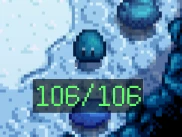
Adds a text that display monster health below them.
You can configure the size, color, background of HP text.
There are options to show health as absolute value or percentage.
Leave a comment if you have any feature ideas you'd like to see in this mod!
I initially coded this mod in 1 day for my own use, but thought I should share with the community. It's my first mod, hope you enjoy it!
Adding new features as I come up with them while playing.
Installation
-
[]Install the latest version of SMAPI
[
]Unzip the mod folder into Stardew Valley/Mods[]Run the game using SMAPI
Config
Generic Mod Config Menu is recommended or you can directly edit config.json file.
Also supports GMCM Options for color configs. You can still change colors in mod config menu without this mod, but it is easier/prettier with it.
-
[]Enable: Display monster health.
[]ToggleKey: Press to toggle display.
[]ShowInvisibleMonsters: Shows health even for invisible monsters. Also affects hidden/indistinguishable/invulnerable monsters such as rock crab, rock golem, armored bug, grub. (Let me know if I should add any other monsters here).
[]HideOnFullHealth: Hide health display if the monster is on full health. It will show up once they take damage.
[]ShowAbove: Display health above monster instead of below.
[]NoJumping: If enabled, health display stays still for jumping monsters such as Dust Sprite.
[]OffsetX: Offset health display in x axis.
[]OffsetY: Offset health display in y axis.
[]ShowMaxHealth: Show max health next to current health.
[]FixMaxHealth: Some monsters have higher health than their maximum. Enabling this adjusts the displayed max health so it feels more natural. This option also affects percentage and health decay color.
[]ShowPercentage: Replaces absolute health with percentage.
[]FontSize: Changes the font of health text. Options: 1, 2, 3. Defaults to 2 if you put anything else.
[]HealthDecay: Change color as health decreases. You can still adjust the text color alpha value (recommended to leave at max) and background color.
[]HealthDecayColor: Color gradient for health decay (0-6).
[]TextColor: 0-255 RGBA values for text color. (A is alpha. Adjusts opacity).
[]BackgroundEnable: Puts a rectangle background to make text more readable.
[]BackgroundColor: 0-255 RGBA values for background color. (A is alpha. Adjusts opacity).
[*](Possibly) due to a bug in SMAPI or the game itself, when Zoom is 100% but UI Scale is anything other
Display Monster Health is a UI mod that shows monster health below them as either an absolute HP value or a percentage, with configurable text color. It has 1,627 endorsements and 58,249 downloads, last updated April 2024. Simple and focused, it's for players who want clear health readouts without extra clutter.
✨ Key Features
📊 Pros & Cons
✅ Pros
- Community-approved with 1,627 endorsements and over 58k downloads.
- Simple, focused feature set—does exactly what it says.
- Recently updated (April 2024), so likely compatible with current game versions.
⚠️ Cons
- No screenshots or detailed installation instructions provided by the author.
- Limited to health display only—no other UI tweaks or customization options.
- May require manual configuration for color settings, which could be confusing for some users.
For players who want a clear, at-a-glance view of monster health without relying on guesswork or mods that overhaul the entire UI. It's perfect for those who prefer minimalistic tweaks and want to customize the color to match their setup. Skip if you're looking for a comprehensive UI overhaul—this mod does one thing and does it well.
💡 Beginner Tips
- Check if the mod requires a specific UI framework or if it's standalone—if it needs one, install that first.
- If you're using a mod manager, use it to install and manage the mod for easy updates.
- Test the mod in a low-stakes area to see if the health display is readable and adjust the color if needed.
📊 Mod Details
- Game
- Stardew Valley Mods
- Author
- Atesba
- Version
- 1.3.0
- Downloads
- 58,249
- Endorsements
- 1,627
- Category
- User Interface
- Created
- 3/25/2024
- Updated
- 4/1/2024
🧩 Commonly Used Together
Users add these mods to the same collections — a real compatibility signal, not an AI guess.
🔧 How to Install Stardew Valley Mods
Download from Nexus.
📖 Full step-by-step install guide for Stardew Valley →
Visit the official mod page for specific installation instructions for this mod.
🎮 Need cheat codes or console commands? Check ur gaming wiki for Stardew Valley commands, item IDs, and more.
Keep browsing — more Stardew Valley mods await