Categorize Chests
⚪ Last updated 2017⚠️ Install Order · 2 steps
Install in this order, then this mod last — most mods fail to load without their framework and dependencies in place.
Preview
🔍 Analysis
- 👍 3.8% endorsement rate — high engagement, a strong quality signal
- 🏆 #55 of 179 User Interface mods in this game by downloads
📋 About This Mod
Requires SMAPI 1. 14+. Compatible with Chests Anywhere. Like a lot of farmers, I enjoy keeping my chests neatly organized by item category. I have a fish chest, a vegetable chest, a forage chest, a food chest, and a dozen others, and I spend several minutes at the end of each day sorting the day's haul into the appropriate chests.
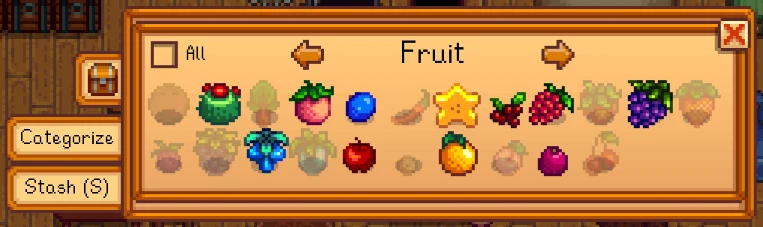
With this mod, I can tell each chest which kinds of items I want to keep in it, and from then on, with the click of a mouse (or a customizable hotkey), I can transfer those items into it from my inventory automatically.
Notes
- []You can change the stash hotkey by editing the config.json file. []If you pick up a chest and put it down again, it will lose its category settings. This is a consequence of the way the mod is implemented and is unlikely to change in the near future.
Changelog
- []Added optional automatic update checks []Removed some more unobtainable items from the menu
- []Fixed a bug that caused the item held by the cursor to be lost when the stash button was pressed []Minor compatibility fix for Chests Anywhere
- []Removed various unsightly weeds and debris from the menu
- []Miscellaneous cosmetic changes []Play an appropriate sound when stashing items
- []Expanded the set of items available for categorization []Fixed bug that prevented stashing items after throwing something in the trash []Added item tooltips in categorization menu
- Updated save file format
Categorize Chests lets you assign item types to each chest and auto-sort matching items with one button press. A well-established UI mod with 4,605 endorsements and 119,904 downloads, last updated in 2017, so compatibility with current game versions is uncertain.
✨ Key Features
📊 Pros & Cons
✅ Pros
- Huge community trust (4,605 endorsements) — this is a proven mod.
- Massive download count (119,904) shows it's been widely used.
- Saves serious time if you're tired of manually sorting loot.
⚠️ Cons
- Last updated in 2017 — might break with newer game patches.
- Only works if you're willing to set up categories per chest first.
For players who hoard loot and hate manual sorting. If you're a completionist or base-builder, this is a must-have. Skip if you prefer vanilla inventory management or play on a version where the mod is outdated.
💡 Beginner Tips
- Check if the mod is compatible with your game version before installing, since it's from 2017.
- Start by categorizing a few chests for common item types like weapons or armor to get the hang of it.
- If you use a mod manager, let it handle the file placement to avoid errors.
📊 Mod Details
- Game
- Stardew Valley Mods
- Author
- Don Collins
- Version
- 1.4.2
- Downloads
- 119,904
- Endorsements
- 4,605
- Category
- User Interface
- Created
- 7/4/2017
- Updated
- 7/18/2017
🧩 Commonly Used Together
Users add these mods to the same collections — a real compatibility signal, not an AI guess.
🔧 How to Install Stardew Valley Mods
Download from Nexus.
📖 Full step-by-step install guide for Stardew Valley →
Visit the official mod page for specific installation instructions for this mod.
🎮 Need cheat codes or console commands? Check ur gaming wiki for Stardew Valley commands, item IDs, and more.
Keep browsing — more Stardew Valley mods await