Better Crafting
🟠 Updated over a year ago⚠️ Install Order · 2 steps
Install in this order, then this mod last — most mods fail to load without their framework and dependencies in place.
Preview
🔍 Analysis
- 👍 1.0% endorsement rate — high engagement, a strong quality signal
- 🏆 #1 of 63 Crafting mods in this game by downloads
📋 About This Mod
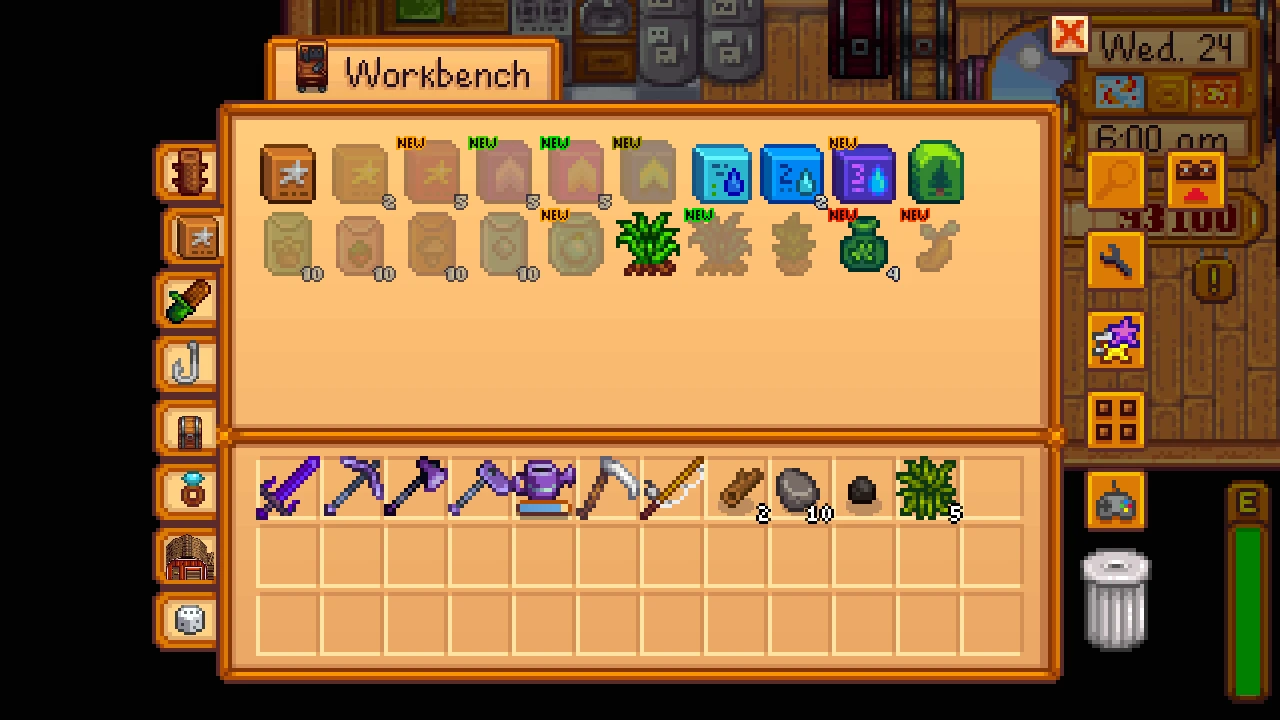
Better Crafting adds a new customizable crafting UI with support for customizable categories, favorites, and a uniform grid size. There is easy bulk crafting. It also prevents use of a workbench from keeping chests locked when playing in multiplayer, and expands the workbench to connect to more than just the directly adjacent chests. On top of that, it provides a framework for content authors to create more powerful recipes and custom crafting stations.
Install
-
[]Install the latest version of SMAPI.
[
]Download this mod and unzip it into Stardew Valley/Mods.[]Run the game using SMAPI.
How to use
By default, both the crafting and cooking interfaces are replaced. Just use them like you normally would.
If you want to favorite or un-favorite a recipe, you can press F while hovering over it. Controller users can press Back. You can also change these bindings as you please. You can easily see which items are favorites because they'll have a silver star.
Want to craft a lot of something? Right-click to open the Bulk Crafting menu! It lets you enter a specific quantity, and shows you how much of your resources it'd take to craft.
Categories are displayed along the left side of the crafting interface. There are default categories, but they can be customized by clicking a new button to the right. When customizing categories, right-click an item to make it the icon for that category. Categories are per-user in multiplayer saves.
As of version 1. 3. 0, categories can have rules to automatically add matching recipes to the category. As of version 2. 5. 0, you can now combine manually selected recipes with rules.
When cooking, this mod also lets you choose whether or not you want to use Qi Seasoning to enhance the quality of the food.
By using Generic Mod Config Menu, or editing the config file, you can enable or disable the replacement of Crafting and Cooking menus separately. Also, holding a key (Left-Shift by default) when opening a crafting menu will prevent it from being replaced.
But what if I don't like it?
In case you don't like the tabbed look with categories, good news! You don't need to use categories! Just go into settings and turn them off, and it'll look just like the built-in crafting menu, just with the other added features.
Compatibility
[]Works with Stardew Valley 1. 6 on Linux/Mac/Windows.
[]Does not work on Android, which has a separate menu system
[]Works with Generic Mod Config Menu.
[]Works in single player and multiplayer.
[]May have issues with mods that add custom recipes, depending on how their items are added. Please report incompatible mods so I can work with the developers to add support.
Better Crafting overhauls the crafting interface with customizable categories, favorites, bulk crafting, and improved workbench functionality. An optional add-on enables building construction directly from the crafting menu. Popular with 16,822 endorsements and 1.6M downloads, last updated March 2025.
✨ Key Features
📊 Pros & Cons
✅ Pros
- Huge community trust: 16,822 endorsements and 1.6M downloads.
- Actively maintained: updated March 2025.
- Bulk crafting is a game-changer for mass production.
⚠️ Cons
- Requires an extra mod for building construction—not included by default.
- Customization options may require time to set up to your liking.
- Potential compatibility issues with other UI mods—test before adding to a modded save.
For crafters who spend hours at the workbench and want a more efficient, organized interface. Perfect for players who mass-produce items or want to build without leaving the menu. Skip if you prefer the vanilla UI or rarely craft.
💡 Beginner Tips
- Check the mod's settings to set up custom categories and favorites—it's worth the initial time.
- If you want building construction, grab the optional extra mod from the same author.
- Test with your other UI mods in a test save to avoid conflicts.
📊 Mod Details
- Game
- Stardew Valley Mods
- Author
- Khloe Leclair
- Version
- 2.18.0
- Downloads
- 1,616,731
- Endorsements
- 16,822
- Category
- Crafting
- Created
- 2/22/2022
- Updated
- 3/26/2025
🔗 Required By 4 Mods
These mods list this mod as a dependency.
🧩 Commonly Used Together
Users add these mods to the same collections — a real compatibility signal, not an AI guess.
🔧 How to Install Stardew Valley Mods
Download from Nexus.
📖 Full step-by-step install guide for Stardew Valley →
Visit the official mod page for specific installation instructions for this mod.
🎮 Need cheat codes or console commands? Check ur gaming wiki for Stardew Valley commands, item IDs, and more.
Keep browsing — more Stardew Valley mods await