Display Stats
⚪ Last updated 2011⚠️ Install Order · 2 steps
Install in this order, then this mod last — most mods fail to load without their framework and dependencies in place.
Preview
🔍 Analysis
- 👍 2.9% endorsement rate — high engagement, a strong quality signal
- 🏆 #24 of 96 User Interfaces mods in this game by downloads
📋 About This Mod
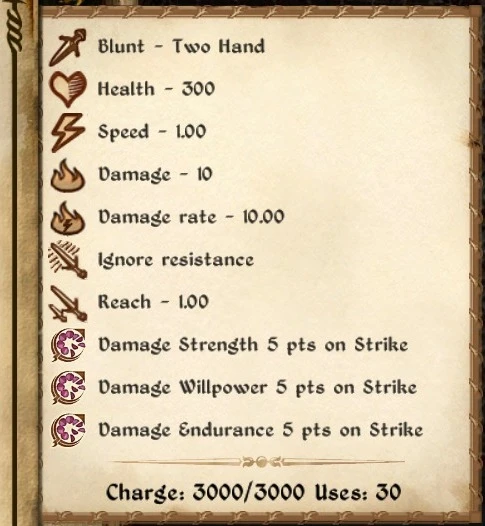
- Health
- Durability of weapon/armor. The standard health value displayed is only the percentage of this.
- Speed
- Speed of weapons and arrows. Higher speed means faster attacks.
- Reach
- Reach of weapons. Longer means easier to hit enemies.
- Damage
- Base damage of weapons and arrows (unmodified by skills and attributes).
- Damage rate
- Base damage of weapons, multiplied by speed.
- Ignore resistance
- True for weapons that ignore Resist Normal Weapons effects.
- Armor
- Base armor factor for armor. This is how much a 100% healt item adds when your skill is 100.
Display Stats is a UI mod for Fallout: New Vegas that reveals hidden item stats in the popup tooltip when hovering over items in inventory, container, and barter menus. With 2,415 endorsements and 82,988 downloads, it's a well-established utility for players who want more detailed item information. Last updated in 2011, it remains a popular choice for its simple, functional approach.
✨ Key Features
📊 Pros & Cons
✅ Pros
- Community favorite with 2,415 endorsements and nearly 83k downloads
- Adds useful hidden info without cluttering the UI
- Simple and focused—does one thing well
⚠️ Cons
- Last updated in 2011—may have compatibility issues with newer mods or game patches
- Requires manual installation; no mod manager support mentioned
For Fallout: New Vegas players who want to see hidden item stats like value-to-weight ratios or condition details without digging through menus. Perfect for inventory hoarders and barter enthusiasts. Skip if you prefer a minimal UI or don't care about min-maxing.
💡 Beginner Tips
- Place the .esp file in your Fallout New Vegas Data folder and activate it in the launcher's load order.
- If you use a mod manager like Nexus Mod Manager, you can install it with one click, but manual works fine.
- Check the mod's comments on Nexus for user reports about compatibility with other UI mods.
📊 Mod Details
- Game
- Oblivion Mods
- Author
- TheNiceOne
- Version
- 2.0.1
- Downloads
- 82,988
- Endorsements
- 2,415
- Category
- User Interfaces
- Created
- 5/23/2010
- Updated
- 2/5/2011
🧩 Commonly Used Together
Users add these mods to the same collections — a real compatibility signal, not an AI guess.
🔧 How to Install Oblivion Mods
Download from Nexus.
📖 Full step-by-step install guide for Oblivion →
Visit the official mod page for specific installation instructions for this mod.
🎮 Need cheat codes or console commands? Check ur gaming wiki for Oblivion commands, item IDs, and more.
Keep browsing — more Oblivion mods await