DarNified UI
⚪ Last updated 2008⚠️ Install Order · 2 steps
Install in this order, then this mod last — most mods fail to load without their framework and dependencies in place.
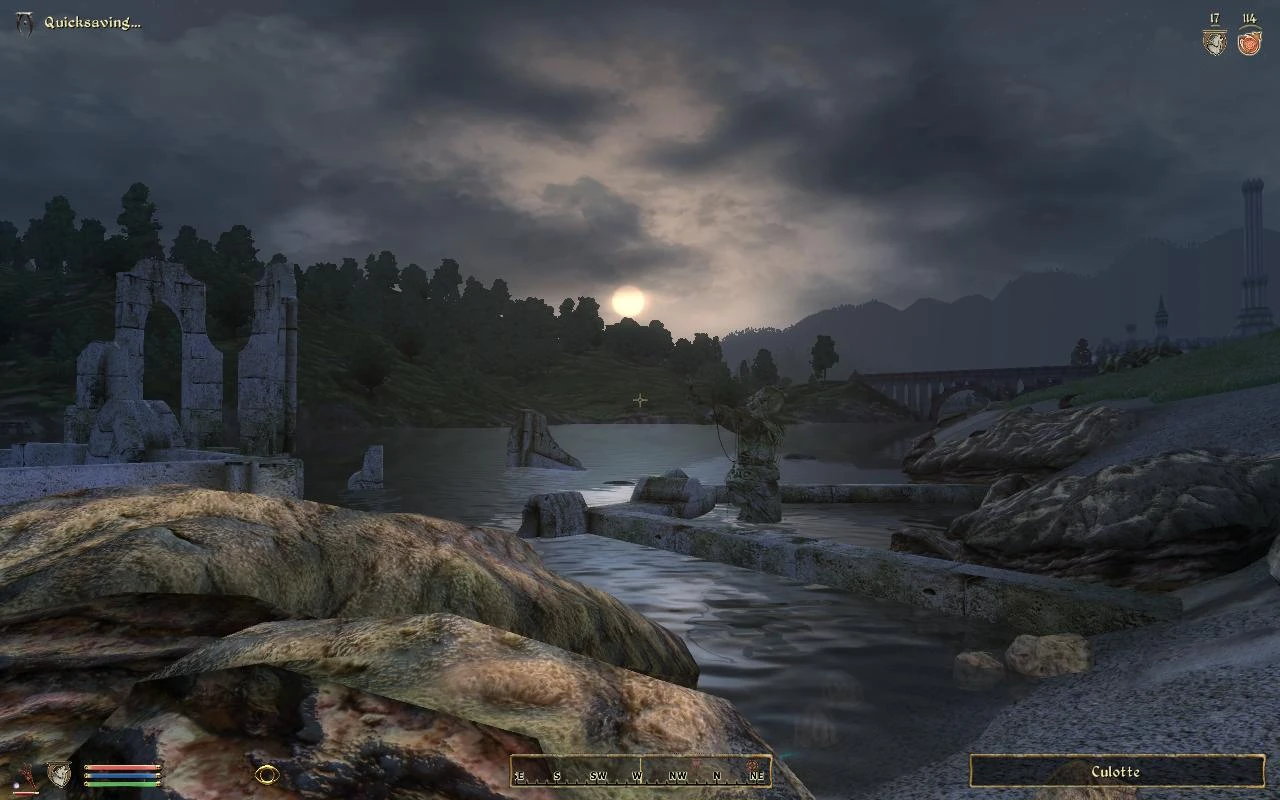
Preview
🔍 Analysis
- 👍 2.5% endorsement rate — high engagement, a strong quality signal
- 🏆 #1 of 96 User Interfaces mods in this game by downloads
📋 About This Mod
This mod gives the Oblivion UI the most extensive facelift yet. It's goal is to rid the pc version of the horrid xbox interface. Fonts are smaller, settings can be adjusted in game, user controls are scaled, more info on screen, and the hud is vastly improved.
OBMM Install
This requires OBMM v1. 1. 12+ and 'Allow additional script types' to be set in OBMM settings.
1. Extract OMOD file in the archive to "(Oblivion install folder)\obmm\mods\"
2. Start Oblivion Mod Manager.
3. Make sure the icon by the mod name is green/tan.
4. Double-click the the mod in the right-hand side of the OBMM screen.
5. After the install process has finished, icon should turn blue.
6. DarNify Books in Wrye Bash.
1. Extract archive to Oblivion\Data.
2. Copy the desired fonts to Oblivion\Data\fonts
3. Edit "My Documents\My Games\Oblivion\Oblivion.ini" to use the new fonts.
Normal fonts:
SFontFile_1=Data\Fonts\Kingthings_Regular.fnt
SFontFile_2=Data\Fonts\DarN_Kingthings_Petrock_14.fnt
SFontFile_3=Data\Fonts\DarN_Kingthings_Petrock_16.fnt
SFontFile_4=Data\Fonts\DarN_Oblivion_28.fnt
SFontFile_5=Data\Fonts\Handwritten.fnt
Large fonts:
SFontFile_1=Data\Fonts\Kingthings_Regular.fnt
SFontFile_2=Data\Fonts\DarN_LG_Kingthings_Petrock_14.fnt
SFontFile_3=Data\Fonts\DarN_LG_Kingthings_Petrock_18.fnt
SFontFile_4=Data\Fonts\DarN_Oblivion_28.fnt
SFontFile_5=Data\Fonts\Handwritten.fnt
SFontFile_1 will depend on your choice (see 4. 4).
4. Custom options (custom_files folder)
4. 1: If you're using AF/KCAS/Realistic Leveling for leveling, copy KCAS_levelup_menu.xml to "Data\menus". Remove the KCAS_ prefix. Set the "_KCAS" setting in stats_config.xml to &true;.
4. 2: The classic inventory can be installed by copying the contents of the "classic_inventory" folder to the "Data" folder.
4. 3: If you're using Trollf's "Loading Screens Themed Replacer", copy trollf_loading_menu.xml to the "Data\menus" folder. Remove the trollf_ prefix.
4. 4: The fonts folder has a selection of fonts suitable for replacing font 1 (preview included). Copy the desired .fnt and .tex pair to "Data\fonts", and edit the ini.
4. 5 For the "No Quest Added popup" option, copy empty.xml to "Data\menus\generic", and name it quest_added.xml.
5. DarNify Books
DarNified Books is handled in Wrye Bash from v1. 3. 1. You need Wrye Bash 1. 54+.
To DarNify your books, Rebuild Patch and select "Tweak Assorted->DarNify Books".
DarNified UI is a comprehensive overhaul of Oblivion's user interface, removing the console-style design for a more PC-friendly experience. It offers smaller fonts, in-game adjustable settings, scaled user controls, and more on-screen information. With 57,950 endorsements and 2.3 million downloads, it's a highly popular and enduring mod.
✨ Key Features
📊 Pros & Cons
✅ Pros
- Massive community trust with 57,950 endorsements and 2.3 million downloads.
- Transforms the clunky console UI into a sleek, PC-friendly interface.
- In-game settings mean you can tweak without restarting the game.
⚠️ Cons
- Last updated in 2008 — may have compatibility issues with newer mods or patches.
- Requires manual installation, which might be tricky for modding newcomers.
For Oblivion players who can't stand the default console-style UI and want a cleaner, more informative interface. If you're a purist who likes the original look, skip it, but if you want a more PC-native experience, this is a must-have.
💡 Beginner Tips
- Since it's an older mod, check if you have any UI-altering mods that might conflict.
- Use a mod manager like OBMM or Wrye Bash to keep track of your load order.
- If you're using the Steam version, make sure to back up your original UI files before overwriting.
📊 Mod Details
- Game
- Oblivion Mods
- Author
- DarN
- Version
- 1.3.2
- Downloads
- 2,295,288
- Endorsements
- 57,950
- Category
- User Interfaces
- Created
- 5/5/2007
- Updated
- 12/7/2008
🔗 Required By 13 Mods
These mods list this mod as a dependency.
🧩 Commonly Used Together
Users add these mods to the same collections — a real compatibility signal, not an AI guess.
🔧 How to Install Oblivion Mods
Download from Nexus.
📖 Full step-by-step install guide for Oblivion →
Visit the official mod page for specific installation instructions for this mod.
🎮 Need cheat codes or console commands? Check ur gaming wiki for Oblivion commands, item IDs, and more.
Keep browsing — more Oblivion mods await