HUD Status Bars
⚪ Last updated 2011⚠️ Install Order · 2 steps
Install in this order, then this mod last — most mods fail to load without their framework and dependencies in place.
Preview
🔍 Analysis
- 👍 3.0% endorsement rate — high engagement, a strong quality signal
- 🏆 #7 of 96 User Interfaces mods in this game by downloads
📋 About This Mod
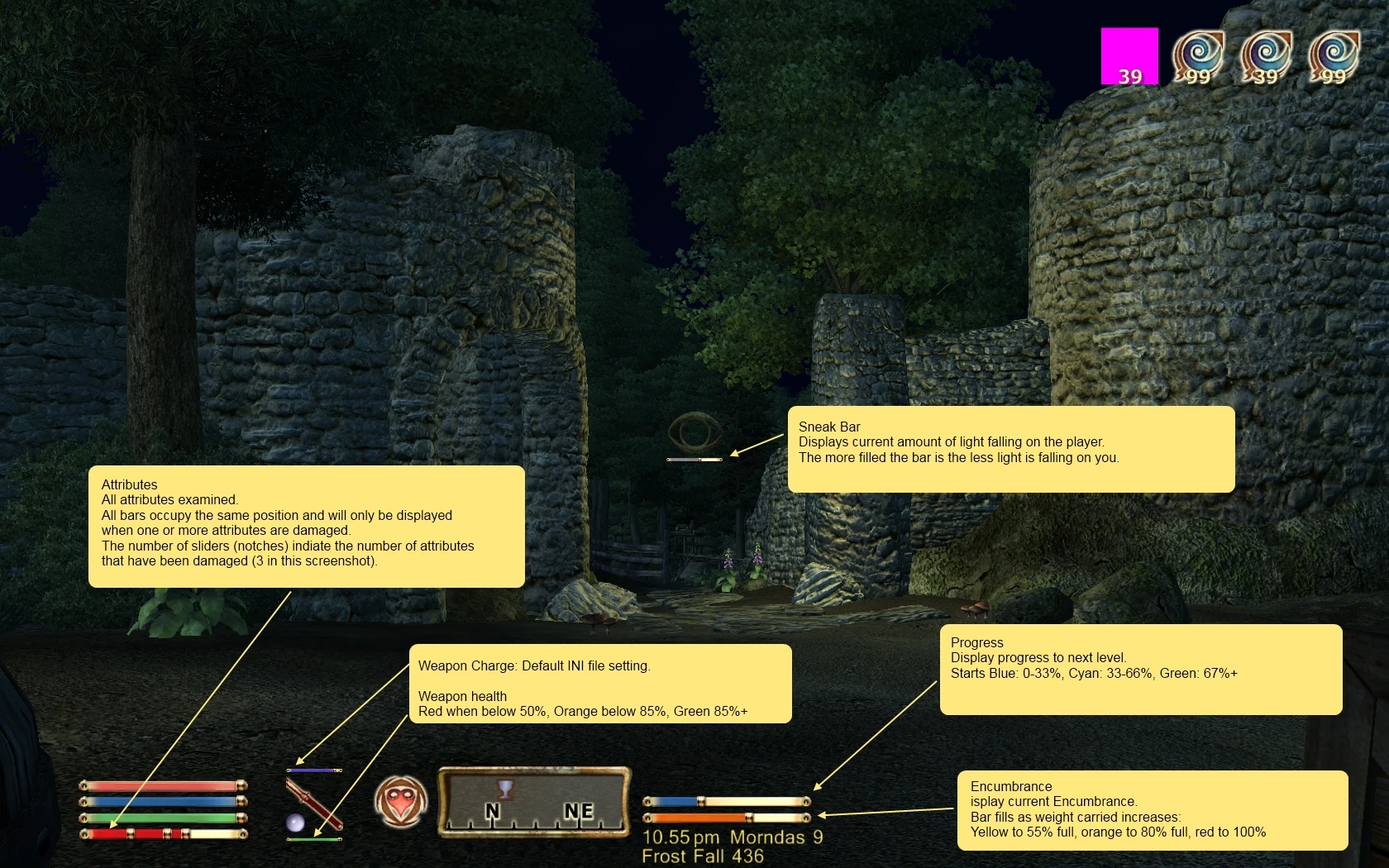
========= HUD Status Bars 5. 3. 2 ============ Author: Ole Boe, a.k.a. TheNiceOne Date: Oct 25, 2011 OBSE 19 (or later) required. OBSE 20 is recommended, and required for some bars. MenuQue required. ========= Have as many bars you want and make the HUD look the way you want! More Bars You have the three HUD status bars at the bottom left (most likely) of your hud, but with HUD Status Bars you can easily add more status bars that display anything you want it to display, like health of companions or summons, your encumbrance, charge of equipped weapon, sleep status (of sleep mods), etc. The bars can be horizontal, vertical or filled circles, or be completely custom. And the bars can have text (with or without the bar). HUD Status Bars has big depth but is easy to use. Just install it (and OBSE+MenuQue if you haven\'t already) and start up your game. The immediate change will be an Encumbrance bar above your health bar, a diseas display telling you when you\'re diseased, a weapon charge bar that is only visible when you have an enchanted weapon equipped, above the weapon icon - and a few other useful bars for you to discover. :) You can easily add more bars like this yourself, by adding 2 or more lines in HUD Status Bars\' ini file for each bar. \"docs\\Hud Status Bars ini file examples.txt\" contains many other examples for you to copy into \"Hud Status Bars.ini\", so it is easy to add more bars even for relatively inexperienced mod users. The bars can be horizontal, vertical or a filled circle - or even completely custom styles, and can easily be placed anywhere, relative to your other hud components. The bars can also display text, both static and variable text in a number of different ways (value of max, percentage, etc). The bar can have one of any of 15 different base colors, and the color can further be adjusted individually for the red/green/blue components. New look HUD Status Bars lets you completely change the look of the HUD. This is done by moving/resizing/hiding the standard bars/icons, and by completely changing the look and improving the functionality of bars/icons replacing them. Example of improved bars/icons are colored enemy health bar that also works when enemy\'s health is buffed above normal, or sneak icon that also displays amount of light falling on player, and health bar that changes color when you get a disease. See the preset ini files, or ini file examples for such bars. HUD Status Bars have an \"Hud Status Bars - base.ini\" file where you define the position/hiding of standard bars/icons, and the standard look of the bars to use. By changing those, you can get a slightly improved HUD, or a dramatically different HUD. HUD Status Bars comes with three preset ini files to choose from: vanilla style, Skyrim style, and Orb style inspired by Diablo 3. Just swap ini files if you want to change it later, or adjust the existing one to your
HUD Status Bars is a highly endorsed UI mod for Skyrim that lets you add custom bars and HUD elements to display any data, including from other mods. It includes default bars for encumbrance and weapon charge, and is easy to customize. With over 8,000 endorsements and 274,000 downloads, it's a community staple for UI enhancement.
✨ Key Features
📊 Pros & Cons
✅ Pros
- Community favorite with 8,336 endorsements and 274,731 downloads—clearly a must-have for UI tweakers.
- Default bars cover the essentials: encumbrance and weapon charge, so you get immediate value.
- Highly customizable—you can add bars for any data, even from other mods, making it a versatile tool.
⚠️ Cons
- Last updated in 2011—may have compatibility issues with newer Skyrim versions or mods.
- The description is cut off, leaving some features unexplained—you'll have to explore in-game.
For Skyrim players who want a more informative HUD without overhauling the entire interface. Perfect for modders who want to display custom stats from their own mods. Skip if you prefer a minimalist HUD or are on a newer Skyrim version where compatibility might be an issue.
💡 Beginner Tips
- Since this mod is from 2011, check if it works with your Skyrim version—if you're on Special Edition, you might need a patch or a different mod.
- Use a mod manager like Vortex or Mod Organizer 2 to install and manage the files, making it easier to remove if needed.
- After installing, load your save and look for the new bars—if they don't appear, check your mod load order and ensure the mod is activated.
📊 Mod Details
- Game
- Oblivion Mods
- Author
- TheNiceOne
- Version
- 5.3.2
- Downloads
- 274,731
- Endorsements
- 8,336
- Category
- User Interfaces
- Created
- 9/30/2010
- Updated
- 10/25/2011
🔗 Required By 4 Mods
These mods list this mod as a dependency.
🔧 How to Install Oblivion Mods
Download from Nexus.
📖 Full step-by-step install guide for Oblivion →
Visit the official mod page for specific installation instructions for this mod.
🎮 Need cheat codes or console commands? Check ur gaming wiki for Oblivion commands, item IDs, and more.
Keep browsing — more Oblivion mods await