Map Marker Overhaul
⚪ Last updated 2011⚠️ Install Order · 2 steps
Install in this order, then this mod last — most mods fail to load without their framework and dependencies in place.
Preview
🔍 Analysis
- 👍 3.5% endorsement rate — high engagement, a strong quality signal
- 🏆 #9 of 96 User Interfaces mods in this game by downloads
📋 About This Mod
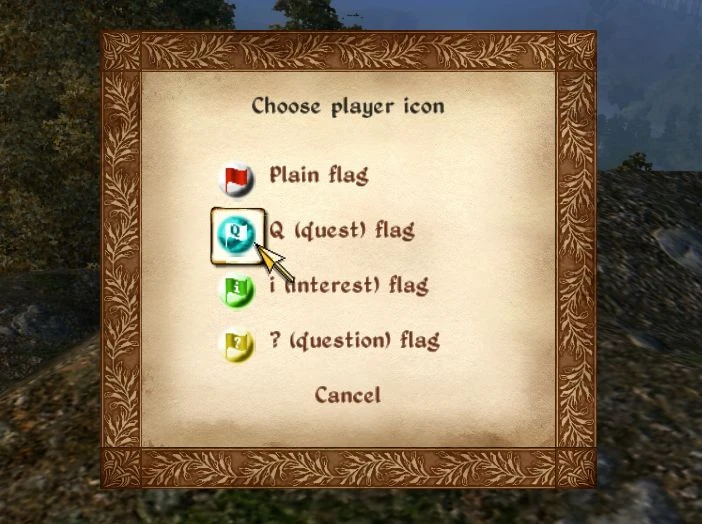
========= MAP MARKER OVERHAUL 3. 9. 3 ============ Have you ever visited a ruin and been stopped by a locked door or a too powerful enemy, forcing you to turn with a firm intention of going back later - but then completely forgot which ruin it was? Have you ever wondered if a cave on your map is one you have already visited and fully explored, or one you just peeked inside? Have you ever wished you could add new map markers, or notes to the existing map markers to remember such things? Have you ever wished the Oblivion map did not function as a modern GPS, but rather as an immersive map where you could actually get lost if you misread the map? Map Marker Overhaul does this and much more: Add new map markers at the player\'s position - freely named and four unique icons to choose between Click on any map marker to add a freely named tag (like ) You can change state of most marker types, to add a superscript E (entered) or C (completed) to the icon Oblivion gate markers changes to a closed gate symbol (or disappears) when the gate is closed Includes eight different map marker icon designs for you to choose from Lets you control the distance map marker becomes visible in the HUD, or placed on the map Moves map markers closer to the place they mark, important if you reduce the marker visibility distances Adds map markers for all the game\'s Ayleid Wells, Magical Stones, Wayshrines, player-owned houses and Obelisks of Order, with completely new and unique icons Replaces more generic map marker icons with icons for docks, castles, houses, farms, stables, merchants and more Has several immersive map options for players who don\'t want the map to lead you by the hand Lets you control how far and how much you can use Fast Travel Can export changed/added map markers to backup file, and then later import them Map Marker Overhaul has a lot of options (as described further below), but don\'t let that scare you. It has an easily editable ini file that comes with sensible default settings, so you can just install it and play - and maybe look into settings later. It is also omod-ready, so if you install with OBMM, it will ask you a lot of questions and set the ini file up accordingly. ========= Author: Ole Boe, a.k.a. TheNiceOne Date: Oct 27, 2011 OBSE 20 (or newer) required! Pluggy 128 or newer required to save or load map marker backup files! ========= Marker tags and states: In the map menu, ctrl-click (configurable in ini) on any normal map marker to open a marker tag menu. From it you can add one of 8 existing tags, or ctrl-click on a tag to change its text, thus being able to write anything you want in the tags. For most marker types you can also change its state from the marker tag menu. A state of E (entered) or C (completed) will display as a superscript E or C on the marker icon in the world map, thus easily le
Map Marker Overhaul is a user interface mod for Skyrim that lets you add custom map markers anywhere, tag existing markers with notes, and choose from new icon types like docks and castles. With nearly 7,000 endorsements and over 200,000 downloads, it's a popular tool for players who want better map organization. Last updated in 2011, it may not be compatible with the latest game version.
✨ Key Features
📊 Pros & Cons
✅ Pros
- Huge community trust with 6,942 endorsements and 201,058 downloads
- Lets you drop custom markers anywhere and name them whatever you want
- Adds new icon types like docks and castles for better map readability
⚠️ Cons
- Last updated in 2011 — likely outdated and may not work with current Skyrim versions
- Potential conflicts with other UI mods that alter the map interface
For Skyrim players who want to personalize their map with custom markers and tags. Great for completionists tracking loot or quests. Skip if you're on the latest game version and want guaranteed compatibility.
💡 Beginner Tips
- Since this mod is old, check if your Skyrim version matches the mod's release era before installing.
- Use a mod manager like Vortex or Mod Organizer 2 to handle installation and avoid overwriting other UI mods.
- Test the mod on a new save to see if it conflicts with your current map mods.
📊 Mod Details
- Game
- Oblivion Mods
- Author
- TheNiceOne
- Version
- 3.9.3
- Downloads
- 201,058
- Endorsements
- 6,942
- Category
- User Interfaces
- Created
- 8/10/2009
- Updated
- 10/27/2011
🧩 Commonly Used Together
Users add these mods to the same collections — a real compatibility signal, not an AI guess.
🔧 How to Install Oblivion Mods
Download from Nexus.
📖 Full step-by-step install guide for Oblivion →
Visit the official mod page for specific installation instructions for this mod.
🎮 Need cheat codes or console commands? Check ur gaming wiki for Oblivion commands, item IDs, and more.
Keep browsing — more Oblivion mods await