Custom In-Game Mod Menu API
⚪ Last updated 2023This mod may not work until the author updates it. Check for an update, or see the rollback guide.
⚠️ Install Order · 1 step
Install in this order, then this mod last — most mods fail to load without their framework and dependencies in place.
Preview
🔍 Analysis
- 👍 2.8% endorsement rate — high engagement, a strong quality signal
- 🏆 #4 of 28 User Interface mods in this game by downloads
📋 About This Mod
This was a tricky project for sure
This bad boy has so much black magic in it. Slaps the GitHub Repo
~What Does It Do?~
Well, not much on its own.
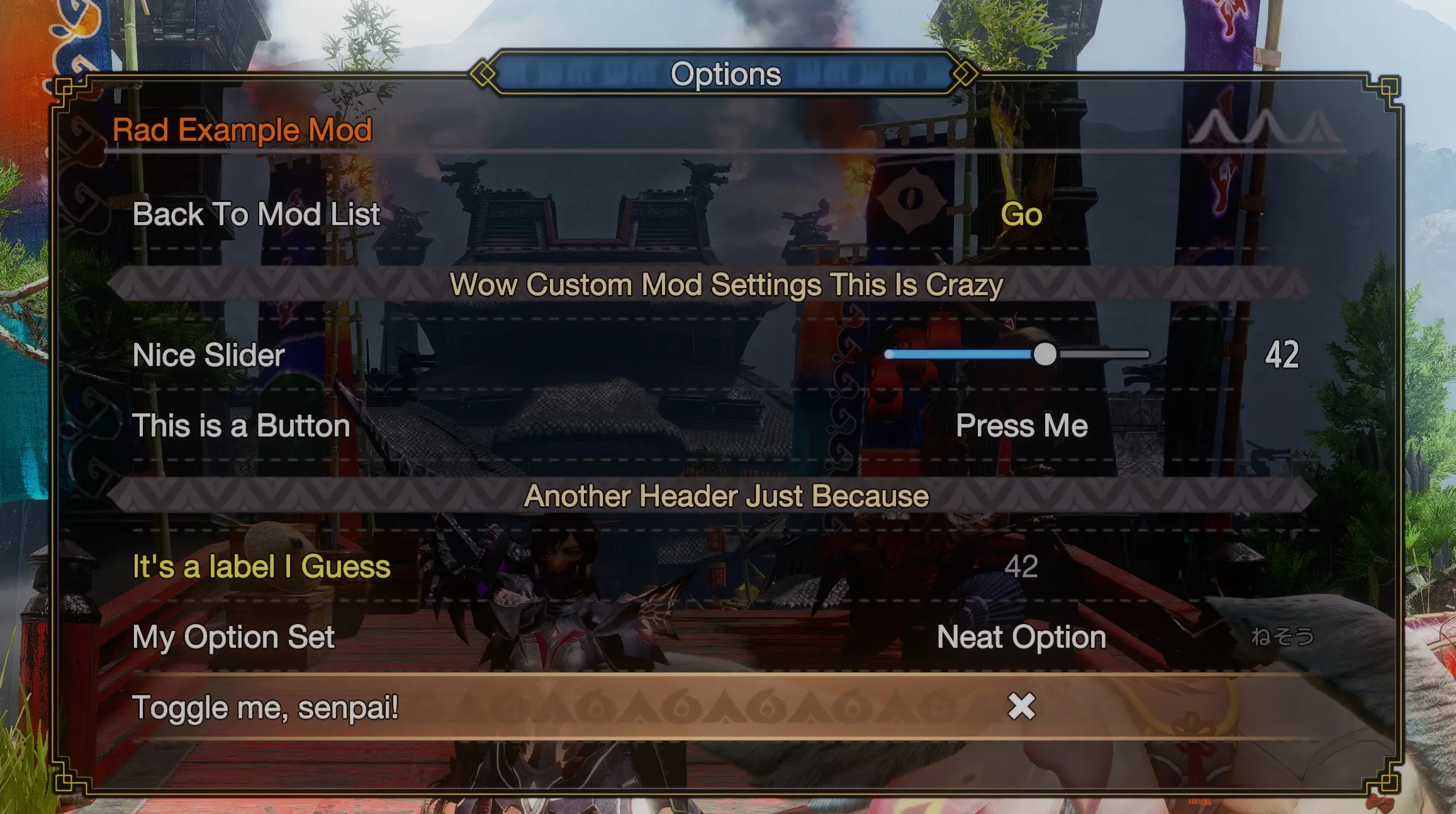
But in the hands of mod authors, settings menus can be added directly to the in-game options menu through a simple API.
The API functions are very similar to imgui, with a few caveats
~What Do I Have To Do?~
Just install the mod like any other REFramework mod.
If you don't know how to do that, this probably shouldn't be your first rodeo.
Once in the right place, it should automatically add a "Mods" category to the options menu.
Then simply by using other supported REF mods, settings will show up there.
For Mod Authors:
Download the example mod implementation from the files and that should get you started pretty easily.
For more API detail you can look at the GitHub page.
I promise it's almost as easy to use as the built in imgui functions, and it'll be really cool to see the community add menus!
Just require the package and use the API like imgui.
You can optionally check to see if the user has the package installed, and optionally support the menus so you don't have to force people to install it. But it'd be nice if you could still mark this as a required file.
I ask that you don't redistribute this mod along with your mods, at convenient as that'd be.
I worked hard on this, but also I might need to update things here, and you wouldn't want conflicting versions in various mods.
Do let me know if you release a mod using this menu so I can add it to the list of supported mods!
Limitations
Unfortunately, because this uses the games own menus, we're limited to what the game can do natively.
There's no advanced drawing functionality obviously.
It only mimics an imgui, really the "draw" functions are callbacks to grab data from the games UI, you can have dynamic menus but try not to do anything too crazy.
It won't be a good fit for every mod, but if all you need is some simple settings, please consider it!
~Credits~
Thanks to Stracker for (making cool mods but also ) letting me reference one of their mods for the coroutines and system message prompts. And also like, actually adding the coroutines to REF.
And of course, thanks to praydog for all the work they do on REFramework, and for giving some guidance on this.
Contributions:
raffRun - Auto wrapping tooltips
Stracker - Finding a way to read GUID data from pointers within lua
HookedBehemoth - Implemented Stracker's findings
Discord: Bolt#6265
GitHub: https://github.com/BoltManGuy/MHR-InGame-ModMenu-API
Mods Using This Menu:
[]Better Matchmaking - GreenComfyTea
[]Forced Display Settings - GreenComfyTea
[]No More Blinking Icons - GreenComfyTea
[]Loadout Wipe - GreenComfyTea
[]Link Equipment and Layered Sets - raffRun
[]No Skill Message Spam - raffRun
[]Hard or Soft-Natoler
[][url=https://www.nexusmods.com/monsterhunterrise/mods
A user-friendly IMGUI inspired API for drawing in-game settings menus for REF mods in Monster Hunter Rise. It simplifies creating custom menus, making it a must-have for modders. With 9,119 endorsements and 327,872 downloads, it's a proven tool in the community.
✨ Key Features
📊 Pros & Cons
✅ Pros
- Huge community trust (9,119 endorsements) — this is the go-to for MHR mod menus
- Massive download count (327,872) shows it's widely used and stable
- Makes menu creation a breeze — no need to reinvent the wheel
⚠️ Cons
- Last updated in April 2023 — might not support the latest game patches or mods
- Requires REF (REFramework) to work — extra dependency for users
- No detailed documentation provided — you'll need to figure out the API from examples
For Monster Hunter Rise modders who want to add custom settings menus to their REF mods without hassle. Perfect for those who want a clean, IMGUI-style interface. Skip if you're a player looking for gameplay changes — this is a developer tool.
💡 Beginner Tips
- Make sure you have REFramework installed and updated — this API won't work without it.
- Check the mod's forum posts for examples — the description is sparse, but the community often shares code snippets.
- If you're new to modding, start with a simple menu template to understand the API structure before diving into complex settings.
📊 Mod Details
- Game
- Monster Hunter Rise Mods
- Author
- Bolt
- Version
- 1.71
- Downloads
- 327,873
- Endorsements
- 9,092
- Category
- User Interface
- Created
- 8/1/2022
- Updated
- 4/29/2023
🧩 Commonly Used Together
Users add these mods to the same collections — a real compatibility signal, not an AI guess.
🔧 How to Install MHRise Mods
Install REFramework. Drop mod files into game directory.
📖 Full step-by-step install guide for MHRise →
Visit the official mod page for specific installation instructions for this mod.
🎮 Need cheat codes or console commands? Check ur gaming wiki for MHRise commands, item IDs, and more.
Keep browsing — more MHRise mods await