Village Reminders
⚪ Last updated 2023Preview
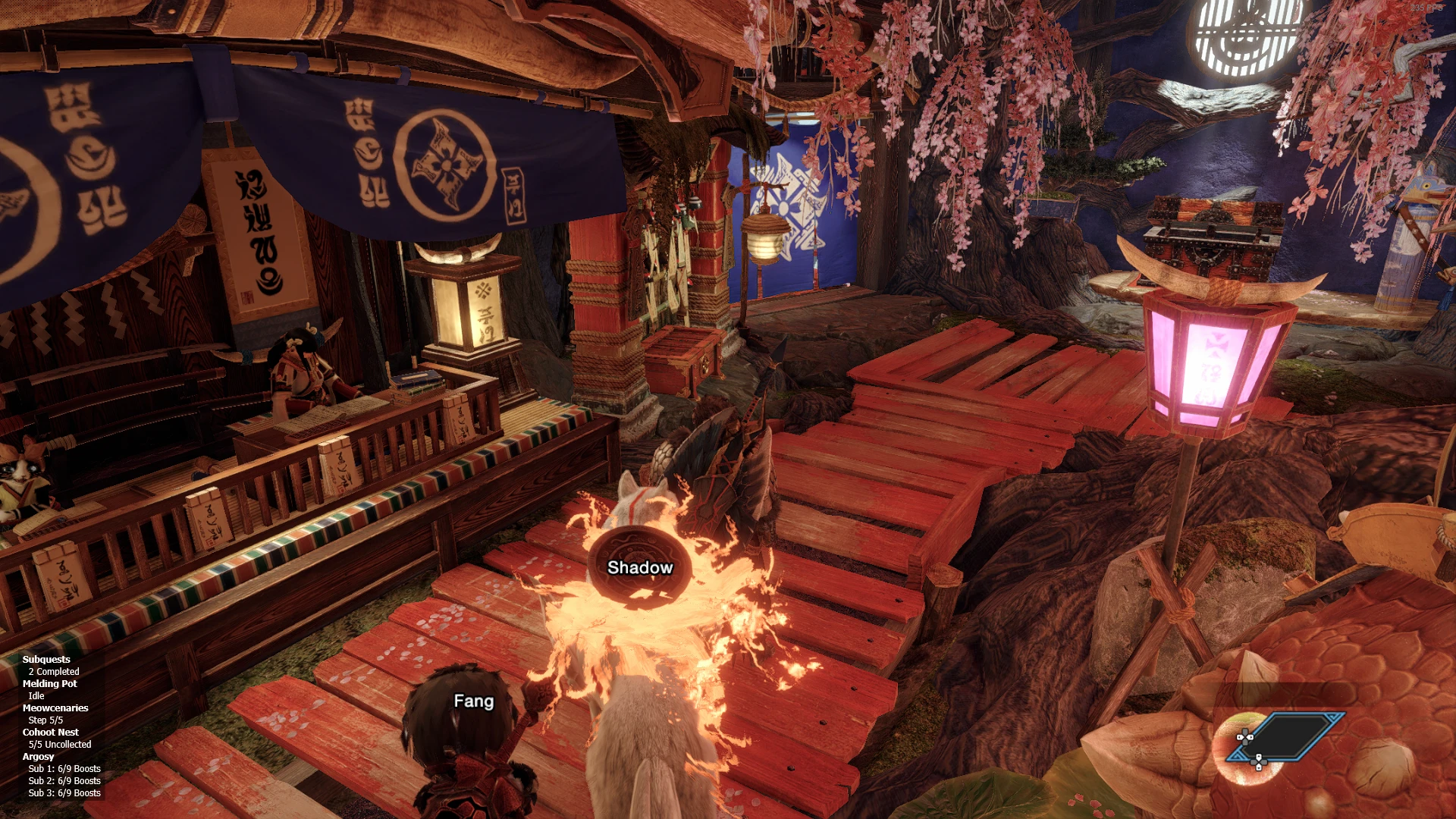
🔍 Analysis
- 👍 3.4% endorsement rate — high engagement, a strong quality signal
- 🏆 #17 of 28 User Interface mods in this game by downloads
📋 About This Mod
Tired of having to mentally keep track of all of the various facilities and activities you can do in the village between quests? This mod can help you with that! While the game tries its best to remind you of most of these already, they tend to come from brief notifications that only last a few seconds after returning from a quest or loading your character. Once those notifications are gone, the only way to find them again is to dig through the chat logs which can be tedious at times. With this mod, now you can have a highly-configurable persistent reminder on your screen that will go away after you've completed any pending actions.
Features
-
[]Dynamic Visibility (automatically hidden in menus, cutscenes, etc.)
[
]Overlay Customization[]Anchoring
[]Colors
[]Facility and Activity Order
[]Position
-
[]Argosy
[
]Bargaining Skill Duration[]Trade Request Idling
[]Uncollected Items
[]Rare Items Stocked (disabled by default)
-
[]Boosts
[
]Buddies (or lack thereof)[]Idling
[]Max Level Buddies
- [
[]Items
- []Check Item Pouch (disabled by default)
- [
[]Melding Pot
-
[]Idling
[
]Orders[]Uncollected Talismans
-
[]Speech Bubbles by Area (when they have important dialogue, have requests, want to give you items, etc.)
[
]Souvenirs from Sailor Pingarh (note: Sunbreak only)
- [
[]Completed
[]Progress During Quests (disabled by default)
Installation
-
[]Install REFramework.
[
]Install REFramework Direct2D. Note: Skip this step for Steam Deck/Linux/Proton.[]Download the mod and copy the files to your MonsterHunterRise folder.
MonsterHunterRise
└reframework
├village_reminders
│├argosy.lua
│├buddy_dojo.lua
│├cohoot_nest.lua
│├config.lua
│├constants.lua
│├hooks.lua
│├items.lua
│├lookup.lua
│├market.lua
│├melding_pot.lua
│├meowcenaries.lua
│├overlay.lua
│└subquests.lua
└village_reminders.lua
FAQ
-
[]Does this work with other REFramework-D2D overlays?
[]I currently play with the MHR Overlay mod and have not had any issues with it. If you run into any issues with other mods, feel free to report them and I'll try to look into it if I have time.
[]Yes and no. In order to work on these platforms, I had to allow you to use the mod without REFramework-D2D. Without D2D, a lot of the overlay functionalities only partially work or don't work at all. In any case, it's "good enough" to get the bare minimum working but it comes with jank and requires specific configuration. Here is an overview of the process:
[]Install REFramework and Village Reminders as normal. Also refer to this post for getting REFramework working on Steam Deck/Linux/Proton. Disregard the comment on D2D; it doesn't actually work as of the moment of writing this guide, but you're welcome to try if you want (no promises it won't just end up crashing though). If you're still having trouble setting up REFramework, please troubleshoot on that mod's page instead. I am not the owner/maintainer of REFramework and would prefer not having to do tech support for it.
[]Do not install REFramework-D2D. If you have already installed it, you must uninstall it. It should just be a simple matter of removing the autorun script and plugin file.
[]When configuring the mod, do not change the font settings. The font family should not do anything, but changing the font size may cause layout issues (note: the default is 12). Change the overlay position (base and quest) to anchor from the top left. Any other anchor will not work correctly and will likely just try to render somewhere off screen. Adjust the X and Y values as needed. Finally, set the minimum width to however large you need the background to be. If it's too small, the text may e
Village Reminders is a UI overlay mod that tracks village facilities and activities, alerting you to pending actions. With 851 endorsements and 25,081 downloads, it's a popular quality-of-life tool for managing village tasks. Last updated in February 2023, it remains a reliable choice for players seeking better organization.
✨ Key Features
📊 Pros & Cons
✅ Pros
- Community-approved with 851 endorsements
- Solid download count (25,081) shows real demand
- Simple concept that fills a genuine need for village management
⚠️ Cons
- Last updated in February 2023 – might not be compatible with the latest game patches
For players who juggle multiple village tasks and want a nudge when something's ready. If you're the type who forgets to check your facilities, this overlay is a handy companion. Skip if you prefer minimal UI or don't need reminders.
💡 Beginner Tips
- Check if the mod requires a mod manager or manual installation – the description doesn't specify, so look for a readme or forum post.
- Since it's an overlay, make sure it doesn't conflict with other UI mods you have installed.
- If the game has been updated since February 2023, test the mod in a safe save to ensure it still works.
📊 Mod Details
- Game
- Monster Hunter Rise Mods
- Author
- Wolvenbane
- Version
- 1.5.2
- Downloads
- 25,080
- Endorsements
- 850
- Category
- User Interface
- Created
- 2/22/2022
- Updated
- 2/19/2023
🧩 Commonly Used Together
Users add these mods to the same collections — a real compatibility signal, not an AI guess.
🔧 How to Install MHRise Mods
Install REFramework. Drop mod files into game directory.
📖 Full step-by-step install guide for MHRise →
Visit the official mod page for specific installation instructions for this mod.
🎮 Need cheat codes or console commands? Check ur gaming wiki for MHRise commands, item IDs, and more.
Keep browsing — more MHRise mods await