MHR Overlay - Monster HP - Damage Meter (and more)
🟡 Updated this yearPreview
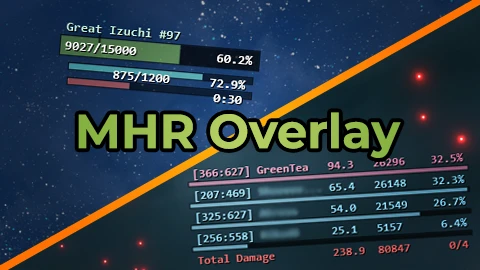
🔍 Analysis
- 👍 2.5% endorsement rate — high engagement, a strong quality signal
- ✅ Updated 23 days after the latest game patch — actively maintained
- 🏆 #1 of 28 User Interface mods in this game by downloads
📋 About This Mod
Overlay mod for Monster Hunter Rise that exposes in-game data about monsters, creatures, players and damage.
This mod is solely intended to empower players with means of self-improvement. Please don't use the information provided by this tool
to make hurtful comments and actions toward other players.
If you like my mods, please consider making a small donation! That would be very helpful for me to maintain existing mods and create new ones in the future!
PLEASE READ FAQ.
Links:
Donate
PayPal
Buy Me a Tea
Requirements
-
[]REFramework (latest Nightly build);
[
]REFramework Direct2D (v1. 0. 1 or above) - Needed for Unicode Support.How to install:
-
[]Install REFramework;
[
]Install REFramework Direct2D;Windows: Works normally.
Linux: Latest Experimental Proton seems to have it working normally as well (cursey/reframework-d2d#5).
Steam Deck: I've seen people getting it working but I don't have the exact instructions.
You will have to figure it out yourself and/or search the nexus pages for information (REFramework, REFramework Direct2D).
[]Download the mod;
[]Extract the mod from the archive and place it in MonsterHunterRise folder. Refer to FAQ to verify how the file hierarchy should look like if everything is done correctly.
Customization:
Mod features a convenient Customization Menu inside REFramework. Open REFramework (Insert key by default) -> Script Generated UI -> MHR Overlay.
Your settings will be automatically saved and loaded.
Default values are made for 1080p screen.
Credits:
GreenComfyTea - creator of the mod and it's main contributor.
cursecat - creator of REFramework, REFramework Direct2D plugin and Monster Has HP Bar mod, which provided an example on how to retrieve monster HP data.
praydog2 - creator of REFramework. Contributed huge improvements to the performance of the mod.
coavins - creator of coavins damage meter mod.
lingsamuel - creator of Data Reporter and Buff Notification mod.
neatnet - Korean translation.
s9000008, mcc1 - Traditional Chinese translation.
etnAtker, sukiqwq - Simplified Chinese translation.
AKILAND0214 - Japanese translation.
Krude - German translation.
-
[]Install REFramework;
MHR Overlay is a UI mod for Monster Hunter Rise that displays real-time monster HP, damage meters, and other in-game data. With 18,541 endorsements and 733,667 downloads, it's a highly popular tool for players who want to track their performance and monster health. Last updated December 2025, it remains actively maintained.
✨ Key Features
📊 Pros & Cons
✅ Pros
- Massive community trust (18,541 endorsements) — this is the go-to overlay for MHR
- 733,667 downloads prove it's battle-tested across thousands of hunters
- Still updated as of late 2025, so it keeps pace with game patches
⚠️ Cons
- Overlay mods can clutter your screen if you don't tweak settings — expect some fiddling
- Requires the REFramework or similar mod loader (not stated, but typical for this type) — check compatibility
For Monster Hunter Rise players who want to min-max their hunts and see exact monster HP and damage numbers. Also great for speedrunners and content creators who need precise data for analysis. Skip if you prefer a pure, unmodded experience or dislike UI clutter.
💡 Beginner Tips
- Make sure you have REFramework installed first — most MHR overlay mods depend on it, even if not listed here
- Check the mod's forum posts or Discord for configuration guides — the description is bare-bones
- Start with default settings and adjust opacity/position to avoid blocking your view during hunts
📊 Mod Details
- Game
- Monster Hunter Rise Mods
- Author
- GreenComfyTea cursecat coavins praydog
- Version
- 2.7.4
- Downloads
- 733,664
- Endorsements
- 18,501
- Category
- User Interface
- Created
- 1/18/2022
- Updated
- 12/31/2025
🧩 Commonly Used Together
Users add these mods to the same collections — a real compatibility signal, not an AI guess.
🔧 How to Install MHRise Mods
Install REFramework. Drop mod files into game directory.
📖 Full step-by-step install guide for MHRise →
Visit the official mod page for specific installation instructions for this mod.
🎮 Need cheat codes or console commands? Check ur gaming wiki for MHRise commands, item IDs, and more.
Keep browsing — more MHRise mods await