LooksMenu
🟡 Updated this year⚠️ Install Order · 3 steps
Install in this order, then this mod last — most mods fail to load without their framework and dependencies in place.
Preview
🔍 Analysis
- 👍 1.5% endorsement rate — high engagement, a strong quality signal
- 🏆 #2 of 110 User Interface mods in this game by downloads
📋 About This Mod
Requires F4SE for game version 1. 5. 157 or greater
-
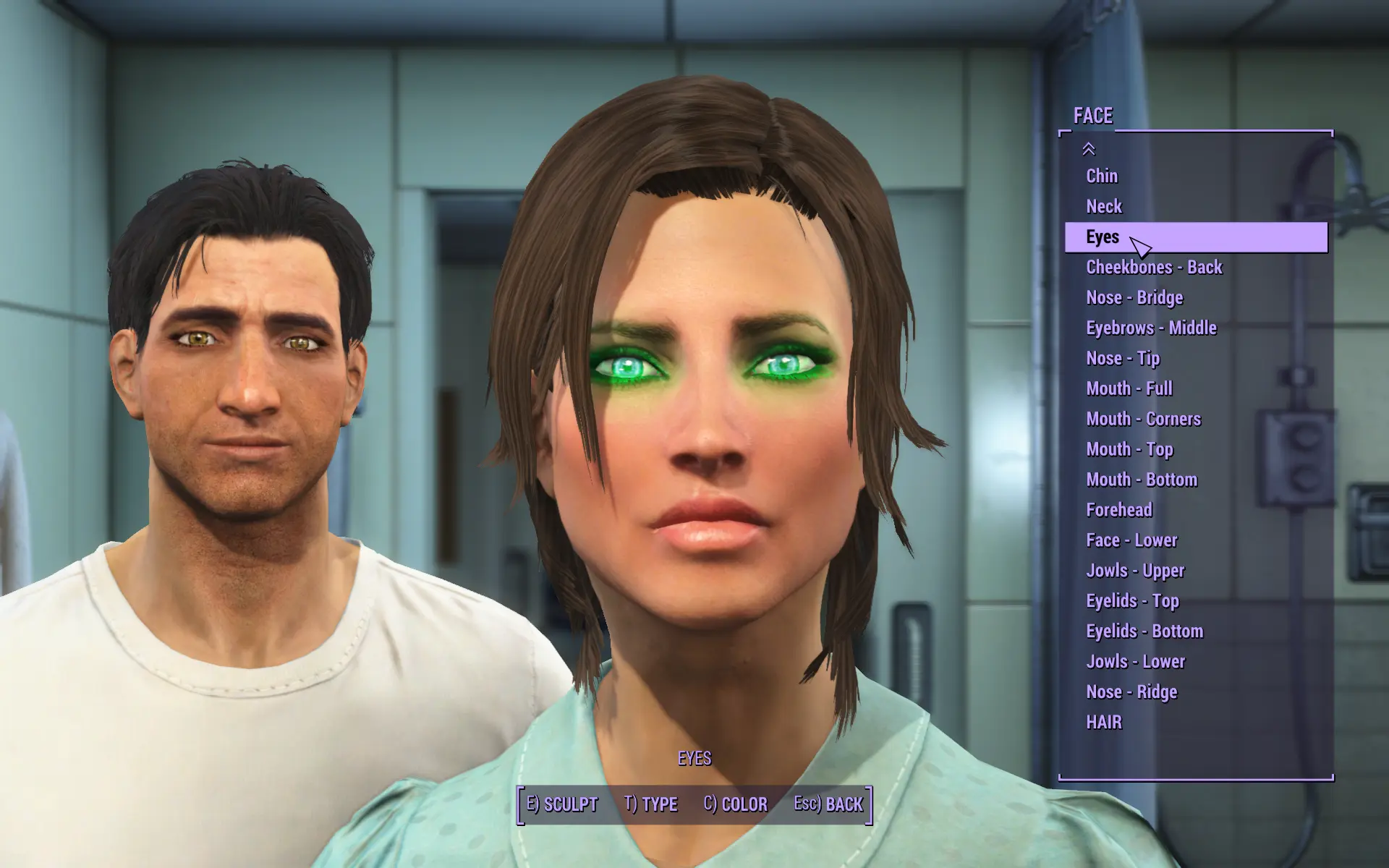
[]Feature list is much larger, allowing to see more items at once
[
]Facial features can now be selected from the list, rather than selecting the actual face aka select part by name[]Presets can now be saved/loaded
[]CBBE Bodyslide Sliders can be used ingame if properly generated
[]BodyGen can generate body shapes randomly for NPCs
[]Allows for hair palette overrides (for more hair colors)
[]Overlays can be applied overtop of the existing body
[]Skin can be overridden to another set of textures or mesh
[]Skin and makeup can be colorized via HSV
Game Version Table
-
[]If you're using Game Version 1. 10. 26 use 1. 6. 2
[]If you're using Game Version 1. 10. 20 use 1. 6. 1
[]If you're using Game Version 1. 9. 4 use 1. 5. 0
[]If you're using Game Version 1. 8. 7 use 1. 1. 7
[]If you're using Game Version 1. 7. 22 use 1. 1. 5
[]If you're using Game Version 1. 7. 15 use 1. 1. 4
[]If you're using Game Version 1. 7. 12 use 1. 1. 2
[]If you're using Game Version 1. 7. 10 use 1. 1. 1
[]If you're using Game Version 1. 7. 9 use 1. 1. 0
[]If you're using Game Version 1. 6. 9 use 1. 0. 9
[]If you're using Game Version 1. 6. 3 use 1. 0. 8
[]If you're using Game Version 1. 5. 416 use 1. 0. 7
[]If you're using Game Version 1. 5. 307 use 1. 0. 6
[]If you're using Game Version 1. 5. 210 use 1. 0. 5
[]If you're using Game Version 1. 5. 205 use 1. 0. 3
Tint Injection
See the link above for more information on how to inject tints.
Skin Override
This feature allows for an Actor/ActorBase's skin Forms to be overridden to an alternative, see the included Sample Skin Override for more details
This feature is similar to that of RaceMenu, where textures can be applied overtop of the body. Instead of altering the textures individually, it will change the entire material for the overlay. You may use either a BGSM or a BGEM material file as a target. Note that BGSM materials do not support alpha blending (BGEM does). If the texture is using a BGSM and is flagged for Skin Tint, it is possible to colorize the overlay, however colorization is not yet available through the User Interface.
Transforming is a new feature to LooksMenu's overlays where the UV map of the body can be altered for the overlay such that it can be placed where you please. The offset and scale are relative to the assigned values in the material. This means that if you create an overlay with a material where the offset or scale are altered, the overlay will add to the existing offset, and multiply the existing scale.
See the provi
-
[]If you're using Game Version 1. 10. 26 use 1. 6. 2
LooksMenu is a Fallout 4 mod that adds engine-level modifications to enhance the character creation system. With over 152,000 endorsements and 10 million downloads, it's a highly popular tool for players who want more control over their character's appearance. Last updated in June 2026, it remains actively maintained.
✨ Key Features
📊 Pros & Cons
✅ Pros
- Massive community trust (152k endorsements) — this is the go-to for character creation.
- 10 million downloads prove it's a staple for modded Fallout 4 setups.
- Actively updated (June 2026) so it's likely compatible with current game versions.
⚠️ Cons
- Description is barebones — no details on specific features or installation steps.
- Requires F4SE (Fallout Script Extender) to function, which isn't mentioned here.
- As an engine-level mod, it may conflict with other UI or character creation mods if load order isn't managed.
For Fallout 4 players who want deeper character customization and rely on mods like BodySlide or CBBE. Essential for mod authors and users who want to create unique characters. Skip if you're happy with vanilla character creation or play on console.
💡 Beginner Tips
- Install F4SE first, then drop LooksMenu into your Data folder or use a mod manager like Vortex.
- Make sure to launch the game through F4SE loader, not the default launcher, for the mod to work.
- If you use BodySlide, install LooksMenu before BodySlide to ensure proper integration.
📊 Mod Details
- Game
- Fallout 4 Mods
- Author
- Expired6978
- Version
- 1.7.0.3
- Downloads
- 10,004,501
- Endorsements
- 152,196
- Category
- User Interface
- Created
- 4/30/2016
- Updated
- 6/5/2026
🔗 Required By 83 Mods
These mods list this mod as a dependency.
🧩 Commonly Used Together
Users add these mods to the same collections — a real compatibility signal, not an AI guess.
🔧 How to Install Fallout 4 Mods
Download from Nexus.
📖 Full step-by-step install guide for Fallout 4 →
Visit the official mod page for specific installation instructions for this mod.
🎮 Need cheat codes or console commands? Check ur gaming wiki for Fallout 4 commands, item IDs, and more.
Keep browsing — more Fallout 4 mods await