Full Dialogue Interface (NewDialog English and CN-DE-ES-FR-IT-JA-PL-PTBR-RU translations)
⚪ Last updated 2016⚠️ Install Order · 4 steps
Install in this order, then this mod last — most mods fail to load without their framework and dependencies in place.
Preview
🔍 Analysis
- 👍 2.5% endorsement rate — high engagement, a strong quality signal
- 🏆 #3 of 110 User Interface mods in this game by downloads
📋 About This Mod
Full Dialogue Interface
What does this mod do?
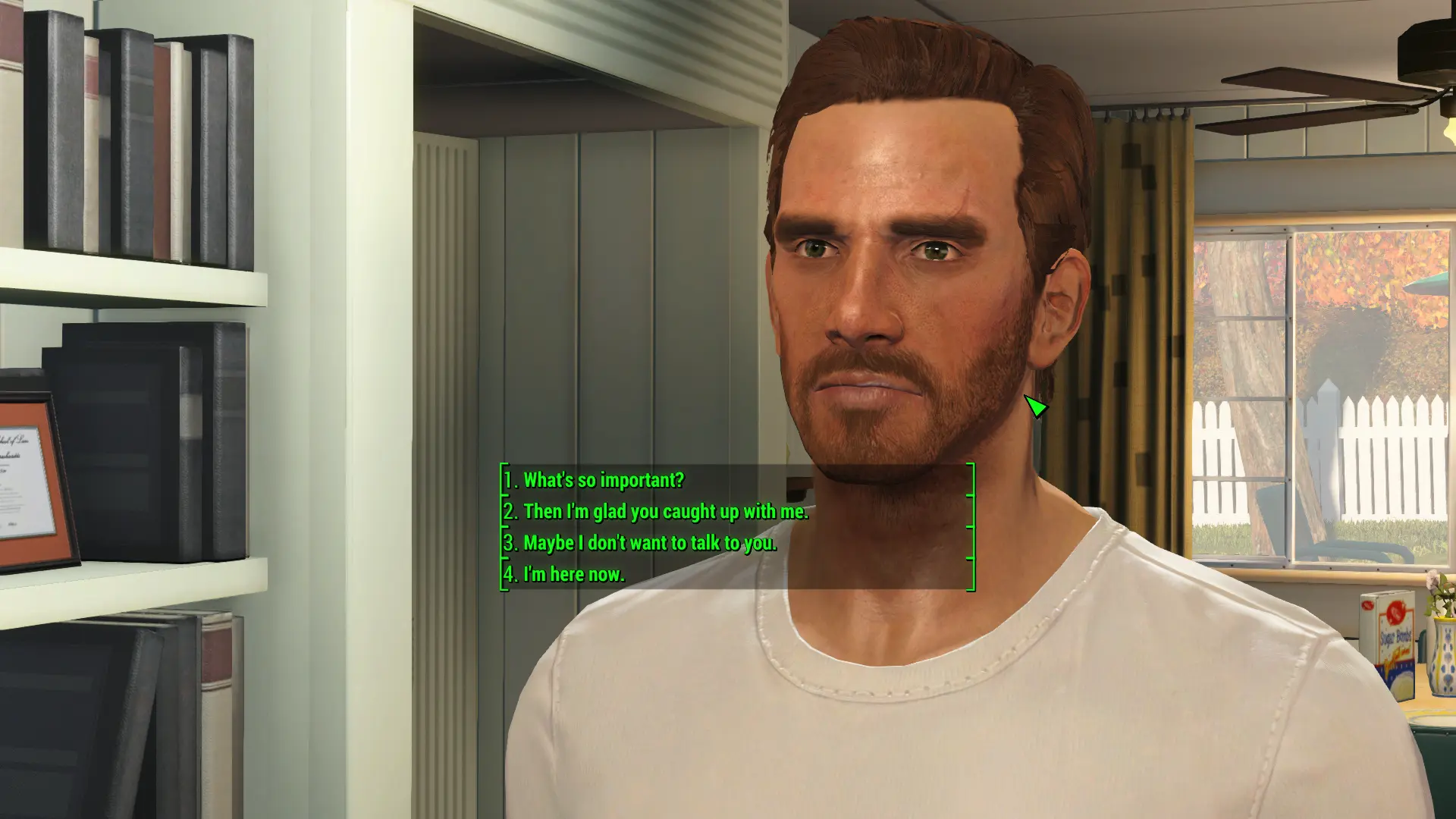
The Full Dialogue Interface mod makes the game display the full lines of what your character is going to say in conversation, instead of just a paraphrase. It also revamps the interface so that the game will now display dialogue options in a list and use the number keys/face buttons for input, depending on your control scheme. The mod supports both keyboard and gamepad. Many different interface layouts are available, so check the screenshot section for examples of what the mod looks like in action.This is a translation of shadwar's work and should not be used at the same time as the NewDialog mod.
News
Support for the new Nuka World DLC has been added. Find it under 'Update files' in the mod's downloads tab. English only for the moment; other languages to come later in the week.Full Dialogue Interface is also available for Xbox One and Playstation 4.
I've got a new mod out, Traits and More Perks, that re-adds New Vegas-style Traits to Fallout 4 and adds some brand new Perks to boot. Give it a look if you're in need of some new content to spice up your game. Apologies for the gross self-promotion.
To all international users: The translations for the Chinese and Spanish documentation need to be redone for Beta12, as many new interface layouts and installation options have been added. If you would like to help, the text that needs translating can be found here:
http://pastebin.com/QCd1vCnu
Full vs. Lite
To clarify: The Full version functions with both keyboards AND gamepads, but changes the interface to a list and will adhere to your control scheme setup (number keys or face buttons). The Lite version retains the vanilla layout.Both versions will function according to your control scheme (keyboard or gamepad) and display the full line of your character's dialogue as opposed to a paraphrase, as in vanilla.
The primary difference between the two is the presentation of the dialogue and the input options. The Full version shows the dialogue choices in a list and can use the number keys for input, while the Lite version retains the vanilla layout and input options (arrow keys, mouse click, and/or gamepad buttons).
Installation
IF USING THE NMM INSTALLER: In the installer, mark the check box next to the one option you want to install. DO NOT CLICK THE "Finish" BUTTON WITHOUT CHECKING AT LEAST ONE OPTION! After the installer is finished, do the following two steps and then you're done:Full Dialogue Interface replaces Fallout 4's paraphrased dialogue options with the full lines your character will say, and revamps the conversation UI into a numbered list. With 179,318 endorsements and 7.2 million downloads, it's one of the most popular UI mods for the game, last updated in 2016.
✨ Key Features
📊 Pros & Cons
✅ Pros
- Massive community trust with 179,318 endorsements and 7.2 million downloads.
- Eliminates guesswork by showing exactly what your character will say.
- Supports 10 languages, making it accessible to a global audience.
⚠️ Cons
- Last updated in 2016, so it may not be compatible with the latest Fallout 4 patches or DLC.
- Requires the Script Extender (F4SE) and MCM, which adds setup complexity.
For Fallout 4 players who hate guessing what their character will actually say from vague paraphrases. Also for anyone who wants a cleaner, more traditional dialogue list interface. Skip if you prefer the original cinematic dialogue camera and don't mind the paraphrases.
💡 Beginner Tips
- Install F4SE first and launch the game through f4se_loader.exe, not the default launcher, or the mod won't work.
- Use a mod manager like Vortex or Mod Organizer 2 to handle the installation and load order automatically.
- After installing, check the MCM settings to customize the dialogue list appearance and hotkeys.
📊 Mod Details
- Game
- Fallout 4 Mods
- Author
- Cirosan and shadwar
- Version
- Beta12
- Downloads
- 7,219,582
- Endorsements
- 179,318
- Category
- User Interface
- Created
- 11/18/2015
- Updated
- 9/13/2016
🧩 Commonly Used Together
Users add these mods to the same collections — a real compatibility signal, not an AI guess.
🔧 How to Install Fallout 4 Mods
Download from Nexus.
📖 Full step-by-step install guide for Fallout 4 →
Visit the official mod page for specific installation instructions for this mod.
🎮 Need cheat codes or console commands? Check ur gaming wiki for Fallout 4 commands, item IDs, and more.
Keep browsing — more Fallout 4 mods await