DEF_UI
⚪ Last updated 2024⚠️ Install Order · 2 steps
Install in this order, then this mod last — most mods fail to load without their framework and dependencies in place.
Preview
🔍 Analysis
- 👍 2.1% endorsement rate — high engagement, a strong quality signal
- 🏆 #5 of 110 User Interface mods in this game by downloads
📋 About This Mod
DEF_Interface
- DEF_INV contain KeyNuker so you no need to install it anymore, but still can endorse lyravega
This is a re-package and re-release of Neanka's DEF_INV and DEF_HUD mods (with permission from Neanka) with a new consolidated installer. These are currently the last versions Neanka released and are provided as-is. Please see notes at the bottom regarding mod support.
DEF_HUD
---------------------
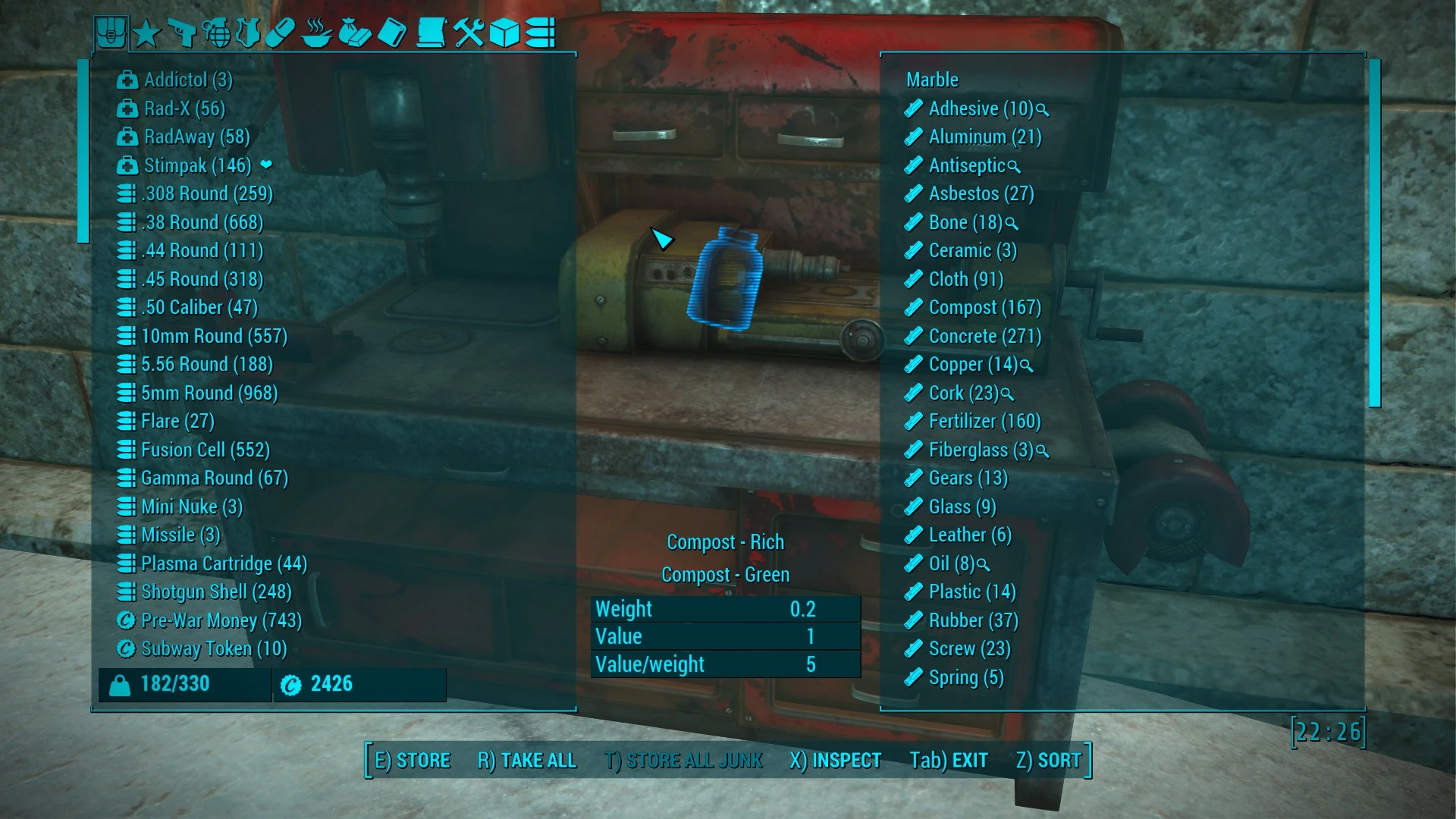
The HUD, or Head's Up Display, refers to the main game interface while adventuring. The HUD elements include HP, AP, Crit, XP, and Enemy HP meters, compass, dialogue, and messages. This mod allows customization of all of those elements. All elements can be moved, rotated and resized as desired. Some elements also have customization options like hiding parts of the element (HP tag on the HP meter for example).
There is also an optional feature to show scrap components beneath items when looting. This feature requires either the included scrap tags file or a similar file from your sorting mod (like VIS). If you use the included scrap tags file it will override any mod that changes scrap items (weight, components, names, etc).
This mod will conflict with any other mod that modifies the interface such as MyHUD or Pleasant UI, however all of the features provided by those mods can duplicated (and then some) with DEF_HUD.
DEF_INV
----------------------
DEF_INV modifies the interface for container, barter and pipboy inventory screens with numerous improvements. Container and Barter screens have been increased in size to fill the screen. All of the remaining features require a sorting mod:
- Sorting tags can be replaced with icons in all three screens.
- New tabs are available in container and barter screens to limit what is displayed by category based on tags.
- Additional tabs have been added to the Pipboy to move Notes and Holotapes to their own tabs based on tags.
- Pipboy items can be rolled up into a single entry based on tags (example: all keys are collected in a single Key Ring entry which can be expanded as needed).
Sorting Mods
----------------------Since most of the features of DEF_INV require a sorting mod, here are some suggestions for known sorting mods that are compatible with DEF_INV:
Valdacil's Item Sorting by Valdacil
Better Item Sorting by xandarori
Bhaal's Better Sorting by SystemLordBhaal
German Item Sorting by messiahgov (Replaced by German Item Sorting by CelloFO4)
A Realistically Weightless Colored Sorting Mod by Zenotep (Get config files from that mod)
DEF_UI is a re-release of DEF_HUD and DEF_INV, offering a fully customizable HUD and improved Pip-Boy, container, and barter inventory screens. With nearly 96,000 endorsements and 4.6 million downloads, it's a proven staple for Fallout 4 players seeking UI overhaul.
✨ Key Features
📊 Pros & Cons
✅ Pros
- Massive community trust: 95,769 endorsements and 4.6M downloads
- Combines two essential UI mods into one installer
- Active maintenance: last updated May 2024
⚠️ Cons
- UI mods can conflict with other interface mods; expect to sort load order carefully
- No explicit compatibility notes for other popular UI mods
For Fallout 4 players who want a cleaner, more efficient HUD and inventory management. If you're tired of the vanilla Pip-Boy and want deep customization, this is a must-have. Skip if you prefer minimal UI changes or are happy with vanilla.
💡 Beginner Tips
- Use a mod manager like Vortex or MO2 to install DEF_UI and manage load order.
- Check the mod's forum posts for known conflicts with other UI mods like VIS or HUDFramework.
- After installing, launch the game and use the in-game configuration to tweak HUD elements to your liking.
📊 Mod Details
- Game
- Fallout 4 Mods
- Author
- Neanka and Valdacil and Old Nick and ParasiteX and sekoms
- Version
- 1.6.0
- Downloads
- 4,628,580
- Endorsements
- 95,769
- Category
- User Interface
- Created
- 3/6/2016
- Updated
- 5/9/2024
🔧 How to Install Fallout 4 Mods
Download from Nexus.
📖 Full step-by-step install guide for Fallout 4 →
Visit the official mod page for specific installation instructions for this mod.
🎮 Need cheat codes or console commands? Check ur gaming wiki for Fallout 4 commands, item IDs, and more.
Keep browsing — more Fallout 4 mods await