What Are You Missing
⚪ Last updated 2023⚠️ Install Order · 2 steps
Install in this order, then this mod last — most mods fail to load without their framework and dependencies in place.
Preview
🔍 Analysis
- 👍 3.6% endorsement rate — high engagement, a strong quality signal
- 🏆 #56 of 179 User Interface mods in this game by downloads
📋 About This Mod
Intro
I made this mod for two main reasons: to help me complete the community center in the first year and to reduce the amount of times I had to go look something up on the wiki.
What does it do?
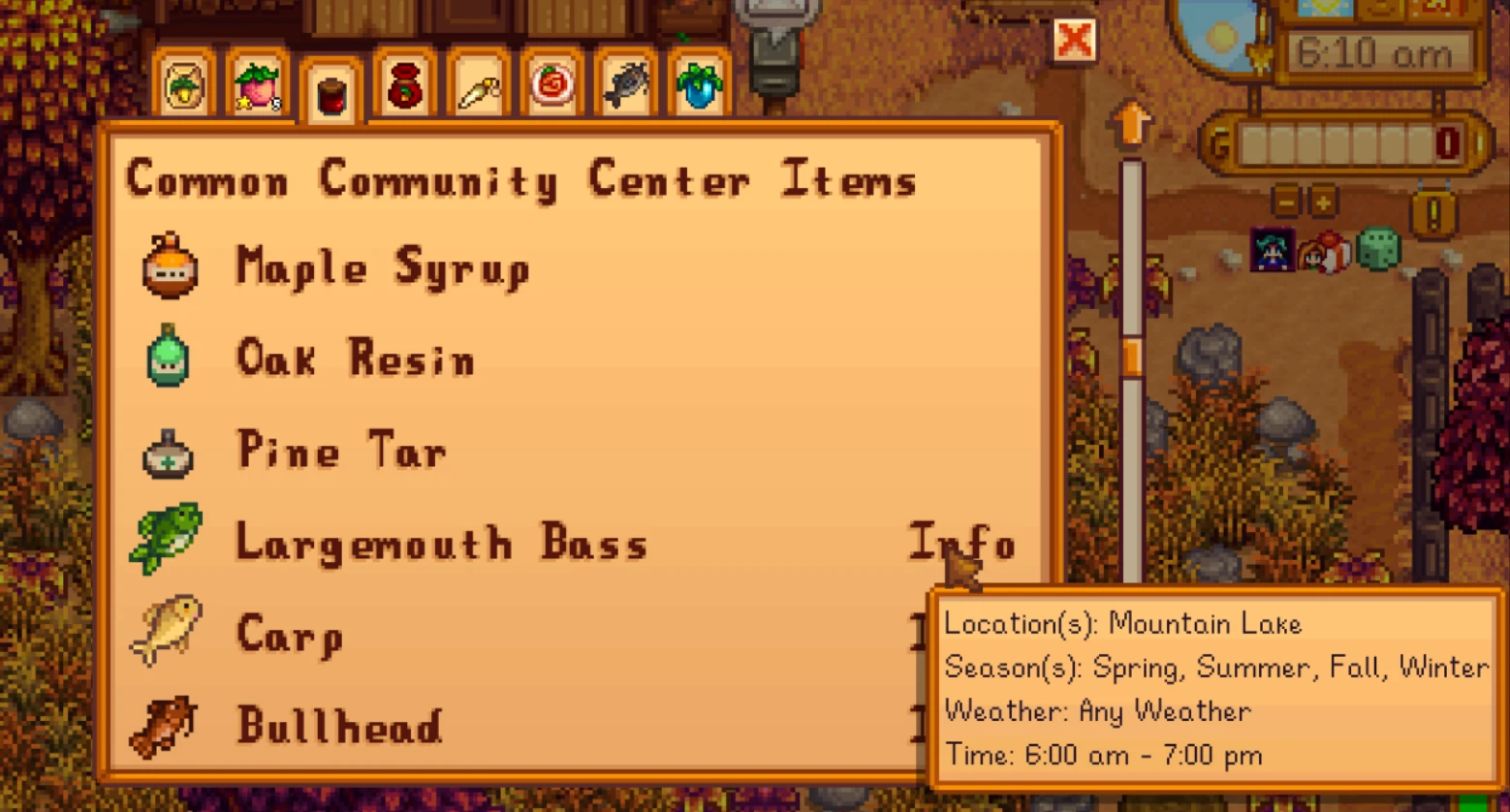
When the item you are missing is a fish, hover over the text "Info" to get the information on the fish (how/where/when to catch the fish). When the item is a recipe/cooked item, hover over the text "Info" to get the information on the recipe (health restored, energy restore, buffs, buff duration, ingredients). If an ingredient has a ~ in front of it, then you are missing that ingredient. The values it displays for the energy/health are what the game actually gives you (it can be different than what would be shown in the tool tip). If you're like me, I like to have at least 5 of every item that I can get so I never run out. The mod can be configured to ensure that you have X amount of every item (except for the items you can only have 1 of). In addition you can specify whether you want to know about the amount of common quality items or whatever the highest quality is for that item.
It can also be configured to show only the fish that are available that day or all the fish for that season.
The default button to bring up the menu is F2.
The Configuration Options
"ShowItemsFromLockedPlaces" : Whether or not you want items that are from locked places like the secret woods or desert to be shown regardless of whether not you have unlocked the area - default is true
"ShowAllFishFromCurrentSeason" : Whether or not you want to see fish all the fish for the season regardless of whether or not you can actually catch it that day -
default is false
"AlwaysShowAllFish" : For the All fish Tab - whether or not to show all fish regardless of how many you have (e.g you have 6 pike and the "CommonAmount" config option is set to 5 if "AlwaysShowAllFish" is false then it won't show you a pike, if its true then it will) - default is false
"ShowAllRecipes" : Whether or not to show all recipes regardless of whether or not you actually know the recipe - default is false
"AlwaysShowAllRecipes" : Whether or not to show all recipes regardless of how many you have (like AlwaysShowAllFish) - default is false
"CommonAmount
What Are You Missing is a Stardew Valley UI mod that tracks missing items tied to the current day and season, including fish with acquisition tips, plus a community center tracker split into two tabs. With 4,248 endorsements and 119,124 downloads, it's a popular tool for completionists. Last updated May 2023.
✨ Key Features
📊 Pros & Cons
✅ Pros
- Huge community trust (4,248 endorsements) — this is a go-to for Stardew completionists.
- Saves you from alt-tabbing to the wiki — it tells you exactly what's missing and how to catch that fish.
- Still relevant for 1.5 players, and the UI integration is seamless.
⚠️ Cons
- Last updated May 2023 — might not be updated for the latest Stardew 1.6 content, so some new items could be missed.
- Only covers day/season-specific items and community center — doesn't track other collections like artifacts or minerals.
For Stardew Valley completionists who hate missing a seasonal fish or forgetting a community center bundle. Also great for players who want to optimize their daily routine without constantly checking the wiki. Skip if you only play casually and don't care about 100% completion.
💡 Beginner Tips
- Make sure you have SMAPI installed — this mod requires it to run.
- Use a mod manager like Vortex or manually drop the folder into your Mods directory.
- Check the in-game menu for the new tabs — they integrate with your existing inventory and community center screens.
📊 Mod Details
- Game
- Stardew Valley Mods
- Author
- PrivateButtface
- Version
- 2.6.6
- Downloads
- 119,124
- Endorsements
- 4,248
- Category
- User Interface
- Created
- 9/2/2019
- Updated
- 5/2/2023
🧩 Commonly Used Together
Users add these mods to the same collections — a real compatibility signal, not an AI guess.
🔧 How to Install Stardew Valley Mods
Download from Nexus.
📖 Full step-by-step install guide for Stardew Valley →
Visit the official mod page for specific installation instructions for this mod.
🎮 Need cheat codes or console commands? Check ur gaming wiki for Stardew Valley commands, item IDs, and more.
Keep browsing — more Stardew Valley mods await