Universal Recolors
🟠 Updated over a year ago⚠️ Install Order · 2 steps
Install in this order, then this mod last — most mods fail to load without their framework and dependencies in place.
Preview
🔍 Analysis
- 👍 0.9% endorsement rate
- 🏆 #33 of 227 Visuals and Graphics mods in this game by downloads
📋 About This Mod
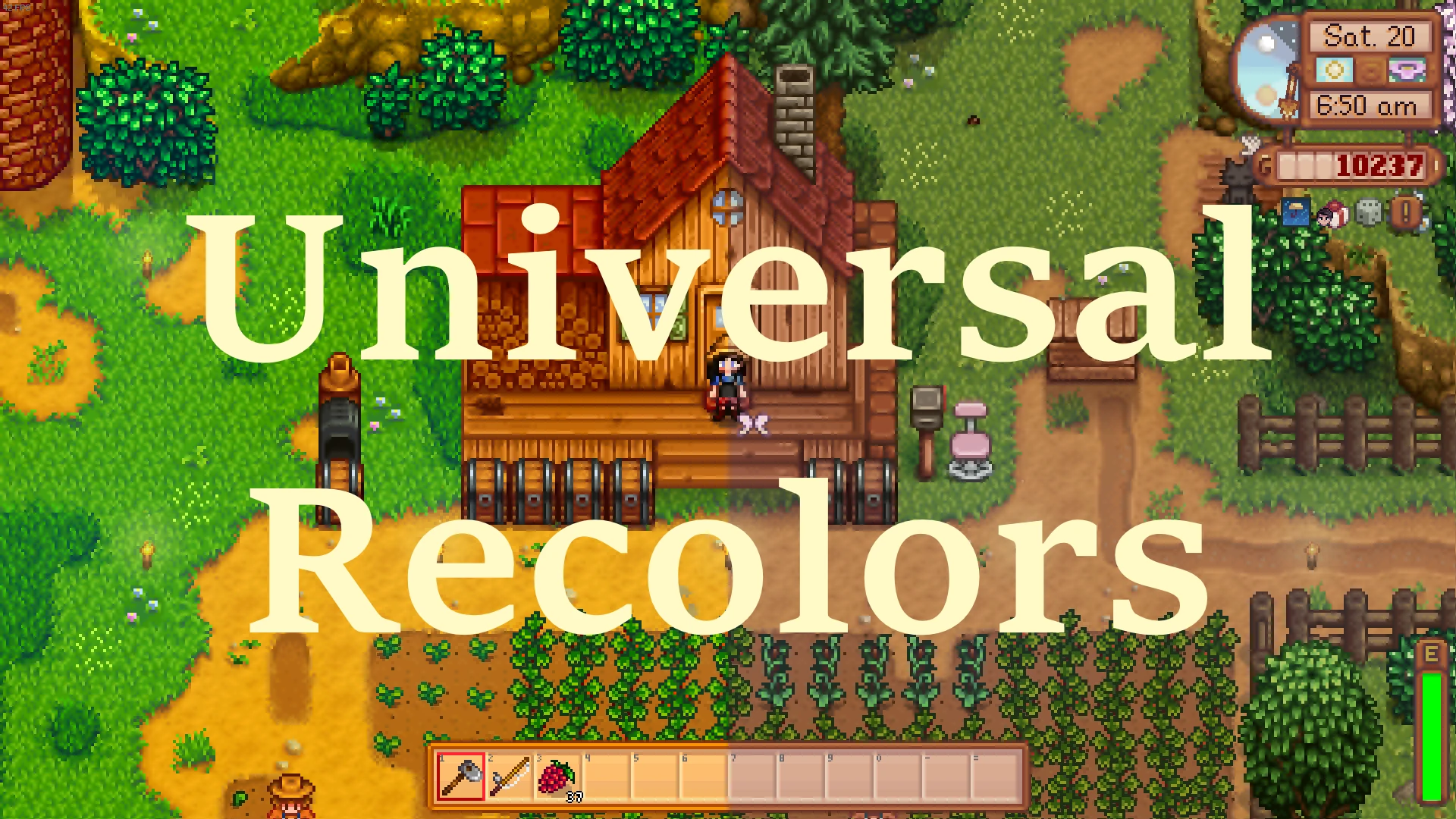
If you don't want to read the whole description, just install the "Significant" preset in Optional Files and your game should look like the images in the gallery!
Eyes bleeding playing 1. 6 vanilla? Don't like using ReShade? Spent hundreds of hours curating a modlist just to get flashbanged by that one item which you don't have a retexture for? Me too.
Not intended to replace your map recolor mods or other texture replacers, this universal desaturation mod uses Content Patcher's new priority feature to make sure it loads as early as possible so that you can build your load order on top of it. You can and should use it with any other mod you want.
Every single texture in the game has been uniformly tweaked (every texture has been tweaked the exact same way). This includes the map, UI, buildings, craftables, portraits, characters, animals, monsters, food, etc. Think of it as vanilla, but through a filter.
There are two ways to install the mod. You can use the main file which contains all the possible options, or use one of the three presets in the optional files. The main file is very large (700MB when installed), but is fully configurable to your exact personal preferences. The presets contained in the optional files are standalone (do not need the main file), smaller (do not contain duplicate tilesheets in different hues and saturations), but not configurable.
These are the preset options:
Subtle: 30% less saturation, no hue change
Significant: 40% less saturation, slight hue change
Extreme: 50% less saturation, significant hue change
For those who value configuration choice over drive space, the main file is for you. Its config contains two options (changed via the config file or GMCM) with a few choices each:
Saturation: how saturated the textures are (i.e. how bright the colors are).
"0": no saturation change
"1": 30% less saturated than vanilla (fairly subtle difference)
"2": 40% less saturated than vanilla (default, obvious difference)
"3": 50% less saturated than vanilla (extremely desaturated)
Hue: how much the hue of the colors has been shifted towards a more cool palette to offset the strong yellows present in vanilla.
"0": no hue change
"1": default, slight hue change - mostly a color correction of vanilla
"2": significant hue change, most textures will have a "peachy" hue - might look strange on some sprites
This means that if you just want really desaturated tilesheets with no hue change, or vanilla saturation in a slightly peachier hue, you can do that.
Thank you so much to seitanicbean for automating the process and saving me hours of w
Universal Recolors is a visual mod that desaturates and color-shifts tilesheets, aiming to replace the vanilla color palette with a uniform baseline. With 1,514 endorsements and 172,787 downloads, it's a popular choice for players seeking a cohesive, muted aesthetic. Last updated in October 2024, it remains relevant for current game versions.
✨ Key Features
📊 Pros & Cons
✅ Pros
- Huge community trust (1,514 endorsements) — clearly fills a need for palette purists
- Massive download count (172k) proves it's a go-to for visual overhauls
- Recent update (Oct 2024) means it's likely compatible with current game patches
⚠️ Cons
- Purely cosmetic — if you want gameplay changes, this isn't it
- Desaturation might not suit everyone; it's a specific aesthetic choice
For players who find the vanilla color palette too vibrant and want a more muted, cohesive look across tilesheets. If you're building a custom visual overhaul or just prefer a desaturated atmosphere, this is a solid baseline. Skip if you love the original colors or want gameplay tweaks.
💡 Beginner Tips
- Since this mod alters tilesheets, make sure to back up your original files if you're manually replacing them — though a mod manager is recommended for easy rollback.
- Pair this with other visual mods that match the desaturated palette for a fully cohesive look.
- Check the mod's comments section for any user-reported compatibility issues with other visual overhauls.
📊 Mod Details
- Game
- Stardew Valley Mods
- Author
- herb and bean
- Version
- 1.3.1
- Downloads
- 172,787
- Endorsements
- 1,514
- Category
- Visuals and Graphics
- Created
- 3/23/2024
- Updated
- 10/20/2024
🧩 Commonly Used Together
Users add these mods to the same collections — a real compatibility signal, not an AI guess.
🔧 How to Install Stardew Valley Mods
Download from Nexus.
📖 Full step-by-step install guide for Stardew Valley →
Visit the official mod page for specific installation instructions for this mod.
🎮 Need cheat codes or console commands? Check ur gaming wiki for Stardew Valley commands, item IDs, and more.
Keep browsing — more Stardew Valley mods await