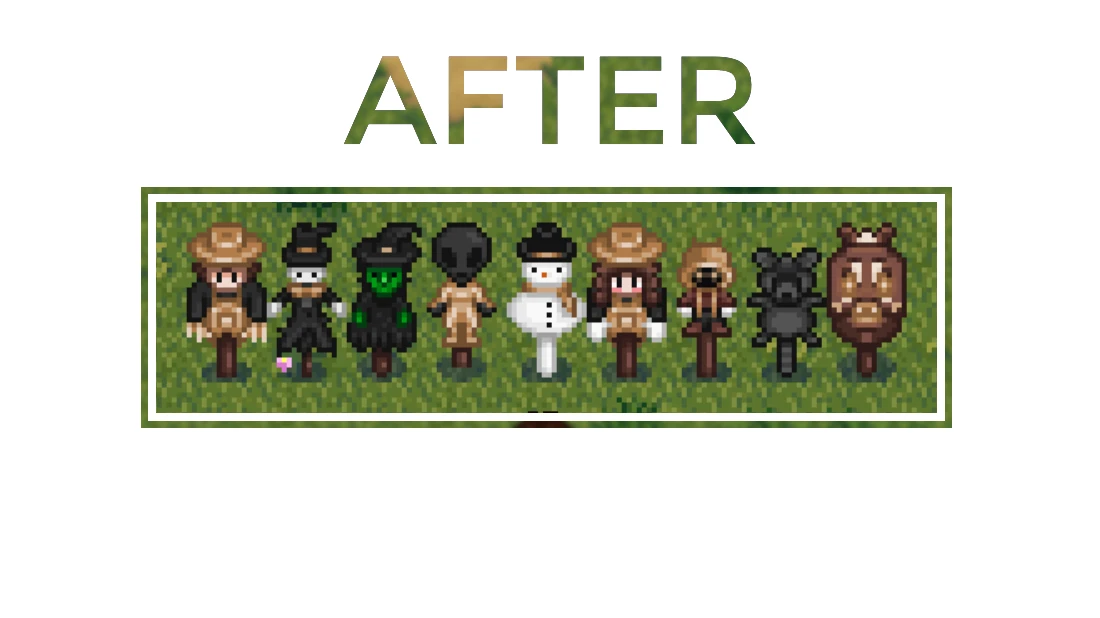
Scarecrow and Rarecrow Recolors (to match Eemies Darker wood and gold craftables)
⚪ Last updated 2019⚠️ Install Order · 3 steps
Install in this order, then this mod last — most mods fail to load without their framework and dependencies in place.
Preview
🔍 Analysis
- 👍 2.0% endorsement rate — high engagement, a strong quality signal
- 🏆 #110 of 144 Items mods in this game by downloads
📋 About This Mod
About
I really fell in love with Eemie's Medival Modern Buildings and combining it with her Darker Wood and Gold Craftables so I decided to also make all my scarecrows match the theme and I thought I'd share.
Contains
- Recolors/Modifications to
- Scarecrow
- Rarecrow #1
- Rarecrow #2
- Rarecrow #3
- Rarecrow #4
- Rarecrow #5
- Rarecrow #6
- Rarecrow #7
- Rarecrow #8
How to Install
Users must have Content Patcher installed.-
[]Download the .zip file by clicking the 'Download' button on the download page of this mod.
[
]Extract the ' New Scarecrows' folder to 'Stardew Valley/Mods' - Run Stardew Valley using SMAPI (make sure you have Content Patcher installed) and enjoy the new scarecrows.
Updates/Changes
- Added a Content Patcher version.
- Fixed an issue regarding the Content Patcher version that resulted in an error message in SMAPI and stopped the pack from working.
- Removed the XNB version from downloadable files.
- Created a new Content Patcher version.
Other
This should be compatible with any other mods that edit Craftables.xnb so long as they aren't changing the same pixels as the scarecrows. If for some reason it isn't working in your game, check for other mods that edit or replace Craftables.xnb.
I also recommend getting Allayna's Recolors to Match Eemiestardew's Color Pallet for more items to match the dark wood and golden theme.
Credit
- Inspiration from Eemiestardew.
This mod recolors all scarecrows and rarecrows in Stardew Valley to match Eemie's 'Darker wood and gold craftables' aesthetic, giving them a dark wood and golden theme. It's a simple cosmetic overhaul for players who want a cohesive look for their farm buildings and items.
✨ Key Features
📊 Pros & Cons
✅ Pros
- Community favorite with 845 endorsements and over 41k downloads.
- Gives your farm a cohesive, high-end look if you're already using Eemie's craftables.
- Lightweight and easy to install—just drop it in and go.
⚠️ Cons
- Last updated in 2019—might not be compatible with the latest Stardew Valley patches.
- Only affects scarecrows and rarecrows; if you want other items recolored, you'll need other mods.
- Requires Eemie's mod to get the full effect, so it's not standalone.
For Stardew Valley players who love aesthetic consistency and are already using Eemie's darker wood and gold craftables. If you want your farm to look like a cohesive, premium build, this is a must-have. Skip if you don't care about matching colors or prefer the vanilla look.
💡 Beginner Tips
- Make sure you have Eemie's mod installed first, or the recolors won't match anything.
- If you're using a mod manager like SMAPI, just drop the mod folder into your Mods directory—no extra setup needed.
- Check the mod's page for any updates or compatibility notes before installing, since it's been a while since the last update.
📊 Mod Details
- Game
- Stardew Valley Mods
- Author
- Sithurism
- Version
- 1
- Downloads
- 41,791
- Endorsements
- 845
- Category
- Items
- Created
- 3/22/2019
- Updated
- 3/28/2019
🧩 Commonly Used Together
Users add these mods to the same collections — a real compatibility signal, not an AI guess.
🔧 How to Install Stardew Valley Mods
Download from Nexus.
📖 Full step-by-step install guide for Stardew Valley →
Visit the official mod page for specific installation instructions for this mod.
🎮 Need cheat codes or console commands? Check ur gaming wiki for Stardew Valley commands, item IDs, and more.
Keep browsing — more Stardew Valley mods await