Reset Terrain Features
⚪ Last updated 2019⚠️ Install Order · 2 steps
Install in this order, then this mod last — most mods fail to load without their framework and dependencies in place.
Preview
🔍 Analysis
- 👍 4.3% endorsement rate — high engagement, a strong quality signal
- 🏆 #13 of 55 Cheats mods in this game by downloads
📋 About This Mod
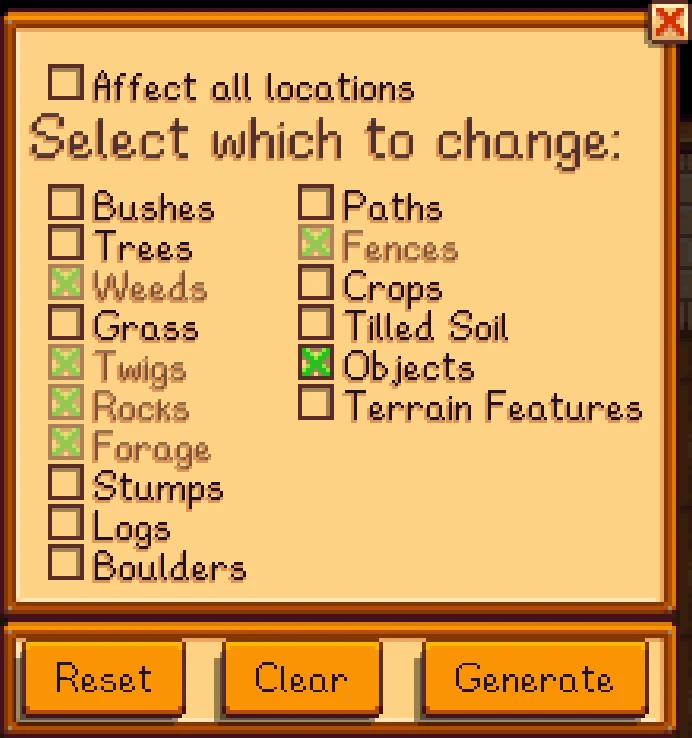
Reset Terrain Features provides a way to clear, reset, and generate everything which spawns on a map. Normally, changing maps mid-game results in bushes in cliffs, weeds in buildings, and trees floating in ponds. With Reset Terrain Features, you can fix all that with a few clicks!
By default, the key used to open the menu is L, but this is configurable with the config.json file found inside the mod folder. Simply change the
"MenuKey": "L" to whatever key is best for you!
If you enjoy my work and want to support me, consider buying me a coffee!
Reset Terrain Features is a cheat tool for Conan Exiles that lets you regenerate, clear, or generate all map-spawned objects. It's designed for players who install or uninstall map mods mid-save, helping to refresh the world without starting over. With nearly 10,000 endorsements, it's a proven utility for modded playthroughs.
✨ Key Features
📊 Pros & Cons
✅ Pros
- Huge community trust (9,806 endorsements) — this is a go-to tool for modded Conan Exiles.
- Solves a real headache: fixing broken map spawns without restarting your save.
- Simple concept, but it does exactly what it says — no bloat, just the tool you need.
⚠️ Cons
- Last updated in 2019 — may not work with the latest game patches or newer map mods.
- No detailed instructions or documentation provided by the author.
- As a cheat tool, it can accidentally wipe or duplicate features if used carelessly.
For Conan Exiles players who run map mods and want to fix spawn issues mid-save. Also for server admins who need to refresh the world after mod changes. Skip if you play vanilla or don't mess with map mods — this tool is niche but essential for its purpose.
💡 Beginner Tips
- Always back up your save before using this tool — it can permanently alter your world.
- Use the 'clear' option first to remove old spawns, then 'generate' to refresh them.
- If you're on a server, test on a single-player copy first to avoid ruining your community's progress.
📊 Mod Details
- Game
- Stardew Valley Mods
- Author
- MabelSyrup
- Version
- 1.0.1
- Downloads
- 225,935
- Endorsements
- 9,806
- Category
- Cheats
- Created
- 11/26/2019
- Updated
- 11/26/2019
🧩 Commonly Used Together
Users add these mods to the same collections — a real compatibility signal, not an AI guess.
🔧 How to Install Stardew Valley Mods
Download from Nexus.
📖 Full step-by-step install guide for Stardew Valley →
Visit the official mod page for specific installation instructions for this mod.
🎮 Need cheat codes or console commands? Check ur gaming wiki for Stardew Valley commands, item IDs, and more.
Keep browsing — more Stardew Valley mods await