Portraiture
⚪ Last updated 2024⚠️ Install Order · 3 steps
Install in this order, then this mod last — most mods fail to load without their framework and dependencies in place.
Preview
🔍 Analysis
- 👍 2.4% endorsement rate — high engagement, a strong quality signal
- 🏆 #3 of 185 Characters mods in this game by downloads
📋 About This Mod
Portraiture
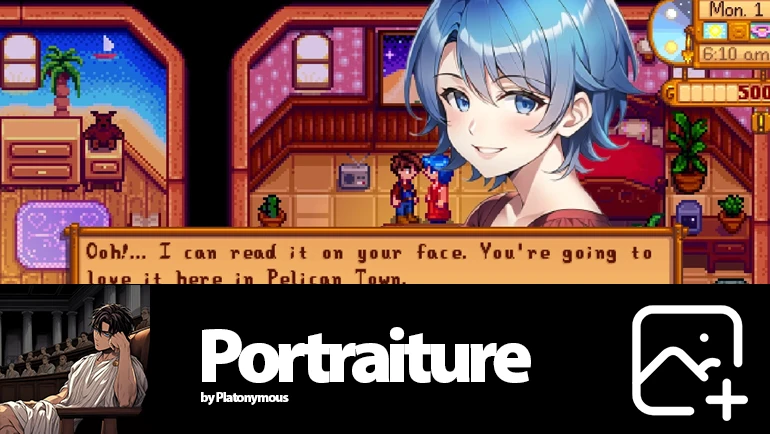
by PlatonymousThis Mod allows you to add Portraits with a higher resolution to the game and easily switch between Portrait Mods.
Press P to change Portrait-Set when the DialogBox is open.
Press I to toggle between the larger portrait above the dialogue and the normal ones when the DialogBox is open.
Press O to fix or unfix a portrait-set selection of a specific NPC when their DialogBox is open, when fixed they will ignore further set changes and stay as they are.
This Mod itself includes no Portraits.
Important regarding HDP support (SDV 1. 5. 6 & 1. 6 alpha):
If you download an want to use a HDP content pack with this, put it into the regular mod folder, NOT the Portraits folder.
If the manifest.json file of that pack has hdp in it's dependencies, but you do not have hdp installed, remove the dependency and select HDP when picking a portraits-set in game, to have it show up as intended. (This will still work with HDP installed, it does not require the dependency to be set)
If you leave or add the HDP dependency to an HDP pack and allow sideloading in Portraitures config.json, Portraiture will attempt to load them and give them there own set, while otherwise HDP contentpacks combine into the HDP set and can't be seperately selected. This only works if the pack has the file-structure that Portraiture requires, which is often the case. Despite that, it is recommended to use the non-sideloaded approach to ensure the portraits work properly.
(If HDP is installed, the HDP option and Vanilla option in the set selection will look the same)
Important regarding PyTK:
Despite claims to the opposite, this mod does no longer require PyTK unless you use a version older than 1. 10. 0. Even if a content mod for this claims that it relies on PyTK, it does not
Version 1. 11. 8
Change MaxAbovePortraitPercent in the config to adjust the size of the abovebox portrait.
Sideloading of HDP Packs is now deactivaded by default. Packs added without the HDP dependency set in the manifest are still loaded in the HDP Portrait option. This can be changed in the config. Packs sideloaded like this may not work as intended by the author as the contentpatcher part is ignored, but unlike non-sideloaded packs have their own option in the portrait selection. Non-sideloaded packs show only in the HDP option and may override each other.
If HDP is installed, the HDP and vanilla option should look the same.
Version 1. 11. 0
Support for HDP content packs. (Install HDP Packs like normal, not in the Portraits folder)
New Above Box Mode (active on default, can be deativated in the config and by pressing the Style-Change key while in a dialogue (Default: I)
Fix portraits to NPCs by pressing the fix/unfix kex (Default: O) If portraits ar
Portraiture is a Stardew Valley mod that upgrades portrait resolution and lets you switch between portrait mods in-game. With 65,717 endorsements and 2.7M downloads, it's a community staple for players who want crisper character portraits and easy mod swapping.
✨ Key Features
📊 Pros & Cons
✅ Pros
- Huge community trust: 65,717 endorsements and 2.7M downloads.
- Solves a real problem: no more manual file swapping for portrait mods.
- Active as of March 2024, so it's up-to-date with recent game versions.
⚠️ Cons
- Requires SMAPI to run, which might be a hurdle for new modders.
- Only affects portraits—no changes to gameplay or other visuals.
- Switching mods mid-game might cause portrait glitches if mods aren't compatible.
For Stardew Valley players who love custom portraits and want a seamless way to try different styles. Also for anyone who finds default portraits too low-res. Skip if you're happy with vanilla portraits or don't use mods.
💡 Beginner Tips
- Install SMAPI first, then drop Portraiture into your Mods folder.
- Use the in-game menu (press P) to switch portrait sets without restarting.
- Make sure your portrait mods are compatible with Portraiture—check their descriptions.
📊 Mod Details
- Game
- Stardew Valley Mods
- Author
- Platonymous
- Version
- 1.12.1-alpha.20240304
- Downloads
- 2,712,344
- Endorsements
- 65,717
- Category
- Characters
- Created
- 3/15/2017
- Updated
- 3/4/2024
🔗 Required By 22 Mods
These mods list this mod as a dependency.
🧩 Commonly Used Together
Users add these mods to the same collections — a real compatibility signal, not an AI guess.
🔧 How to Install Stardew Valley Mods
Download from Nexus.
📖 Full step-by-step install guide for Stardew Valley →
Visit the official mod page for specific installation instructions for this mod.
🎮 Need cheat codes or console commands? Check ur gaming wiki for Stardew Valley commands, item IDs, and more.
Keep browsing — more Stardew Valley mods await