Who's High Res Wizard Portrait and Sprites
⚪ Last updated 2024⚠️ Install Order · 5 steps
Install in this order, then this mod last — most mods fail to load without their framework and dependencies in place.
Preview
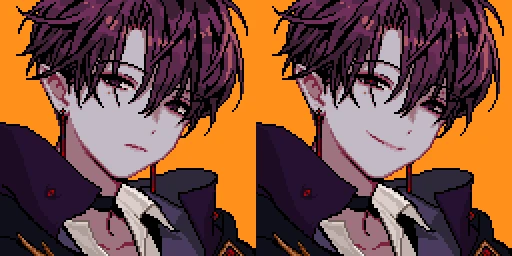
🔍 Analysis
- 👍 2.5% endorsement rate — high engagement, a strong quality signal
- 🏆 #11 of 130 Portraits mods in this game by downloads
📋 About This Mod
!!attention!!
-This Portrait and character is built on the basis of the Looking for Love mod.
-Never use this character in any other wizard portrait.
-Do not modify or refer to characters.
-Please stop illegal sharing
-Don't upload this mod to another location.
-Don't convert to another game.
-I'm not active anywhere except Naver Cafe and Nexus mods.
Update Logs.
-----------------------------------------------------------------------------------------------------------------------------------------------
● 1. 0. 1 ver.
1. Added character sprite.
2. The flower dance costume has been added (only four-way fixed motion is added).
3. Change the warp pose to fit the character.
● 1. 0. 2 ver.
1. Add missing motion(sleep motion)
2. Simplifying Installation
-----------------------------------------------------------------------------------------------------------------------------------------------
Required Mods
Portraiture
Content Patcher
설치 가이드
1. 기존에 사용중이던 Who_M_Wizard 모드를 제거 후 Required Mods를 모두 설치하세요.
2. 다운로드한 압축파일의 Who_M Wizard Sprites 폴더를 Mods 폴더에 설치하세요.
3. 본인의 상황에 맞춰 다음 지침을 따라주세요.
-고해상도 모드를 처음 설치하시는 분 ▶ 압축파일의 Who_M Wizard Portrait 폴더를 Mods 폴더에 설치하세요.
-고해상도 모드를 이미 사용 중이신 분 ▶ 사용 중인 고해상도 모드 폴더에 압축파일의 Wizard.png 파일을 붙여 넣어 주세요.
4. 게임에 접속하여 NPC와 대화 도중 P 키를 눌러 초상화를 적용하세요. (설정하신 값에 따라 단축키가 다를 수 있습니다.)
Installation Guide (English)
※The sentences can be awkward because I use a translator.1. Remove the existing Who_M_Wizard mode and install all Required Mods.
2. Install the Who_M Wizard Sprites folder of the compressed file in the Mods folder.
3. Please follow the guidance below according to your situation.
-New to installing Portraiture mode ▶ Install the Who_M Wizard Portrait folder in the Mods folder.
-If you are already using Portraiture mode ▶ paste the Wizard.png file into the Portraiture mode folder you are using.
4. Access the game and apply the portrait by pressing 'P'key during the conversation with NPC. (The shortcut may vary depending on the value you set.)
This mod replaces the default wizard portrait and character sprites with high-resolution versions, requiring SMAPI, Portraiture, and Content Patcher. It's a popular cosmetic enhancement for Stardew Valley players who want a crisper look for the wizard, with over 7,800 endorsements and 313,000 downloads.
✨ Key Features
📊 Pros & Cons
✅ Pros
- Huge community trust with 7,861 endorsements and over 313k downloads
- Simple cosmetic upgrade that makes the wizard look sharper without changing gameplay
- Actively maintained, last updated in March 2024
⚠️ Cons
- Requires three separate mods (SMAPI, Portraiture, Content Patcher) just to run
- Only affects the wizard character—if you want high-res for other NPCs, this won't help
For Stardew Valley players who love the wizard and want a cleaner, more detailed look for him without altering the game's mechanics. If you're already running SMAPI and Portraiture, this is a no-brainer. Skip if you're not into cosmetic mods or don't want to deal with the dependency chain.
💡 Beginner Tips
- Make sure you have SMAPI installed first—it's the backbone for all mods, and you'll need to launch the game through SMAPI for this to work.
- Portraiture is a framework that lets you swap portraits in-game; you'll need to place the mod's files in the right folder (usually Mods/Portraiture/Portraits) for the portrait to show up.
- Content Patcher handles the sprite replacement, so double-check that it's updated to the latest version to avoid conflicts with other mods.
📊 Mod Details
- Game
- Stardew Valley Mods
- Author
- Who_M
- Version
- 1.0.2
- Downloads
- 313,686
- Endorsements
- 7,861
- Category
- Portraits
- Created
- 1/1/2020
- Updated
- 3/1/2024
🔧 How to Install Stardew Valley Mods
Download from Nexus.
📖 Full step-by-step install guide for Stardew Valley →
Visit the official mod page for specific installation instructions for this mod.
🎮 Need cheat codes or console commands? Check ur gaming wiki for Stardew Valley commands, item IDs, and more.
Keep browsing — more Stardew Valley mods await