Peachy Objects
⚪ Last updated 2024⚠️ Install Order · 2 steps
Install in this order, then this mod last — most mods fail to load without their framework and dependencies in place.
Preview
🔍 Analysis
- 👍 2.4% endorsement rate — high engagement, a strong quality signal
- 🏆 #66 of 144 Items mods in this game by downloads
📋 About This Mod
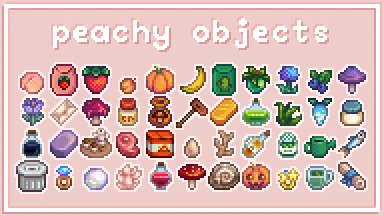
what started as wanting to edit a few objects on the springobjects tile sheet has spiraled into this: Peachy Objects. i like the simple charm of the vanilla art, so this is more focused on changing colors and slight shading alterations. with some entirely new art.
----------
here is the current rundown of this mod:
-
[]replaces a lot (but not all) of the items in the springobjects tile sheet. and some new objects added in 1. 6 in the Objects_2 tilesheet.
[
]replaces all crops growth states.[]replaces certain monsters to match my object edits. (false magma cap, iridium crab, dangerous lava crab, and stick bug)
[]replaces all tools.
[]replaces a small selection weapons.
[]replaces the star quality indicator on items with colors matching my edits.
what's configurable?
-
[]the trellis color for the crops: dark, brown, light, white, or old (default: brown)
[
]iridium's color scheme: purple, pale, pink, black, or blue (default: purple) (note: the black color is inspired by 6480's Oil iridium recolor)now there are two different routes you can go for disabling some changes.
- []the first way, for if you only know how to use GMCM:
there is also ONE option for individually disabling something: the torch. this is because i'm actually using orangeblossom7's firefly torch, and it's my personal favorite right now. but let me be clear: i am not writing a config for 400+ individual items. i'm sorry. if someone else is willing to do this, that's fine. i know other modders have done this, but other modders are smarter than me and didn't bundle everything in one mod. and i don't feel like changing it now. :(
- []the second way, for if you know how to navigate a folder on PC:
Peachy Objects is a visual overhaul mod for Stardew Valley that recolors and redoes various objects, including crops, tools, and weapons. Updated for game version 1.6, it has earned 1,505 endorsements and over 61,000 downloads, making it a popular choice for players seeking a fresh look.
✨ Key Features
📊 Pros & Cons
✅ Pros
- Community favorite with 1,505 endorsements and 61k downloads — clearly doing something right.
- Covers a broad range of items: crops, tools, and weapons, so your whole inventory gets a fresh look.
- Updated for 1.6, so it's ready for the latest version of the game.
⚠️ Cons
- Description is bare-bones — no preview images or detailed feature list, so you're flying blind on what exactly changes.
- Only covers crops, tools, and weapons — if you wanted furniture or buildings recolored, this isn't it.
For Stardew Valley players who want a cohesive visual refresh of their everyday items without overhauling the whole game. If you're tired of the default look and want something cuter or more cohesive, this is a low-effort pick. Skip if you're after gameplay changes — this is purely cosmetic.
💡 Beginner Tips
- Since it's a recolor mod, make sure you have Content Patcher installed if required — check the mod page for dependencies.
- If you use other visual mods, load order matters: put Peachy Objects after other texture mods to ensure it takes priority.
- Back up your save before installing any mod, just in case — but this one is cosmetic, so it's low risk.
📊 Mod Details
- Game
- Stardew Valley Mods
- Author
- peachitto
- Version
- 3.2
- Downloads
- 61,963
- Endorsements
- 1,505
- Category
- Items
- Created
- 12/17/2019
- Updated
- 5/3/2024
🧩 Commonly Used Together
Users add these mods to the same collections — a real compatibility signal, not an AI guess.
🔧 How to Install Stardew Valley Mods
Download from Nexus.
📖 Full step-by-step install guide for Stardew Valley →
Visit the official mod page for specific installation instructions for this mod.
🎮 Need cheat codes or console commands? Check ur gaming wiki for Stardew Valley commands, item IDs, and more.
Keep browsing — more Stardew Valley mods await