Overgrown Flowery Cursors
⚪ Last updated 2022⚠️ Install Order · 2 steps
Install in this order, then this mod last — most mods fail to load without their framework and dependencies in place.
Preview
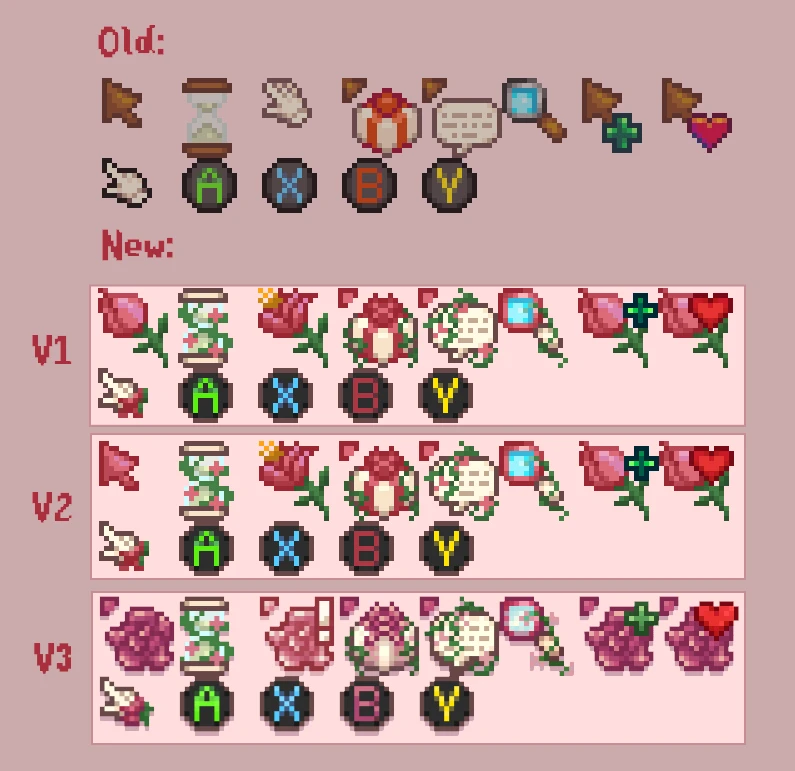
🔍 Analysis
- 👍 2.5% endorsement rate — high engagement, a strong quality signal
- 🏆 #132 of 179 User Interface mods in this game by downloads
📋 About This Mod
Please do NOT redistribute/re-upload ANY of my mods to other websites, and
definitely not behind a paywall. This is not your work and you will be
infringing copyright and disrespecting my work if you do so. I do NOT
give permission to anyone to include my work in e.g. mod packs, not even
with credit. Always link back to my Nexus Mods page. I only upload my
mods on Nexus.
Changelog v. 2. 0. 0:
-
[]Updated for 1. 5
[
]Config options available, v1/v2 (set in config.json)Compatibility with Vintage Interface (V1 or V2):
If you're seeing an overlapping cursor with the one in Vintage Interface, open up Cursors.png in the assets folder of Vintage Interface in any photo editing program and erase the bunch of cursors on the top left and save the png. The flowery cursors should now display as they should.
Overgrown Flowery Cursors is a simple UI mod that replaces the default cursor with a flowery set, based on an older version from the Overgrown Flowery Interface. It has 991 endorsements and 40,371 downloads, last updated in March 2022. For players who want a floral touch to their interface.
✨ Key Features
📊 Pros & Cons
✅ Pros
- Community-approved with 991 endorsements and over 40k downloads
- Simple cosmetic change that adds a unique floral aesthetic
- No extra dependencies or complex setup required
⚠️ Cons
- Last updated in 2022 — may not be compatible with the latest game patches
- Only affects cursors, so if you want a full UI overhaul, this won't do it
- No preview images or detailed description, so you can't see the cursors before installing
For players who want a subtle, nature-themed UI touch without overhauling the whole interface. If you're a fan of the Overgrown Flowery Interface but prefer a lighter option, this is for you. Skip if you're looking for gameplay changes or a complete UI replacement.
💡 Beginner Tips
- Make sure to back up your original cursor files before replacing them, just in case you want to revert.
- If the mod doesn't work after updating the game, check for compatibility patches or community fixes.
- Since it's a simple file replacement, you can manually install it by dropping the files into the appropriate game folder.
📊 Mod Details
- Game
- Stardew Valley Mods
- Author
- SugarSugarRuin
- Version
- 2.0.0
- Downloads
- 40,371
- Endorsements
- 991
- Category
- User Interface
- Created
- 5/22/2020
- Updated
- 3/1/2022
🧩 Commonly Used Together
Users add these mods to the same collections — a real compatibility signal, not an AI guess.
🔧 How to Install Stardew Valley Mods
Download from Nexus.
📖 Full step-by-step install guide for Stardew Valley →
Visit the official mod page for specific installation instructions for this mod.
🎮 Need cheat codes or console commands? Check ur gaming wiki for Stardew Valley commands, item IDs, and more.
Keep browsing — more Stardew Valley mods await