Garden Variety User Interface Recolours
⚪ Last updated 2018⚠️ Install Order · 2 steps
Install in this order, then this mod last — most mods fail to load without their framework and dependencies in place.
Preview
🔍 Analysis
- 👍 4.3% endorsement rate — high engagement, a strong quality signal
- 🏆 #176 of 179 User Interface mods in this game by downloads
📋 About This Mod
General Note About 1. 3: Due to time constraints in real life, I will most likely not be updating my mods in the near future. There have been significant changes to how the game works in terms of the code, we don't know for sure that nothing else will be changed after the beta, and I am not familiar with the tools necessary to make mods compatible. Once everything is ironed out after the update, I'll look into compatibility as soon as I have time. Thanks for your understanding.
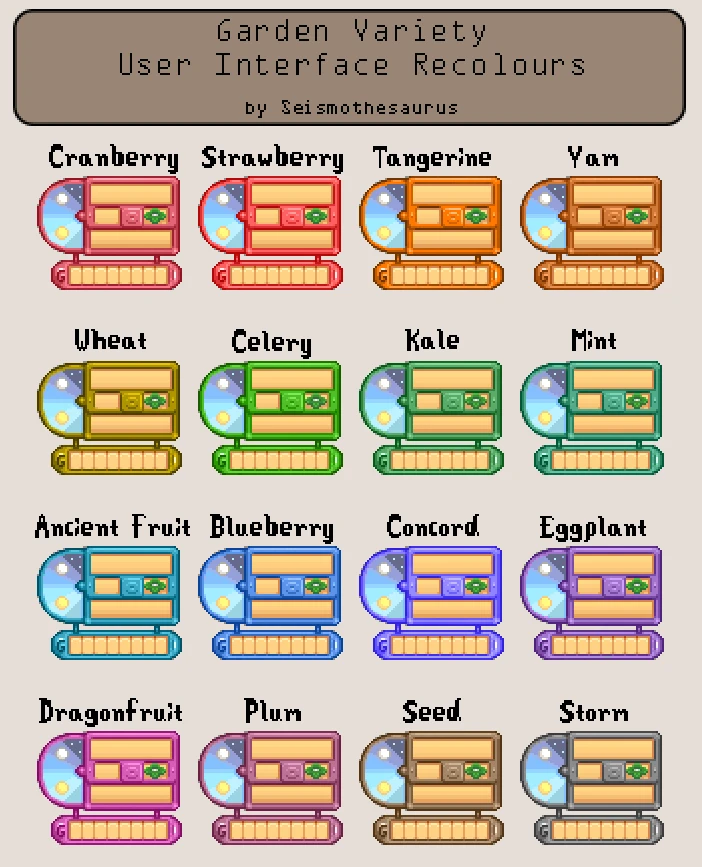
Garden Variety provides a selection of 16 UI/HUD recolours. See the Menu image for a preview of all 16. See in-game screenshots here for a few in-game examples. Some schemes work better than others, but it's all down to personal taste in the end.
Conflicts/Use:
This mod is not compatible with any mod that replaces Cursors.xnb, MenuTiles.xnb, or font_bold.xnb. However if you use my Junimo Artifact Dig Spots mod, you can contact me on the Chucklefish forums or here and I can merge that mod into this one for you. Just let me know which colour UI and Junimo you want. If I get any requests, I will upload them, so please check below first.
SMAPI not required. To use this mod, navigate to the folder of your chosen colour. BACK UP YOUR ORIGINAL FILES and then replace Cursors.xnb and font_bold.xnb in Content\LooseSprites, and MenuTiles.xnb in Content\Maps. If you don't like the coloured text, I recommend using the text file from the Storm pack as it's a neutral hue.
Known Issues:
-v1. 0 had a number of issues (visual only) with a few colour packs and has been scrapped. I'm sorry if you liked some aspects of v1. 0 better, but I believe that v2. 0 is a vast improvement.
-No known issues in v2. 0. Please let me know if you find any.
PSA: I have finished updating all 16 packs to v2. 0 (dialogue boxes, dialogue text, and inventory borders were all completely recoloured). I highly recommend grabbing this update if you were using v1.x. v2. 0 looks better (in my opinion). I am still open to feedback, but due to other mod commitments and life in general, I most likely won't be doing any updates to this mod any time soon (other than fixes if necessary).
Versions now compatible with Junimo Artifact Dig Spots (available under Miscellaneous files):
-Seed UI with rainbow Junimo
-Storm UI with blue Junimo
-Blueberry UI with green Junimo
Garden Variety User Interface Recolours is a cosmetic mod that offers 16 crop-themed UI recolours for HUD, NPC dialogue, inventory, menus, and cursors. With over 1,100 endorsements and 26,000 downloads, it's a popular choice for players wanting a fresh, farm-inspired look. Last updated in 2018, it remains a stable, lightweight addition for Stardew Valley fans.
✨ Key Features
📊 Pros & Cons
✅ Pros
- Community favorite with 1,147 endorsements and 26k downloads – clearly a hit
- 16 colour options give you plenty of variety to match your farm aesthetic
- Covers all major UI elements – HUD, dialogue, inventory, menus, and cursors – so the whole game feels cohesive
⚠️ Cons
- Last updated in 2018 – might not be compatible with the latest game patches
- No screenshots or detailed previews in the description, so you're flying blind until you try it
- Purely cosmetic – if you're after UI overhauls or functionality changes, this isn't it
For Stardew Valley players who want a subtle, farm-themed visual refresh without changing gameplay. If you're tired of the default blue UI and love the idea of tomato-red or wheat-gold menus, this is for you. Skip if you need UI mods that add new features or fix bugs.
💡 Beginner Tips
- Since this mod changes UI colours, make sure to back up your original files if you're manually installing – though using a mod manager like Vortex or SMAPI's mod folder is safer.
- If you're using SMAPI, place the mod in the Mods folder and ensure you have the latest SMAPI version for your game version.
- Try a few recolours in-game to see which one suits your farm's vibe – you can switch between them easily by replacing the files.
📊 Mod Details
- Game
- Stardew Valley Mods
- Author
- Seismothesaurus
- Version
- 2.0
- Downloads
- 26,558
- Endorsements
- 1,147
- Category
- User Interface
- Created
- 7/26/2017
- Updated
- 2/8/2018
🔧 How to Install Stardew Valley Mods
Download from Nexus.
📖 Full step-by-step install guide for Stardew Valley →
Visit the official mod page for specific installation instructions for this mod.
🎮 Need cheat codes or console commands? Check ur gaming wiki for Stardew Valley commands, item IDs, and more.
Keep browsing — more Stardew Valley mods await