Elle's Cat Replacements
⚪ Last updated 2019⚠️ Install Order · 2 steps
Install in this order, then this mod last — most mods fail to load without their framework and dependencies in place.
Preview
🔍 Analysis
- 👍 3.7% endorsement rate — high engagement, a strong quality signal
- 🏆 #4 of 53 Pets / Horses mods in this game by downloads
📋 About This Mod
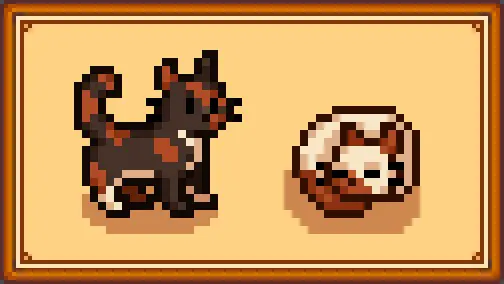
- 51 cat skins to choose from
- Ability to configure a different skin for the 3 cat textures
- Optional collars in 20 colors which can be different for each of the 3 cats
- Replacement of the cat head icons in the menu (which change based on your skin choices)
1. Install the latest version of SMAPI.
2. Install the latest version of Content Patcher.
3. Extract into your \Stardew Valley\Mods\ folder.
4. Run the game through SMAPI to generate a config.json, then close.
5. Open the config.json with a program like Notepad and use the images in the References folder to change your cats/collars to the textures/colors you prefer. Collars or skins are disabled with the value "False"
6. Run the game using SMAPI to play with your new retexture!
Each pair of options in the config.json refers to the 3 vanilla cat textures available when you create a character or use the Shrine of Illusions. They replace the following:
The collar options are set to "False" by default. To enable them, replace "False" with the color you want! All texture replacements are enabled by default, but can also be disabled with the value "False" to keep any of the vanilla cats you want. Names for each cat texture and collar color can be found in the images in the included References folder.
To uninstall, just delete the folder you put in your Mods directory.
Optional: I have also included an optional folder of skins for use with the Adopt 'n Skin mod! This will let you use more variants of cats and dogs on your farm. Note that if you use A&S, you should only use the skins, not the main download.
To use, extract the skins folder into Adopt 'n Skin's assets folder and merge it. I have included all skins shown here; simply delete the ones you don't want to use! They are named Dog_1 through Dog_101, so if you already have skins in your folder you want to keep, you will need to do some renaming.
This mod is also compatible with the Cats and Dogs mod if you want to have more pets on your farm.
1. 1. 0 - Updated for SDV v1. 4, now allows 3 separate skin choices for the 3 cat textures
- Added optional collars in 20 colors (enabled per texture)
- Added a new cat skin called Vanilla, uses vanilla cat colors
1. 0. 1 - Added cat heads to the Cursors tilesheet so your cat shows up in the menu. (Optional, enabled by default)
Elle's Cat Replacements offers 51 retextures to replace your cat in Skyrim, including skins for Adopt 'n Skin. With 24,368 endorsements and 665,805 downloads, it's a highly popular cosmetic mod. Last updated in 2019, it remains a staple for players wanting variety in their feline companions.
✨ Key Features
📊 Pros & Cons
✅ Pros
- Massive community favorite with 24k endorsements and over 665k downloads—clearly a must-have for cat lovers.
- 51 retextures give you tons of variety, so your cat won't look like everyone else's.
- Works with Adopt 'n Skin, so you can customize your adopted pets too.
⚠️ Cons
- Last updated in 2019—might have compatibility issues with newer Skyrim versions or mods.
- Only retextures cats; if you want new meshes or behaviors, this isn't it.
For Skyrim players who want to give their in-game cats a fresh look without messing with complex mods. If you're a completionist who loves collecting cosmetic options, this is a no-brainer. Skip if you're looking for gameplay changes—this is purely visual.
💡 Beginner Tips
- Since this mod is from 2019, check if your Skyrim version is compatible—if you're on Special Edition, make sure you grab the right version.
- Use a mod manager like Vortex or Mod Organizer 2 to install and manage the files easily.
- If you use Adopt 'n Skin, make sure to load this mod after it so the retextures apply correctly.
📊 Mod Details
- Game
- Stardew Valley Mods
- Author
- Elle
- Version
- 1.1
- Downloads
- 665,805
- Endorsements
- 24,368
- Category
- Pets / Horses
- Created
- 5/8/2019
- Updated
- 12/9/2019
🧩 Commonly Used Together
Users add these mods to the same collections — a real compatibility signal, not an AI guess.
🔧 How to Install Stardew Valley Mods
Download from Nexus.
📖 Full step-by-step install guide for Stardew Valley →
Visit the official mod page for specific installation instructions for this mod.
🎮 Need cheat codes or console commands? Check ur gaming wiki for Stardew Valley commands, item IDs, and more.
Keep browsing — more Stardew Valley mods await