Elle's Dirt and Cliff Recolor
🟡 Updated this year⚠️ Install Order · 3 steps
Install in this order, then this mod last — most mods fail to load without their framework and dependencies in place.
Preview
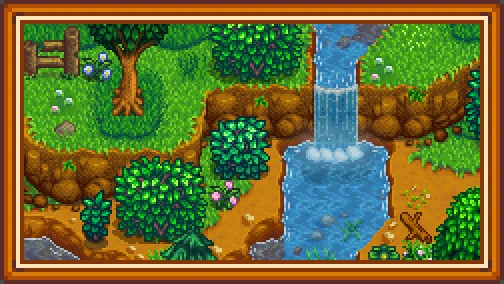
🔍 Analysis
- 👍 3.8% endorsement rate — high engagement, a strong quality signal
- 🏆 #35 of 130 Miscellaneous mods in this game by downloads
📋 About This Mod
- Recolors the yellow dirt (and makes the brown dirt in the Mountain map darker)
- Recolors dirt on cliffs to match
- Seasonal hoe dirt recolors
- Seasonal mini map (automatically disabled if you have NPC Map Locations)
- Greenhouse dirt recolor to match
- More visible seasonal worm/stem recolors (optional)
- More visible fertilizer (optional)
1. Install the latest version of SMAPI.
2. Install the latest version of Content Patcher.
3. Extract into your \Stardew Valley\Mods\ folder.
4. Run the game through SMAPI to generate a config.json, then close.
5. Open the config.json with a program like Notepad to make your choices.
6. Run the game using SMAPI to play with your new retexture!
To uninstall, just delete the folder you put in your Mods directory.
Config options:
Dirt and Cliff Recolor: Defaults to "True", set to "False" to disable dirt and cliff recolors
Island Recolor: Defaults to "True", set to "False" to disable dirt and cliff recolors when in the new area added in 1. 5
Beach Farm Recolor: Defaults to "True", set to "False" to disable dirt and cliff recolors when on the new farm map added in 1. 5
Darker Fertilizer: Defaults to "True", set to "False" to disable
Darker Worms: Defaults to "True", set to "False" to disable
Mini Map Recolor: Defaults to "True", set to "False" to disable
- New Barn Animals
- New Coop Animals
- New Horses
- Critter Replacements
- Grass Replacement
- Kitchen Replacement
Elle's Dirt and Cliff Recolor is a cosmetic Stardew Valley mod that replaces the default yellow dirt with a browner tone and recolors cliffs to match, using Content Patcher. With 3,694 endorsements and nearly 100k downloads, it's a popular choice for players seeking a more natural ground appearance.
✨ Key Features
📊 Pros & Cons
✅ Pros
- Community favorite with 3,694 endorsements and nearly 100k downloads
- Simple cosmetic tweak that enhances the game's natural look
- Easy to install with Content Patcher
⚠️ Cons
- Only affects dirt and cliffs – no other terrain changes
- Requires Content Patcher, so you'll need to set that up first
- No screenshots or detailed previews in the description, so you're going in blind
For Stardew Valley players who want a more grounded, natural color palette without overhauling the whole game. If you're tired of the bright yellow dirt and want something subtler, this is a quick fix. Skip if you're looking for major visual changes or don't want to bother with Content Patcher.
💡 Beginner Tips
- Make sure you have Content Patcher installed and updated before adding this mod – it won't work without it.
- If you're using other recolor mods, check load order in your mod manager to avoid conflicts – this mod should load after other terrain changes.
- You can preview the mod's effect by creating a new save or using a screenshot mod to see the difference before committing.
📊 Mod Details
- Game
- Stardew Valley Mods
- Author
- Elle
- Version
- 1.3.0
- Downloads
- 97,687
- Endorsements
- 3,694
- Category
- Miscellaneous
- Created
- 3/12/2018
- Updated
- 4/5/2026
🧩 Commonly Used Together
Users add these mods to the same collections — a real compatibility signal, not an AI guess.
🔧 How to Install Stardew Valley Mods
Download from Nexus.
📖 Full step-by-step install guide for Stardew Valley →
Visit the official mod page for specific installation instructions for this mod.
🎮 Need cheat codes or console commands? Check ur gaming wiki for Stardew Valley commands, item IDs, and more.
Keep browsing — more Stardew Valley mods await