Debug Mode
🟡 Updated this year⚠️ Install Order · 2 steps
Install in this order, then this mod last — most mods fail to load without their framework and dependencies in place.
Preview
🔍 Analysis
- 👍 2.5% endorsement rate — high engagement, a strong quality signal
- 🏆 #74 of 119 Modding Tools mods in this game by downloads
📋 About This Mod
Debug Mode lets you press ~ to view a debug info overlay, and optionally unlock the game's debug commands (including teleportation and time manipulation).
For non-English players, translations are included in the base mod. Contributions are welcome!
Install
-
[]Install the latest version of SMAPI.
[
]Unzip the mod folder into Stardew Valley/Mods.[]Run the game using SMAPI.
[](optional) Edit the mod settings, including controller/keyboard/mouse mappings.
How to use
Press the ~ key (configurable) to toggle debug mode.
Info overlay
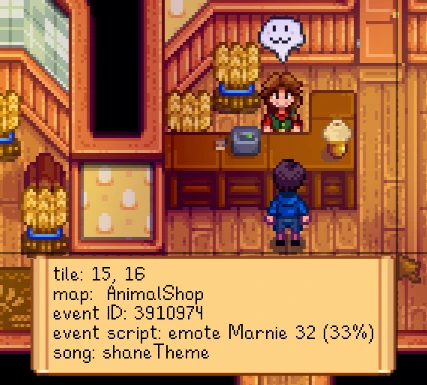
When enabled, the mod shows an overlay with debug info including...
-
[]cursor crosshairs, tile position, map name, and background song name:
[
]menu and submenu names:[]event ID, current command, and progress:
[]festival name:
[]and minigame name:
Game debug mode
If you enable AllowGameDebug in the configuration (disabled by default), the mod will also enable the game's debug mode and hotkeys:
-
[]T adds one hour to the clock.
[]SHIFT + T subtract 10 minutes from the clock.
[]Y adds 10 minutes to the clock.
[]1 warps the mountain (facing Robin's house).
[]2 warps the town (on the path between the town and community center).
[]3 warps the farm (at your farmhouse door).
[]4 warps the forest (near the traveling cart).
[]5 warps the beach (left of Elliott's house).
[]6 warps the mine (at the inside entrance).
[]7 warps the desert (in Sandy's shop).
[]K moves down one mine level. If not currently in the mine, warp to it.
[]F5 toggles the player.
[]F7 draws a tile grid.
[]B shifts the toolbar to show the next higher inventory row.
[]N shifts the toolbar to show the next lower inventory row.
If you also enable AllowDangerousCommands in the settings (disabled by default), it'll also unlock these debug commands:
[]P immediately goes to bed and starts the next day.
[]M immediately goes to bed and starts the next season.
[]H randomises your hat.
-
[]T adds one hour to the clock.
-
[]cursor crosshairs, tile position, map name, and background song name:
Debug Mode by Pathoschild is a modding tool that adds a debug info overlay and optionally unlocks the game's built-in debug commands, including teleportation and time manipulation. With 2,481 endorsements and nearly 98,000 downloads, it's a popular utility for players who want to tweak their game.
✨ Key Features
📊 Pros & Cons
✅ Pros
- Huge community trust with 2,481 endorsements and nearly 98k downloads.
- Unlocks powerful debug commands like teleportation and time control.
- Simple button press to toggle the debug overlay.
⚠️ Cons
- Debug commands can break your save if used carelessly.
- No detailed instructions provided for using the debug commands.
- May require knowledge of the game's console or command syntax.
For players who want to experiment with game mechanics, test mods, or just mess around with teleportation and time control. Also great for mod authors who need to debug their own creations. Skip if you prefer a pure vanilla experience without any cheats.
💡 Beginner Tips
- Make sure to back up your save before using debug commands, as teleporting or changing time can cause issues.
- Use the debug overlay to monitor game performance and identify potential mod conflicts.
- If you're not sure what a command does, look it up online or test in a separate save.
📊 Mod Details
- Game
- Stardew Valley Mods
- Author
- Pathoschild
- Version
- 1.17.4
- Downloads
- 97,952
- Endorsements
- 2,481
- Category
- Modding Tools
- Created
- 11/3/2016
- Updated
- 3/15/2026
🔧 How to Install Stardew Valley Mods
Download from Nexus.
📖 Full step-by-step install guide for Stardew Valley →
Visit the official mod page for specific installation instructions for this mod.
🎮 Need cheat codes or console commands? Check ur gaming wiki for Stardew Valley commands, item IDs, and more.
Keep browsing — more Stardew Valley mods await