DCBurger's High Res Portrait Mod (CP)
⚪ Last updated 2021⚠️ Install Order · 2 steps
Install in this order, then this mod last — most mods fail to load without their framework and dependencies in place.
Preview
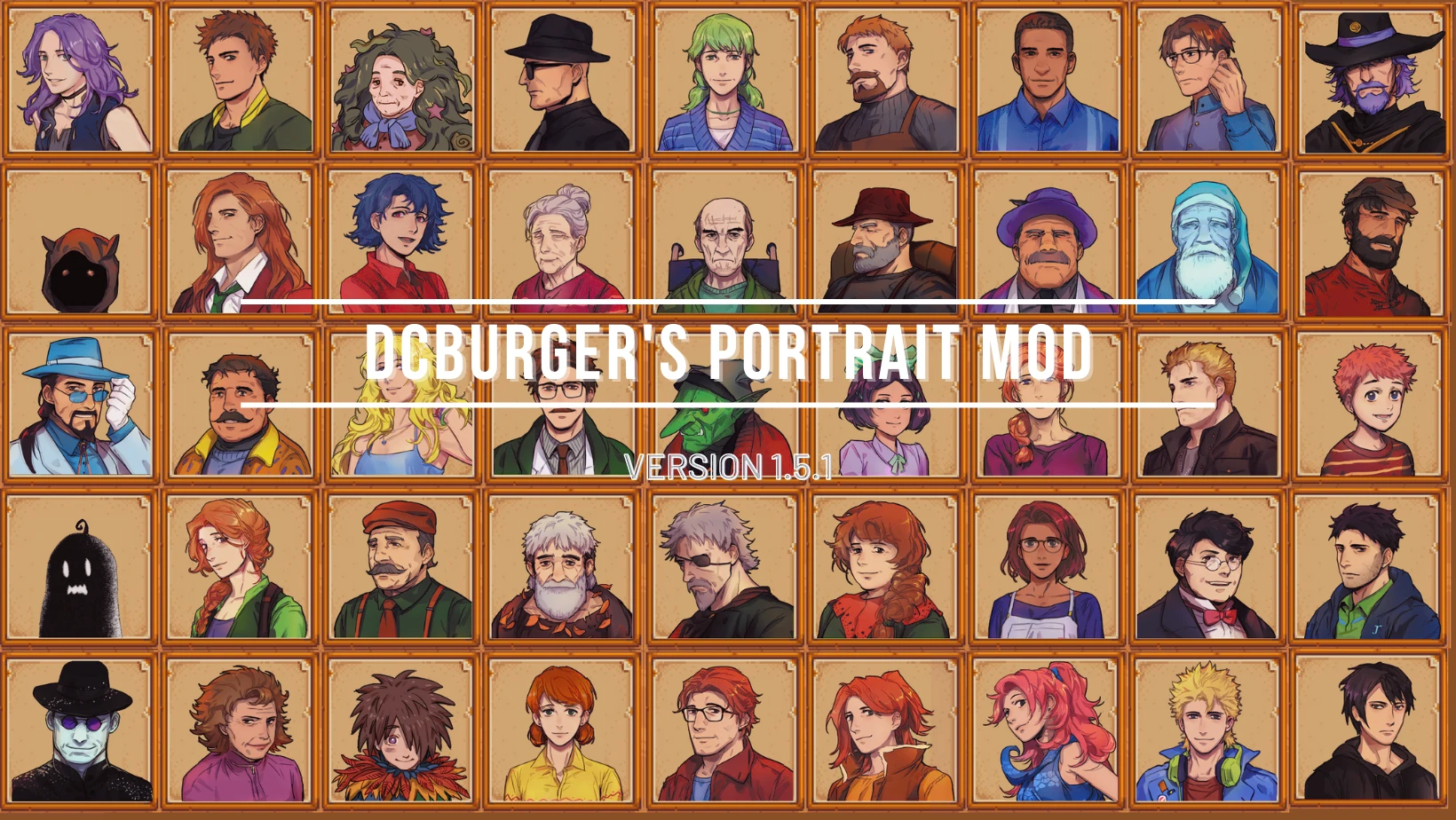
🔍 Analysis
- 👍 2.3% endorsement rate — high engagement, a strong quality signal
- 🏆 #3 of 130 Portraits mods in this game by downloads
📋 About This Mod
Twitter / Tumblr / Ko-fi
Contact: nimozie2@gmail.com
:: CONTENTS ::
-
[]69 high-resolution portraits for all villagers
Stardew Valley Expanded
lunakatt made amazing high res portraits for 'Stardew Valley Expanded' but in the style of my portraits!
You can download 2 separate portraits for SVE from my mod page and 'lunakatt's DCBurger Style Portraits for SVE'.
For more information, please check out the link below!
Link: https://www.nexusmods.com/stardewvalley/mods/9029
Content Pack (CP)
:: REQUIREMENTS ::
- [
[]Content Patcher
[]PyTK - Platonymous Toolkit
:: HOW TO INSTALL ::
-
[]Install the latest version of SMAPI.
[
]Extract all the required mods into your \Stardew Valley\Mods folder.[]Run the game using SMAPI.
[]If you want to apply other options, open the config.json and change the option you prefer. (e.g. "Maru": "glasses" → "Maru": "none")
Portraiture
:: REQUIREMENTS ::
-
[]SMAPI - Stardew Modding API
[
]PyTK - Platonymous Toolkit[]Portraiture
:: HOW TO INSTALL ::
-
[]Install the latest version of SMAPI.
[]Extract all the required mods into your \Stardew Valley\Mods folder.
[]Put the png images inside Stardew Valley\Mods\Portraiture\Portraits\DCBurger folder.
[]Run the game using SMAPI and press p in the in-game dialogue to switch the portraits.
[]If you want to apply other options, change the file name to Name.png. (e.g. Maru(no glasses).png → Maru.png)
SDV Mobile (for Android)
ceruleandeep shared these Android install instructions with me. Thanks for the great tip!
:: HOW TO INSTALL ::
-
[]Install Content Patcher 1. 19
[
]Install PyTK 1. 19. 6[]Install Portraiture latest version (1. 8. 1)
[]Move Portraiture folder out of Portraiture-999-1-8-1-1574796563 and into Mods, then delete Portraiture-999-1-8-1-1574796563 folder
[]Download DCBurger's Portrait Mod (Portraiture version)
[]Move DCBurger folder from DCBurger's Portrait Mod-4745-1-5-1-1611546195 into Portraiture/Portraits, then delete DCBurger's Portrait Mod-4745-1-5-1-1611546195
[]Edit Portraiture/config.json and change "vanilla" into "DCBurger". We used the "Json Editor, Json Formatter, Preview" app from the Play Store.
:: VERSION INFORMATION ::
[]Updated CP
-
[]Install Content Patcher 1. 19
-
[]Install the latest version of SMAPI.
-
[]SMAPI - Stardew Modding API
Adds 69 high-resolution portraits for all villagers in Stardew Valley, replacing the default low-res portraits with sharper, more detailed versions. A popular cosmetic enhancement with over 20,000 endorsements and 870,000 downloads, last updated in 2021.
✨ Key Features
📊 Pros & Cons
✅ Pros
- Huge community trust: 20,009 endorsements and 870,215 downloads — this is a must-have for portrait fans
- Simple cosmetic upgrade: no gameplay changes, just better-looking portraits
- Covers all villagers, so you get a consistent visual overhaul
⚠️ Cons
- Last updated in 2021 — may not be compatible with the latest Stardew Valley updates without patches
- Requires Content Patcher (CP) to work, so you'll need to install that first
- Only affects portraits, not other character sprites or dialogue boxes
For Stardew Valley players who want to give their villagers a visual facelift without changing gameplay. Perfect for those who spend a lot of time in dialogue menus and want sharper, more detailed faces. Skip if you're happy with the vanilla portraits or want more comprehensive visual overhauls.
💡 Beginner Tips
- Make sure you have Content Patcher installed and up to date, as this mod relies on it to load.
- Place the mod folder in your Stardew Valley 'Mods' directory, then launch the game with SMAPI to verify it loads correctly.
- If you're using other portrait mods, check for conflicts — this mod replaces all villager portraits, so it may override others.
📊 Mod Details
- Game
- Stardew Valley Mods
- Author
- DCBurger
- Version
- 1.5.2
- Downloads
- 870,215
- Endorsements
- 20,009
- Category
- Portraits
- Created
- 11/30/2019
- Updated
- 6/28/2021
🧩 Commonly Used Together
Users add these mods to the same collections — a real compatibility signal, not an AI guess.
🔧 How to Install Stardew Valley Mods
Download from Nexus.
📖 Full step-by-step install guide for Stardew Valley →
Visit the official mod page for specific installation instructions for this mod.
🎮 Need cheat codes or console commands? Check ur gaming wiki for Stardew Valley commands, item IDs, and more.
Keep browsing — more Stardew Valley mods await