Data Layers
🟡 Updated this year⚠️ Install Order · 2 steps
Install in this order, then this mod last — most mods fail to load without their framework and dependencies in place.
Preview
🔍 Analysis
- 👍 2.3% endorsement rate — high engagement, a strong quality signal
- 🏆 #29 of 179 User Interface mods in this game by downloads
📋 About This Mod
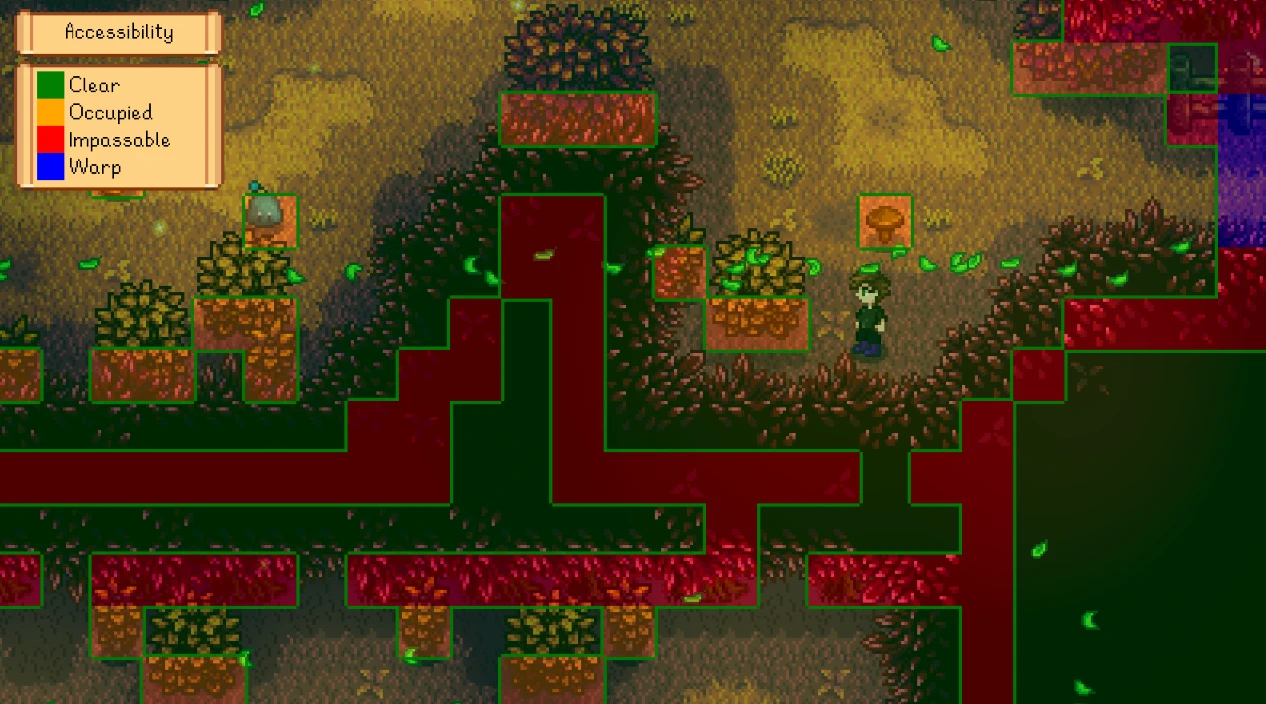
Overlay the world with visual data like bee/Junimo/scarecrow/sprinkler coverage, hidden paths and warps, and more. It automatically includes data from other mods if applicable.
For non-English players, translations are included in the base mod. Contributions are welcome!
Install
-
[]Install the latest version of SMAPI.
[
]Unzip the mod folder into Stardew Valley/Mods. - Run the game using SMAPI.
How to use
Press F2 to show the overlay, and then and to cycle between data layers (buttons configurable). For coverage layers (e.g. scarecrows or sprinklers), point at one with the cursor to see a blue border around that one's range and a green border around the coverage without it.
You can optionally customise the options. That includes keyboard/controller bindings, and hiding layers you don't want.
Current layers
Automatically chooses an overlay based on context like the item you're holding, with live updates when that changes. You can configure which layers can be shown that way.
Shows where you can walk and highlights warp tiles; useful for finding hidden paths and nooks, or testing custom maps.
Shows where you can construct buildings on the farm. Useful for spotting issues before you try to build at Robin's, or testing custom maps.
Coverage: bee houses
Shows bee houses' flower search range.
Coverage: bombs
Shows bombs' explosion radius, including the three different effects (where they'll dig, destroy objects, and hurt monsters/players).
Coverage: Junimo huts
Shows Junimo hut coverage, and highlights crops they won't reach. Also works when placing a Junimo hut from the Wizard's build menu.
Coverage: scarecrows
Shows scarecrow coverage, and highlights unprotected crops. Also works on scarecrows being placed.
Coverage: sprinklers
Shows sprinkler coverage, and highlights unsprinkled crops. Also works on sprinklers being placed.
Crops: fertilized
Shows which crops have fertilizer applied.
Crops: watered
Shows which crops have been watered today.
Crops: ready for harvest
Shows which crops are ready to harvest, or which won't be ready before they die due to a season change.
Crops: water
Data Layers is a Stardew Valley mod that overlays the world with visual data, including coverage areas for bee houses, Junimo huts, scarecrows, and sprinklers, as well as hidden paths and warps. It's a highly popular utility for players who want to optimize their farm layout and explore hidden game mechanics.
✨ Key Features
📊 Pros & Cons
✅ Pros
- Massive community trust – 9,680 endorsements and 425k downloads prove this is a must-have.
- Saves you from guessing where your sprinklers and scarecrows actually cover – huge for min-maxers.
- Reveals hidden paths and warps, perfect for explorers who want to uncover every secret.
⚠️ Cons
- Last updated March 2026 – if you're on an older game version, you might need to check compatibility.
- Visual overlays might clutter the screen for some players, especially if you have many objects placed.
For Stardew Valley farmers who want to optimize their layouts without trial and error. Also great for completionists hunting hidden paths and warps. Skip if you prefer a pure vanilla experience without UI overlays.
💡 Beginner Tips
- Make sure you have SMAPI installed – this mod likely requires it, even though it's not listed in the description.
- Use the overlay to plan your farm before placing new sprinklers or scarecrows – it'll save you time and resources.
- Toggle the overlays on/off with the hotkey to avoid screen clutter when you're just walking around.
📊 Mod Details
- Game
- Stardew Valley Mods
- Author
- Pathoschild
- Version
- 1.23.0
- Downloads
- 425,601
- Endorsements
- 9,680
- Category
- User Interface
- Created
- 12/27/2017
- Updated
- 3/15/2026
🧩 Commonly Used Together
Users add these mods to the same collections — a real compatibility signal, not an AI guess.
🔧 How to Install Stardew Valley Mods
Download from Nexus.
📖 Full step-by-step install guide for Stardew Valley →
Visit the official mod page for specific installation instructions for this mod.
🎮 Need cheat codes or console commands? Check ur gaming wiki for Stardew Valley commands, item IDs, and more.
Keep browsing — more Stardew Valley mods await