Daily Screenshot
🟡 Updated this year⚠️ Install Order · 3 steps
Install in this order, then this mod last — most mods fail to load without their framework and dependencies in place.
Preview
🔍 Analysis
- 👍 3.2% endorsement rate — high engagement, a strong quality signal
- 🏆 #137 of 227 Visuals and Graphics mods in this game by downloads
📋 About This Mod
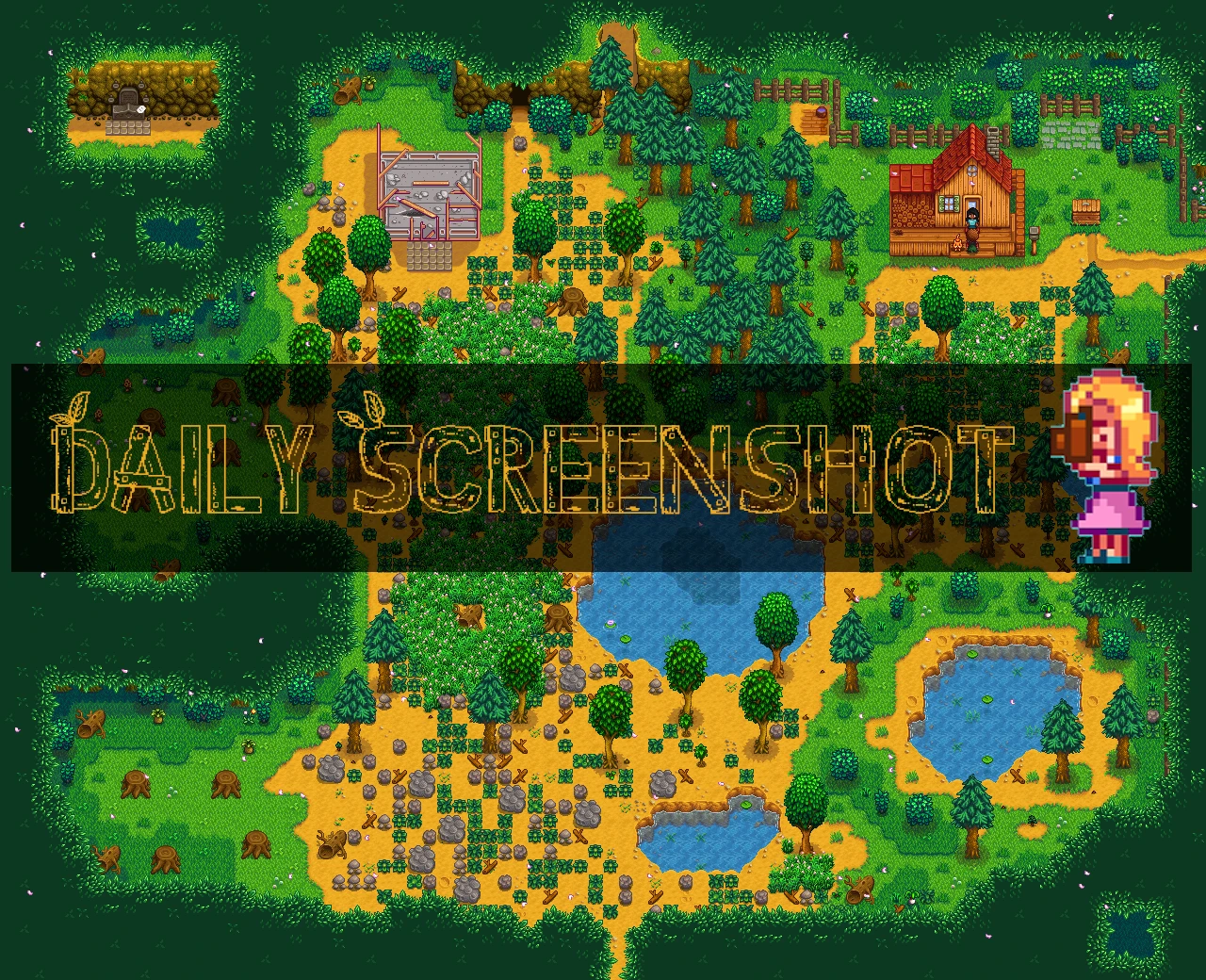
This is an example of what you can do with this mod. You can customize the quality and size. By taking a daily screenshot, eventually you'll have enough images to create a GIF that shows a time-lapse of your farm as you progress through the game!
-
[]One screenshot is automatically taken of your entire farm every day as soon as you leave your house.[/]
[]Easy to gather screenshots to create a GIF that shows how your farm changes over time! GIF makers can be found online, such as ezgif GIF maker. Here is an example.[/]
[]Customizable! Change any number of default settings based on your preferences. Examples:
[]What time of day to take screenshot.[/]
[]How often to take screenshot (e.g. daily, weekly, or monthly).[/]
[]Keyboard shortcut that takes screenshot when pressed (set to "None" by default).[/]
[]What weather conditions are allowed. It is common to allow all except rainy/stormy days, but default option allows all weather.[/]
[]Add multiple sets of rules (common example: 1 set for daily automatic screenshots, 1 for manual key-press screenshots).[/]
[]Compatible with the "Generic Mod Config Menu" mod, which adds an in-game UI for easily updating the config (no need to edit the JSON manually).[/]
[]Screenshots are sent to your StardewValley/Screenshots folder, with each save file getting its own "FarmName-Screenshots" folder. Screenshots between multiple save files will not get mixed up.[/]
[]Easily access the screenshots in-game by scrolling to the bottom of the "Options" tab in the menu and clicking the "Open Destination Folder" button.[/]
[]Keeps the screenshots in the correct order to make creating the GIF easier. This is achieved by naming each screenshot with a "year-season-day.png" numerical format. For example, on Year 1, Winter, Day 3, the screenshot would be named "01-04-03.png".[/]
[]Translations available for the following languages: English, Spanish, Portuguese, French, Chinese. Korean coming soon. All text will be translated if your in-game language is set to any of those listed.[/]
Installation
-
[]Install the latest version of SMAPI.[/]
[]Download Generic Mod Config Menu and unzip it into Stardew Valley/Mods. (recommended, but optional)[/]
[]Download this mod and unzip it into Stardew Valley/Mods.[/]
[]Run the game using SMAPI.[/]
Compatibility
-
[]Works with Stardew Valley 1. 4 or later on Linux/Mac/Windows[/]
[]Works in both single player and multiplayer.[/]
[]No known mod conflicts.[/]
[]Works with the Generic Mod Config Menu.[/]
See step 2 of "Installation" section above
-
[]Works with Stardew Valley 1. 4 or later on Linux/Mac/Windows[/]
Daily Screenshot automatically captures a full-farm screenshot each day when you first exit your house. With 1,479 endorsements and 46,638 downloads, it's a popular quality-of-life tool for Stardew Valley players who want to track their farm's progress visually. Last updated October 2025, it remains actively maintained.
✨ Key Features
📊 Pros & Cons
✅ Pros
- Community-approved with 1,479 endorsements—players clearly love it.
- Set-and-forget: no manual screenshotting, just play and get daily farm shots.
- Actively updated (October 2025), so it's likely compatible with current game versions.
⚠️ Cons
- Only takes one screenshot per day; if you miss the first exit, you miss the shot.
- Screenshots may pile up over time—no built-in management or cleanup mentioned.
For Stardew Valley players who love documenting their farm's evolution and want a hands-off way to capture daily progress. Perfect for content creators or anyone who enjoys looking back at their hard work. Skip if you prefer manual control over screenshots or don't care about visual progress tracking.
💡 Beginner Tips
- Make sure you have SMAPI installed and run the game through it, otherwise the mod won't load.
- Check your Stardew Valley folder for a 'Screenshots' subfolder where the daily images are saved.
- If you use other mods, ensure they're compatible with SMAPI 4.0+ to avoid conflicts.
📊 Mod Details
- Game
- Stardew Valley Mods
- Author
- CompSciLauren
- Version
- 3.4.0
- Downloads
- 46,646
- Endorsements
- 1,479
- Category
- Visuals and Graphics
- Created
- 12/4/2019
- Updated
- 8/16/2026
🧩 Commonly Used Together
Users add these mods to the same collections — a real compatibility signal, not an AI guess.
🔧 How to Install Stardew Valley Mods
Download from Nexus.
📖 Full step-by-step install guide for Stardew Valley →
Visit the official mod page for specific installation instructions for this mod.
🎮 Need cheat codes or console commands? Check ur gaming wiki for Stardew Valley commands, item IDs, and more.
Keep browsing — more Stardew Valley mods await