Convenient Inventory
🟡 Updated this year⚠️ Install Order · 2 steps
Install in this order, then this mod last — most mods fail to load without their framework and dependencies in place.
Preview
🔍 Analysis
- 👍 1.5% endorsement rate — high engagement, a strong quality signal
- 🏆 #10 of 382 Gameplay Mechanics mods in this game by downloads
📋 About This Mod
One of the most tedious parts of any game is inventory management, and this is especially true in Stardew Valley. Every day, whether it be from farming produce, mining rewards, or freshly caught fish, you will be emptying out your backpack to store items into chests on your farm. After a while, this process becomes all too familiar: open chest, deposit items, close chest, open chest, deposit items, close chest, open chest, deposit items, close chest, ... etc.
What if you could stow away all the items taking up space in your backpack, instantly, while keeping the important ones?
Preview
Installation
-
[]Install the latest version of SMAPI.[/]
[]Unzip the mod folder into Stardew Valley/Mods.[/]
[]Run the game using SMAPI.[/]
Features
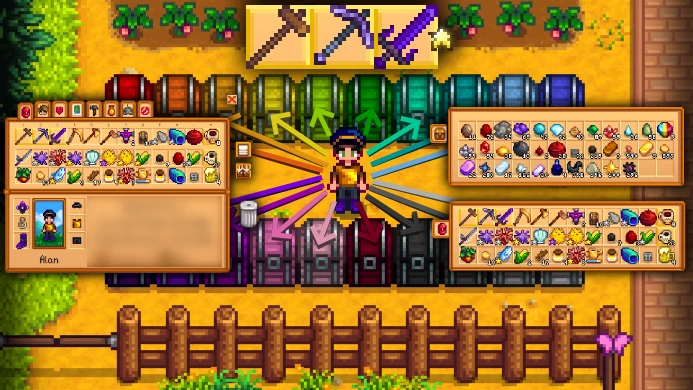
Quick Stack to Nearby Chests
Click the new "Quick Stack to Nearby Chests" button in the player's inventory UI (or press the quick stack hotkey, if enabled) to quickly deposit items from your inventory into any nearby chests which contain that item.
Favorite Items
Hold the favorite-hotkey ( by default, or on controller) and select items in the player's inventory to favorite them.
Favorited items are prevented from:
-
[]Being quick stacked[/]
[]Being trashed[/]
[]Being dropped[/]
[]Being shipped[/]
[]Being considered when using the "Organize" button in the player's inventory[/]
[]Being considered when using the "Add to Existing Stacks" button in a chest[/]
Inventory Page Side-Warp (as of version 1. 3. 0)
For players using controllers, getting to the right side of your inventory menu is a hassle, as your cursor always starts at the leftmost item slot when opening your inventory. This feature allows the cursor to "warp" side-to-side when at either end of the menu.
Take All But One (as of version 1. 5. 0)
Right-click (or press on controller) on an item stack while holding the Take All But One hotkey ( by default, or on controller) to instantly take all but one item from the selected item stack, rather than taking a single item at a time.
Auto Organize Chest (as of version 1. 5. 0)
Right-click (or press on controller) on the Organize button in a chest to toggle Auto Organize mode for that chest. When a chest has Auto Organize ON, all of its items will remain organized, even when new items are added (including quick stack).
-
[]Being quick stacked[/]
Convenient Inventory by gaussfire adds quality-of-life features to the player's inventory, including quick stack to nearby chests and favoriting items. With over 25,000 endorsements and 1.7 million downloads, it's a highly popular mod for players who want smoother inventory management. Last updated in May 2026, it remains actively maintained.
✨ Key Features
📊 Pros & Cons
✅ Pros
- Huge community trust with 25,046 endorsements and 1.7M downloads — this is a must-have for many.
- Quick stack to nearby chests is a massive time-saver when organizing loot.
- Favoriting items makes finding your go-to gear way faster.
⚠️ Cons
- No mention of compatibility with other inventory mods or specific game versions.
- May require a mod manager for installation, but unclear from description.
For players who hate inventory clutter and want to streamline looting and item management. If you're tired of manually dragging items to chests, this mod is for you. Skip if you prefer vanilla inventory or want deeper gameplay changes.
💡 Beginner Tips
- Check if the game has built-in mod support or requires a mod manager like Vortex or MO2.
- Test quick stack with a few chests to understand its range and behavior.
- If you use other inventory mods, test for conflicts in a new save first.
📊 Mod Details
- Game
- Stardew Valley Mods
- Author
- gaussfire
- Version
- 1.6.1
- Downloads
- 1,699,828
- Endorsements
- 25,046
- Category
- Gameplay Mechanics
- Created
- 12/19/2021
- Updated
- 5/25/2026
🔗 Required By 5 Mods
These mods list this mod as a dependency.
🧩 Commonly Used Together
Users add these mods to the same collections — a real compatibility signal, not an AI guess.
🔧 How to Install Stardew Valley Mods
Download from Nexus.
📖 Full step-by-step install guide for Stardew Valley →
Visit the official mod page for specific installation instructions for this mod.
🎮 Need cheat codes or console commands? Check ur gaming wiki for Stardew Valley commands, item IDs, and more.
Keep browsing — more Stardew Valley mods await