Billboard Anywhere
🟠 Updated over a year ago⚠️ Install Order · 2 steps
Install in this order, then this mod last — most mods fail to load without their framework and dependencies in place.
Preview
🔍 Analysis
- 👍 3.4% endorsement rate — high engagement, a strong quality signal
- 🏆 #38 of 179 User Interface mods in this game by downloads
📋 About This Mod
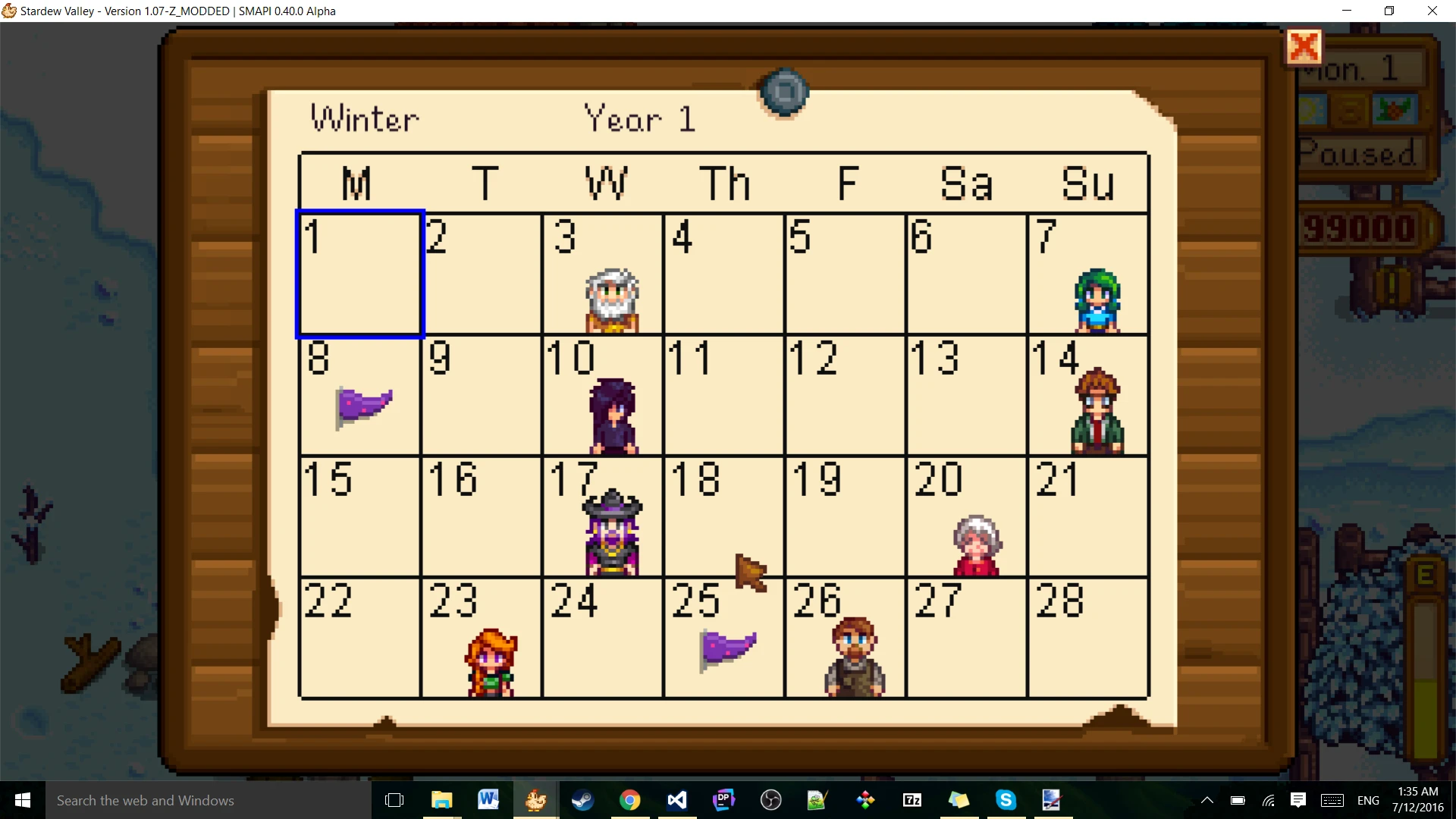
Wondering what NPC's birthday it is while running about the valley? Forgot to check what the quest of the day is? Want to know more about what some of the special quests are without having to make the long trek to go read those request boards? Then this mod should help you out!
This mod lets you look at, and interact with the following anywhere from the inventory menu at your own convenience.
-
[]The calendar detailing all of the NPC's birthdays and town events. (Available from the beginning)
[
]The quest board where the residents of the valley will request certain tasks. (Available from the beginning)\[]The Special Orders board where the residents of the valley will post their more challenging tasks. (Available after unlocking the Special Orders board)
[]Qi's challenges request board, where Mr. Qi will post special challenges to reward you with his mysterious Qi Gems. (Available after unlocking the ability to view Qi's challenges request board)
Compatible with Stardew Valley 1. 6. 5+ on Linux, Mac, and Windows. Requires SMAPI 4. 0 or later.
Install
-
[]Install the latest version of SMAPI.
[
]Download this mod and unzip it into Stardew Valley/Mods.[]Run the game using SMAPI.
Usage
There are a few ways to use this mod's functionality as listed below. All keys can be configured in the mod's config.json file.-
[]To view the calendar, press "B" or use the provided button in the inventory menu.
[]To view the quest menu, press "H" or use the provided button in the inventory menu.
[]To view the Special Orders board, press "N" or use the provided button in the inventory menu after the Special Orders board has been unlocked.
[]To view Qi's challenges menu, press "J" or use the provided button in the inventory menu after the ability to view Qi's challenges menu has been unlocked.
You can also use the console commands provided to adjust the config file and the in-game menu button that displays. Type help in the SMAPI console to see them.
Special Thanks
Thanks to KnewOne for adding the Special Orders request board and Qi's quest board to the mod's functionality and for general improvements to the mod such as generic mod menu functionality!Thanks to KhloeLeclair for support for Better Game Menu.
See also
-
[]Official discussion thread
[]Source code + release notes
[]My other mods
-
[]Official discussion thread
-
[]To view the calendar, press "B" or use the provided button in the inventory menu.
-
[]Install the latest version of SMAPI.
Billboard Anywhere is a simple UI mod for Stardew Valley that lets you view the billboard (calendar) from anywhere in-game. With 9,279 endorsements and 272,726 downloads, it's a popular quality-of-life improvement for players who want quick access to birthdays and events without traveling to town.
✨ Key Features
📊 Pros & Cons
✅ Pros
- Huge community trust (9,279 endorsements) – this is a must-have for many players
- Saves time – no more running to town just to check the calendar
- Lightweight and unobtrusive – doesn't change any other UI elements
⚠️ Cons
- No detailed instructions – you'll need to figure out the hotkey or menu integration yourself
- May conflict with other UI mods that alter the same interface
- Last updated May 2025 – if the game updates, you might need to wait for a fix
For Stardew Valley players who hate backtracking to town just to check birthdays and festival dates. If you're a completionist or just want to plan your days efficiently, this is a no-brainer. Skip if you prefer a more immersive experience and don't mind the trip.
💡 Beginner Tips
- Make sure you have SMAPI installed – this mod requires it to run.
- After installing, check your keybindings in the game options to see what key opens the calendar.
- If you use other UI mods, test them together to ensure no overlapping menus.
📊 Mod Details
- Game
- Stardew Valley Mods
- Author
- Alpha_Omegasis
- Version
- 1.15.0
- Downloads
- 272,726
- Endorsements
- 9,279
- Category
- User Interface
- Created
- 7/12/2016
- Updated
- 5/6/2025
🧩 Commonly Used Together
Users add these mods to the same collections — a real compatibility signal, not an AI guess.
🔧 How to Install Stardew Valley Mods
Download from Nexus.
📖 Full step-by-step install guide for Stardew Valley →
Visit the official mod page for specific installation instructions for this mod.
🎮 Need cheat codes or console commands? Check ur gaming wiki for Stardew Valley commands, item IDs, and more.
Keep browsing — more Stardew Valley mods await