Quest Log Manager
⚪ Last updated 2010⚠️ Install Order · 2 steps
Install in this order, then this mod last — most mods fail to load without their framework and dependencies in place.
Preview
🔍 Analysis
- 👍 2.0% endorsement rate — high engagement, a strong quality signal
- 🏆 #34 of 96 User Interfaces mods in this game by downloads
📋 About This Mod
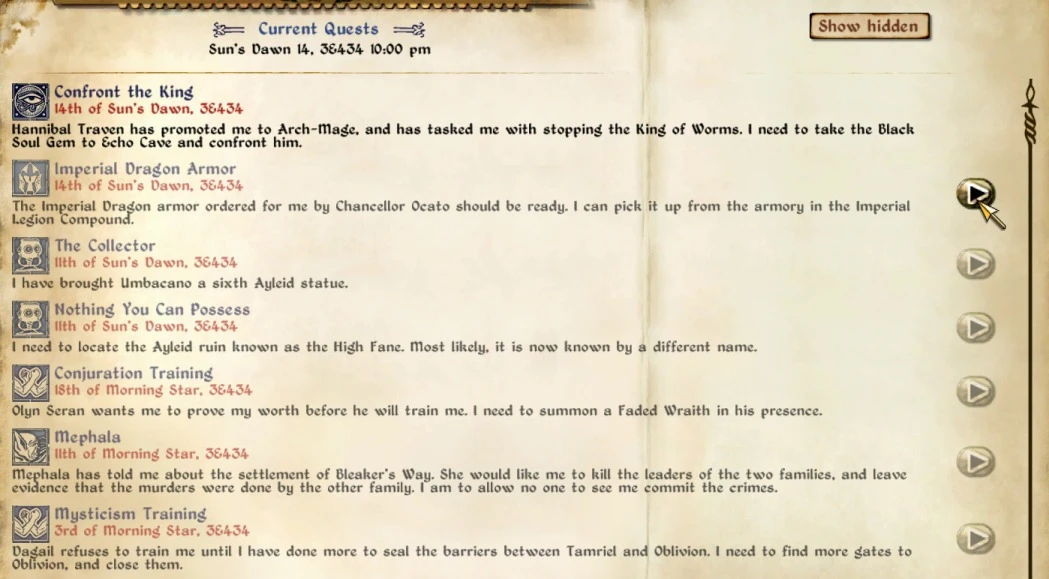
========= Quest Log Manager 1. 3. 2 ============ Author: Ole Boe, a.k.a. TheNiceOne Date: Nov 19, 2010 OBSE v 18 (or newer) required. ========= DESCRIPTION All Oblivion players know that the \"Current Quests\" log can become cluttered by all the quests you have started. Quest Log Manager helps you, by adding a new \"Hidden Quests\" log where you can move away all current quests you\'re not interested in for the time being, and later move them back if you want. Quest Log Manager also lets you swap between alpabetical and chronological sort order. Quest Log Manager adds a button to the right of each current quest in the log, and clicking on the button hides the quest. So click on all the quests you\'re not interested in, and you\'ll get a much cleaner quest log. By default, the buttons are always visible for current quests, but by setting the hide_key setting in \"Ini\\Quest Log Manager.ini\" to the value of a modifier key (like left shift), the buttons will only be visible when this key is pressed. Quest Log Manager adds a button at the upper right corner of the \"Current Quests\" log, named \"Show hidden\". If you click on this, instead of viewing the current quests, you now get to see all the hidden quests, and you can click on their buttons to move them back to the current quests. If a hidden quest becomes active, it will automatically be moved back to current quests. Quest Log Manager adds a sort button to the Current/Hidden quest log. Click on it to swap between alpabetical and chronological sort order for the quests, to make it much easier to find the quest you\'re looking for. ========= COMPATIBILITY Quest Log Manager has support for most UI mods: Vanilla Darnified UI DarkUId DarN Dark UI BTmod Be sure to install Quest Log Manager\'s map_menu.xml file over the file installed by those mods. Quest Log Manager is currently incompatible with other mods that adds their own version of the map_menu.xml file. Of special note is DarNifiedUI Additions, which comes with a special compatibility version for Quest Log Manager. The current version of DarNifiedUI Additions (2. 3. 2) is compatible with Quest Log Manager 1. 2. A newer version of DarNifiedUI Additions compatible with 1. 3 will probably be released too. ========= INSTALLATION The mod is OMOD-ready, so installing with OBMM is adviced, just create an omod by adding the downloaded .rar file. The mod is also packed in a BAIN-ready format. For BAIN or manuall install, install the contents of \"00 Core\" and the contents of the correct \"01 ...\" folder to your Oblivion\\data folder. ========= CHANGELOG 1. 3. 2 Changed initialization of arrays to GameMode from MenuMode, as the former can lead to OBSE array mayhem. 1. 3. 1 Recompiled scripts with OBSE 18 (1. 3 had been compiled with 19b3, which lead to problems for some users). 1. 3 Added support for Dark UI. * Scroll bar now resets properly when switching b
Quest Log Manager adds a 'Hidden Quests' log to Oblivion's UI, letting you declutter the Current Quests list by moving inactive quests out of the way. With 1,461 endorsements and 71,498 downloads, it's a proven quality-of-life tool for players juggling many quests. Last updated in 2010, it remains a staple for UI organization.
✨ Key Features
📊 Pros & Cons
✅ Pros
- Community favorite with 1,461 endorsements and 71k downloads.
- Solves a real problem for completionists who start tons of quests.
- Lightweight UI mod that doesn't change gameplay balance.
⚠️ Cons
- Last updated in 2010 — may have compatibility issues with newer Oblivion patches or mods.
- No detailed instructions or screenshots in the description, so setup might require trial and error.
- Only addresses quest log clutter; doesn't add sorting or filtering beyond the hidden log.
For Oblivion players who start every quest they find and want a cleaner quest log without losing track of objectives. Also great for roleplayers who like to focus on one questline at a time. Skip if you're fine with the vanilla log or want more advanced quest tracking features.
💡 Beginner Tips
- Make sure to back up your save before installing any UI mod, just in case.
- Check the mod's readme or forum posts for load order advice if you use other UI mods.
- Test the hidden log feature with a low-level character to see how it behaves before committing to a long playthrough.
📊 Mod Details
- Game
- Oblivion Mods
- Author
- TheNiceOne
- Version
- 1.3.2
- Downloads
- 71,498
- Endorsements
- 1,461
- Category
- User Interfaces
- Created
- 6/13/2010
- Updated
- 11/20/2010
🔧 How to Install Oblivion Mods
Download from Nexus.
📖 Full step-by-step install guide for Oblivion →
Visit the official mod page for specific installation instructions for this mod.
🎮 Need cheat codes or console commands? Check ur gaming wiki for Oblivion commands, item IDs, and more.
Keep browsing — more Oblivion mods await