NorthernUI Wheel Hotkeys
🟠 Updated over a year ago⚠️ Install Order · 3 steps
Install in this order, then this mod last — most mods fail to load without their framework and dependencies in place.
Preview
🔍 Analysis
- 👍 0.8% endorsement rate
- 🏆 #44 of 96 User Interfaces mods in this game by downloads
📋 About This Mod
NorthernUI Wheel Hotkeys
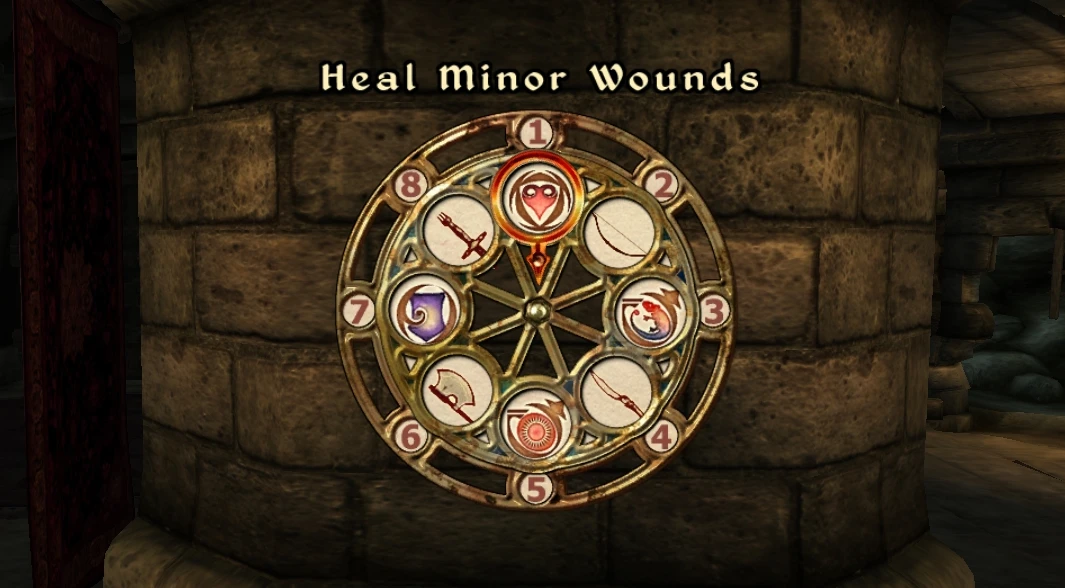
This mod enables the use of hotkeys through the D-pad using the vanilla wheel menu. It allows for a similar control experience to the Xbox/PlayStation versions of Oblivion.
Furthermore, it supports the addition of hotkeys using modifier buttons, allowing for a maximum of 24 (or 48) hotkeys to be used with a controller.
Requirements:
OBSE (xOBSE) v22. 0 or later
NorthernUI
LINK (optional: For in-game configuration menu)
MenuQue (required for LINK)
ConScribe (optional: for backup of settings)
Usage:
(日本語で遊ぶ場合、JPフォルダのファイルを上書きすると日本語化できます)
Open the inventory or magic menu and while holding down the assignment button (default is Y), press the D-pad to assign the selected item to a hotkey.
(If you don't change any settings, this mod will function almost identically to the hotkeys on the console version)
By setting up sub-buttons in the in-game configuration menu (requires: LINK & MenuQue) or in ”NorthernUI Wheel Hotkeys.ini”, you can register additional hotkeys (9-24) by pressing those buttons instead of the Y button. These hotkeys can be used by pressing the modifier buttons along with the D-pad.
If there are no available buttons, I recommend using JoyToKey effectively to free up buttons (e.g. mapping multiple buttons to perform the menu opening action simultaneously).
Additionally, by enabling it in-game settings or through the INI file, you can utilize the following features:
Cycle Mode:
This is an alternative control scheme where you can switch between hotkey slots by pressing the Modifier button and the D-Pad. Thanks to this method, you can handle up to 48 hotkeys in this mode.
Pressing the left or right on the D-pad switches to the previous/next slot, up switches to the 1st slot, and down switches to the middle slot.
In this mode, the method of registering hotkeys in the menu also changes. Use the Sub-Button (default: LB) and Alt-Button (default: RB) to switch slots.
Auto-Cast:
This feature, imported from the NorthernUI Hotkeys (OBSE) mod (Thanks, Legion!), allows you to automatically cast a selected spell from the hotkeys.
Equip Sets:
By using new equip switch items, you can switch between up to 8 sets of equipment from the hotkeys.
Compatibility:
[]This mod is not compatible with other hotkey mods for NorthernUI.
[]I'm not sure about compatibility with keyboard hotkey mods. In my case, I have been using Improved Hotkeys alongside this mod, and although occasionally there have been failures in registering hotkeys, I haven't encountered any other issues, so it might work fine.
[]If you
NorthernUI Wheel Hotkeys is a controller-focused hotkey mod for NorthernUI that leverages the vanilla wheel menu, supporting up to 24 or 48 hotkeys. It's a niche utility for players who want more controller hotkey options without leaving the default UI. With 431 endorsements and recent updates, it's a community-trusted addition.
✨ Key Features
📊 Pros & Cons
✅ Pros
- Community-approved with 431 endorsements and over 52k downloads.
- Expands controller hotkey capacity significantly (24 or 48) for power users.
- Integrates seamlessly with the vanilla wheel, keeping UI consistent.
⚠️ Cons
- Requires NorthernUI as a base mod, so it's useless without it.
- No detailed instructions provided—setup might be tricky for newcomers.
- Limited to controller input; keyboard/mouse players get nothing.
For NorthernUI users who play with a controller and need more hotkeys than the default wheel offers. Skip if you use keyboard/mouse or don't have NorthernUI installed.
💡 Beginner Tips
- Make sure NorthernUI is installed and working before adding this mod.
- Check the mod's forum posts for any configuration steps—author didn't include detailed instructions.
- Test the wheel menu in a safe save to ensure hotkeys bind correctly.
📊 Mod Details
- Game
- Oblivion Mods
- Author
- alt3rf33
- Version
- 1.62
- Downloads
- 52,821
- Endorsements
- 431
- Category
- User Interfaces
- Created
- 6/28/2023
- Updated
- 7/7/2025
🧩 Commonly Used Together
Users add these mods to the same collections — a real compatibility signal, not an AI guess.
🔧 How to Install Oblivion Mods
Download from Nexus.
📖 Full step-by-step install guide for Oblivion →
Visit the official mod page for specific installation instructions for this mod.
🎮 Need cheat codes or console commands? Check ur gaming wiki for Oblivion commands, item IDs, and more.
Keep browsing — more Oblivion mods await