Clouds Sun and Fog
🟡 Updated this year⚠️ Install Order · 1 step
Install in this order, then this mod last — most mods fail to load without their framework and dependencies in place.
Preview
🔍 Analysis
- 👍 2.7% endorsement rate — high engagement, a strong quality signal
- 🏆 #24 of 37 Visuals and Graphics mods in this game by downloads
📋 About This Mod
Clouds Sun and Fog v6. 2
Not being satisfied with the current implementation of several environmental behaviours / effects this mod aims to improve some of these features.
** NOTE: All LOD settings have been restored into the main mod again, it is easier to maintain this way.
If recompiling with AMUMSS you can now control the Fog Strength and Fog Height (valid ranges: 0. 0-1. 0) for Clouds Sun And Fog
Day Length can be altered to suit your own preferences. The default is 30 Minutes (NMS Time) day/night cycle. There are now various versions available with different time ratios for Day Length as shown below.
Time Ratios Available:
30Mn = 1800 (game/script default)
01Hr = 3600
03Hr = 10800
06Hr = 21600
09Hr = 32400
12Hr = 43200
24Hr = 86400
48 Hr = 172800
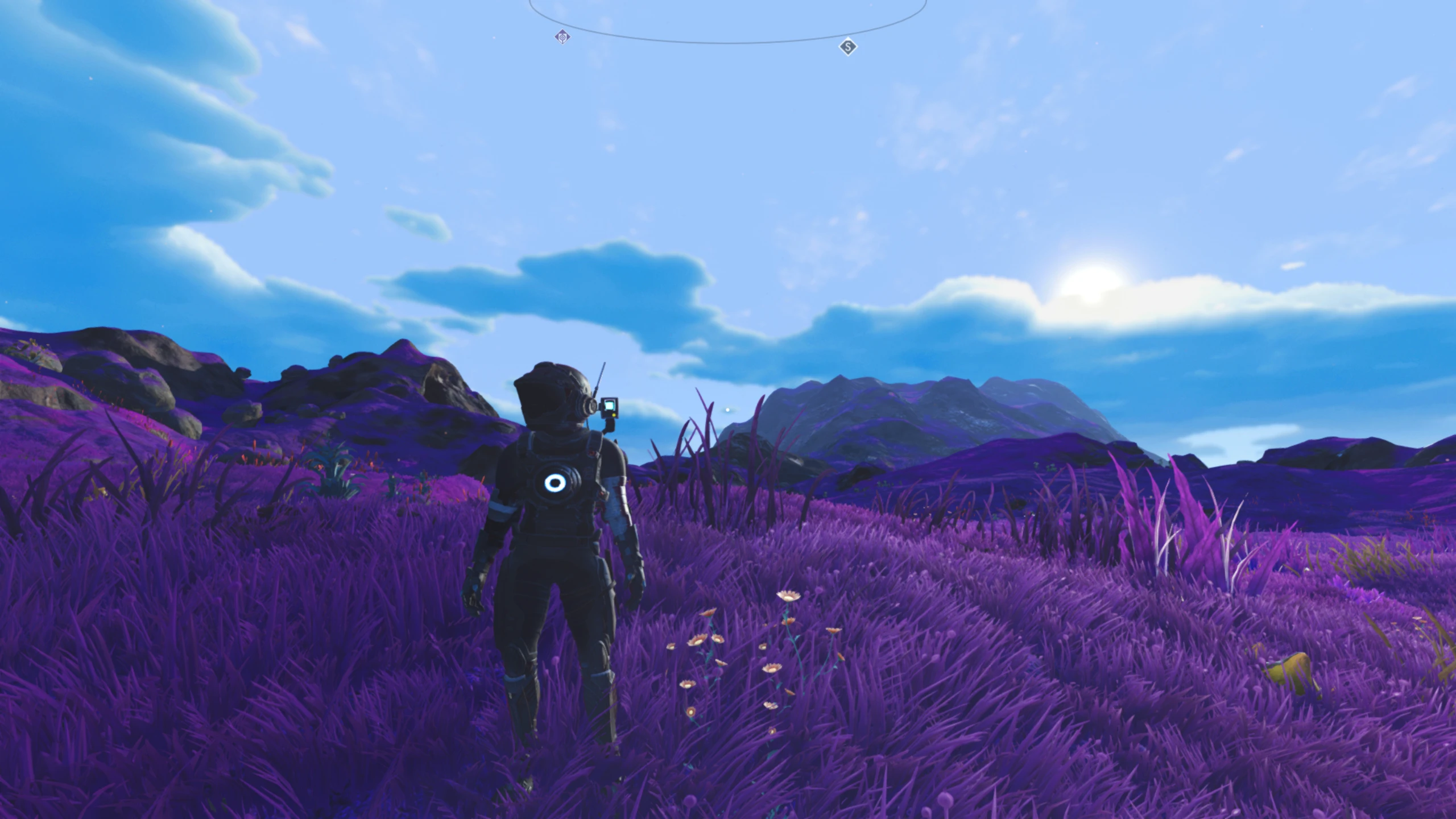
Clouds have been overhauled for more coverage and detail, animation speed and colour bias.
Fog has been greatly reduced and adjusted so that it now should only appear near the far horizon.
Sun properties have been altered for brightness, saturation, MIE factor and fixes sun clamp angle.
Sun Size in Space is reduced to give the illusion of it being a great distance away rather than very close.
Bloom has been disabled via PIPELINES files.
Where possible / appropriate I have kept all original values for reference.
Modifies the following:
GCGRAPHICSGLOBALS. GLOBAL. MBIN
GCENVIRONMENTGLOBALS. GLOBAL. MBIN
GCSKYGLOBALS. GLOBALS. MBIN
PIPELINES\PIPELINEDEFERRED. BIN
PIPELINES\PIPELINEDEFERREDVR. BIN
Installing No Man's Sky Mods (Steam).
Installing No Man's Sky Mods (Steam).
Default Steam installation location:
C:\Program Files (x86)\Steam\steamapps\common\No Man's Sky\GAMEDATA\MODS
Custom Steam installation location:
E:\Steam\steamapps\common\No Man's Sky\GAMEDATA\MODS
1. Browse to the "No Man's Sky\GAMEDATA" folder.
2. Ensure there is a folder named MODS (Uppercase!) within, if not create it!
3. Place the <modname> folder into the GAMEDATA\MODS folder.
4. Delete the file: GCMODSETTINGS. MXML from No Man's Sky\Binaries\SETTINGS
(It will be auto-regenerated with a new load order based on the mods you have)
If done correctly the game will display a MOD Warning Page: Click to continue.
You should now be presented with your save games list to choose from to start playing.
Clouds Sun and Fog is a visual overhaul mod for No Man's Sky that enhances cloud detail, slows cloud animation, adjusts sun properties and planet fog, and offers optional lens dirt removal. It also includes an optional real-time day length setting. With 277 endorsements and recent updates, it's a solid choice for players seeking improved atmospheric visuals.
✨ Key Features
📊 Pros & Cons
✅ Pros
- Community-tested with 277 endorsements and over 10k downloads.
- Recently updated (June 2026) so likely compatible with current game version.
- Optional features let you customize the experience—pick and choose what you want.
⚠️ Cons
- Visual mods can be subjective; the fog and sun changes might not suit everyone's taste.
- Requires manual installation—no mod manager support mentioned, so be ready to drop files into the game folder.
For No Man's Sky players who want a more immersive, realistic atmosphere without overhauling the whole game. If you're tired of the default cloud and fog look and want finer control over day length and lens effects, this is for you. Skip if you prefer vanilla visuals or want gameplay changes—this is purely cosmetic.
💡 Beginner Tips
- Back up your original game files before replacing anything—just in case you want to revert.
- If you're using the optional day length feature, test it in a new save to see how it affects gameplay.
- Check the mod's comments section on the Nexus for user feedback and any known issues.
📊 Mod Details
- Game
- No Mans Sky Mods
- Author
- Silent369
- Version
- 6.2
- Downloads
- 10,442
- Endorsements
- 277
- Category
- Visuals and Graphics
- Created
- 11/13/2021
- Updated
- 6/23/2026
🔧 How to Install No Man\ Mods
Create /MODS/ folder in /GAMEDATA/PCBANKS/. Delete DISABLEMODS.TXT.
📖 Full step-by-step install guide for No Man\ →
Visit the official mod page for specific installation instructions for this mod.
🎮 Need cheat codes or console commands? Check ur gaming wiki for No Man\ commands, item IDs, and more.
Keep browsing — more No Man\ mods await