Monsters are people HUD (REFramework) (D2D)
⚪ Last updated 2022⚠️ Install Order · 1 step
Install in this order, then this mod last — most mods fail to load without their framework and dependencies in place.
Preview
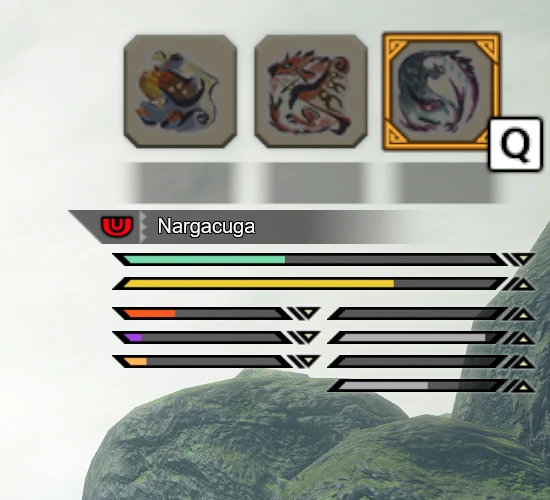
🔍 Analysis
- 👍 3.7% endorsement rate — high engagement, a strong quality signal
- 🏆 #15 of 28 User Interface mods in this game by downloads
📋 About This Mod
Another general HUD for displaying monster info, themed after the player's vanilla HUD. Made to display as little irrelevant information as possible.
A HUD mod for Dragon's Dogma 2 that displays monster info in the style of the vanilla HUD, aiming to show only relevant information. With over 1,000 endorsements and 27,000 downloads, it's a popular choice for players who want a cleaner, more immersive monster info display.
✨ Key Features
📊 Pros & Cons
✅ Pros
- Community favorite with 1,015 endorsements and 27,544 downloads — clearly a lot of players dig it.
- Keeps the HUD clean and immersive by cutting out irrelevant info, perfect for purists.
- Matches the vanilla HUD style, so it feels like a natural part of the game.
⚠️ Cons
- Requires REFramework, so you'll need to install that dependency first.
- Last updated in August 2022 — might have compatibility issues with newer game patches.
For Dragon's Dogma 2 players who want a cleaner monster info display without breaking immersion. If you're tired of cluttered HUDs and want something that blends with the vanilla look, this is for you. Skip if you want fancy custom themes or extra features — this is all about minimalism.
💡 Beginner Tips
- Make sure REFramework is installed and updated to the latest version before adding this mod.
- Check the mod's compatibility with your current game version, as it hasn't been updated since 2022.
- Use a mod manager like Vortex to handle installation and load order automatically.
📊 Mod Details
- Game
- Monster Hunter Rise Mods
- Author
- DSC-173
- Version
- 2.1.0
- Downloads
- 27,540
- Endorsements
- 1,013
- Category
- User Interface
- Created
- 5/2/2022
- Updated
- 8/14/2022
🧩 Commonly Used Together
Users add these mods to the same collections — a real compatibility signal, not an AI guess.
🔧 How to Install MHRise Mods
Install REFramework. Drop mod files into game directory.
📖 Full step-by-step install guide for MHRise →
Visit the official mod page for specific installation instructions for this mod.
🎮 Need cheat codes or console commands? Check ur gaming wiki for MHRise commands, item IDs, and more.
Keep browsing — more MHRise mods await