High-res HUD Mod (4K)
⚪ Last updated 2022This mod may not work until the author updates it. Check for an update, or see the rollback guide.
Preview
🔍 Analysis
- 👍 3.3% endorsement rate — high engagement, a strong quality signal
- 🏆 #6 of 28 User Interface mods in this game by downloads
📋 About This Mod
KAMURA POINTS AND ZENNY ARE CURRENTLY BUGGED!
Anyone who can help fix this, please reach out!
I am also limited in what textures I can edit due to other mapping issues. I have made a more extensive HUD overhaul that covers more textures, but have had to remove some textures as they don't map properly in higher resolution. I would love to finish this mod someday (including Sunbreak) with the help of anyone who is interested in assisting!
HOW TO INSTALL
-
[]Install Fluffy Manager.
[
]In the directory you installed Fluffy Manager to, under Games/MHRise/Mods, unpack 4K HUD Mod.rar[]Enable "4K HUD Mod" in Fluffy Manager.
[]Play the gideo vame
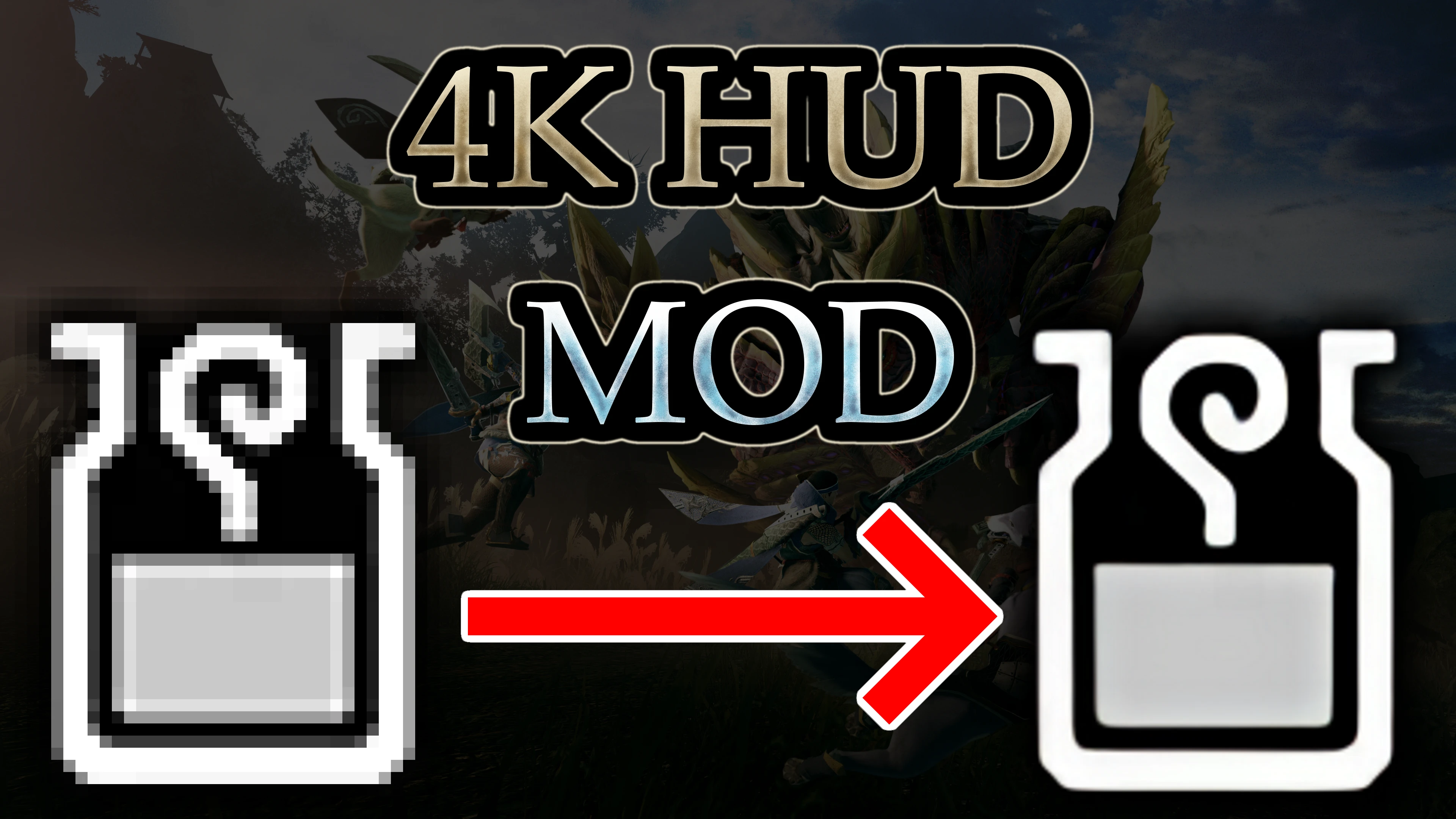
- []This mod updates the HUD/GUI with a 4x higher resolution version that uses a mix of recreation and upscaling to be as accurate to the original game as possible, to be more 4K friendly.
- []A mixture of the upscalers "ESRGAN" and "waifu2x" were used to update the textures(on a case by case basis depending on which looked best where).
- []Parts of the HUD that didn't look clean upscaled were recreated by hand, using the upscales as a template.
-
[]Some parts of this mod, such as the Monster and environmental creature icons(used on the minimap and elsewhere, see picture _), use official higher resolution assets found within the game files, along with edits to make them look more how they appear in the HUD.
-
[]THIS MOD IS INCOMPLETE. For some reason, most of the in-game HUD allows for higher resolution replacements with no issue. However, other parts of the HUD, when replaced with higher res versions, break. Particularly, bullet cases from bowguns and bows(on the top left of the screen, not the ones on the bottom right). This mod does not include those broken parts of the HUD though, so don't worry. What this DOES mean though, is that those aspects of the HUD remain at that low resolution. I've tried downloading another mod, Adjustable UI Scale, to see if that could possibly fix the issue, but unfortunately it does not. (download that mod tho anyway it's good <3)
[
]If anyone knows how this issue could possibly be fixed, that'd be a great help and I'd definitely update the mod with more higher res assets if that happens. (I actually made more higher res textures before finding out they broke when I put in the game, so they're just sitting here on my hard drive waiting to get used lol)
FluffyQuack for RETool, used for unpacking the game's PAK files. (seriously dude you made BOTH of these?? good shit man, doing god's work, thank you)
AsteriskAmpersand for MHR Tex Chopper, which was used to convert the in-game textures from tex files to an editable dds format.
BoltTheMan for Adjustable UI Scale.
Xintao for ESRGAN, used for upscaling the textures.
nagadomi for waifu2x, used for upscaling the textures.
-
[]THIS MOD IS INCOMPLETE. For some reason, most of the in-game HUD allows for higher resolution replacements with no issue. However, other parts of the HUD, when replaced with higher res versions, break. Particularly, bullet cases from bowguns and bows(on the top left of the screen, not the ones on the bottom right). This mod does not include those broken parts of the HUD though, so don't worry. What this DOES mean though, is that those aspects of the HUD remain at that low resolution. I've tried downloading another mod, Adjustable UI Scale, to see if that could possibly fix the issue, but unfortunately it does not. (download that mod tho anyway it's good <3)
High-res HUD Mod (4K) by Chalk updates the in-game HUD/GUI with higher resolution textures, aiming for visual fidelity. It has a known bug affecting Kamura Points and Zenny that the author cannot fix. Popular with 3,479 endorsements and 106,668 downloads, last updated in February 2022.
✨ Key Features
📊 Pros & Cons
✅ Pros
- Huge community trust (3,479 endorsements) and over 100k downloads.
- Sharpens the HUD for 4K displays without changing the game's feel.
- Simple cosmetic upgrade—no gameplay changes, just cleaner visuals.
⚠️ Cons
- Kamura Points and Zenny are bugged—author says they can't fix it without deeper edits.
- Last updated in 2022—might not be compatible with the latest game patches.
For Monster Hunter Rise players on 4K monitors who want a crisper HUD without altering the game's aesthetic. Skip if you rely on Kamura Points or Zenny tracking—the bug could mess with your resource display.
💡 Beginner Tips
- Back up your original HUD files before replacing them, so you can revert if needed.
- Check the mod's comments section for any user-made fixes for the Kamura Points/Zenny bug.
- If you're on PC, ensure your game is updated to a version compatible with this mod's 2022 release.
📊 Mod Details
- Game
- Monster Hunter Rise Mods
- Author
- Chalk
- Version
- 0.5
- Downloads
- 106,659
- Endorsements
- 3,471
- Category
- User Interface
- Created
- 2/12/2022
- Updated
- 2/14/2022
🧩 Commonly Used Together
Users add these mods to the same collections — a real compatibility signal, not an AI guess.
🔧 How to Install MHRise Mods
Install REFramework. Drop mod files into game directory.
📖 Full step-by-step install guide for MHRise →
Visit the official mod page for specific installation instructions for this mod.
🎮 Need cheat codes or console commands? Check ur gaming wiki for MHRise commands, item IDs, and more.
Keep browsing — more MHRise mods await