Fast Pip - Fast UI for PipBoy 2000
🟡 Updated this yearPreview
🔍 Analysis
- 👍 1.8% endorsement rate — high engagement, a strong quality signal
- ✅ Updated 1 day after the latest game patch — actively maintained
- 🏆 #18 of 116 User Interface mods in this game by downloads
📋 About This Mod
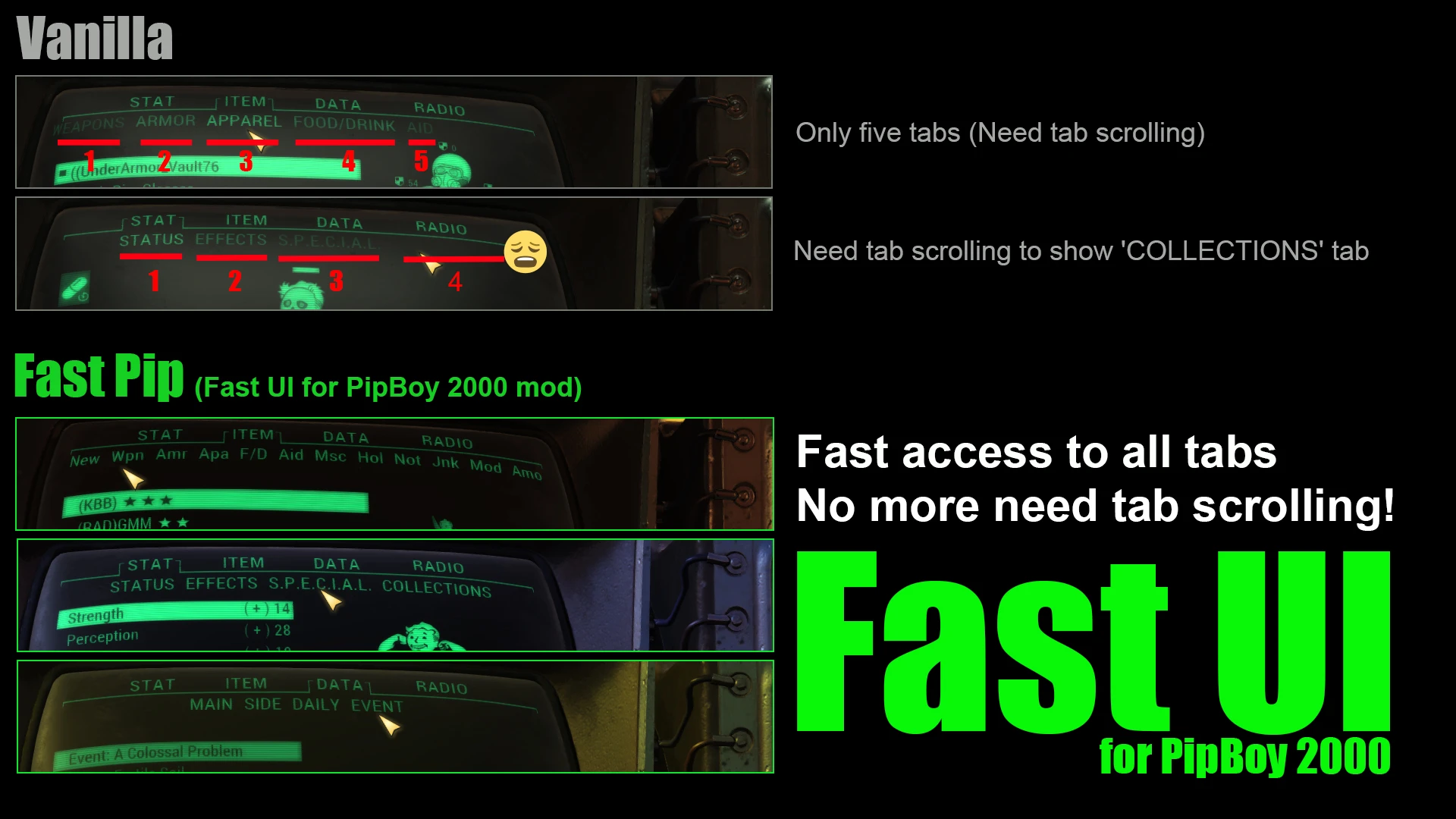
This Fast Pip is a mod that improves the usability of Pipboy.
If you use a mouse, you will see a dramatic improvement.
As with Fast Pip, I recommend using Fast UI, for better stash and trading access.
Note:
FastPip conflicts with other mods that modify pipboymenu.swf.
If you use the Uni Injector, it will work with Save Everything.
# How to use FastPip.ba2:
1) Put FastPip.ba2 to Fallout76's Data folder.
2) Append FastPip.ba2 to sResourceArchive2List in Fallout76Custom.ini.
# How to use Uni Injector:
and, original ba2 will be backedup in same directry with the file name
'SeventySix - Localization.ba2. BACKUP_FastPip'.
1) Click the 'Set Location' button, Set directory where Fallout76.exe is located.
( Do not set the 'Fallout76/Data' directory)
2) If you want to change the FastPip label text or option, you can do so.
PipBoy's display area is bit tight, so make the labels as short as possible.
3) Be sure to click the 'Save Label' button when you are done label editing.
4) Press the 'Load UI (BA2)' button to load the other mod you want to inject FastPip into.
If you are not using any other UI mods, you may want to load SeventySix - Interface.ba2.
( /Fallout76/Data/SeventySix - Interface.ba2)
( I recommend to inject FastPip and FastUI into Save Everything)
( It is not possible to re-inject to already injected mod file)
If there are no problems, you should be able to inject.
( injected mod file name will have '_FastPip' or '_FastUI' or both added to it)
( If you have using FastPip.ba2, do not use FastPip.ba2 . there will be conflicts)
If you want edit label text or parameters again, repeat from '2)'.
( Uni Injector does not access to Windows Registry Key and any networks)
# Mods that can be injected with UniInjector:
[]Vanilla(SeventySix - Interface.ba2)
[]Save Everything
[]riddERs Ultrawide Reloaded
Fast Pip removes the need to scroll through PipBoy tabs by providing fast access to all tabs directly. A UI enhancement mod for Fallout 4 with 701 endorsements and 37,998 downloads, last updated July 2026.
✨ Key Features
📊 Pros & Cons
✅ Pros
- Community-approved with 701 endorsements.
- High download count (37,998) shows real demand.
- Solves a common annoyance—tab scrolling—with a direct fix.
⚠️ Cons
- May require manual file placement or mod manager setup, unclear.
- Limited to UI tweak; no additional features beyond tab access.
For Fallout 4 players who hate scrolling through PipBoy tabs and want quicker access to their inventory, map, and stats. If you're a UI purist who values efficiency, this is for you. Skip if you want more comprehensive UI overhauls or gameplay changes.
💡 Beginner Tips
- If you're using a mod manager like Vortex, install the mod through the manager to avoid manual file placement errors.
- Make sure to load this mod after any other UI mods to ensure compatibility.
- Test the mod in a save before committing to it—if it conflicts with other UI mods, you may need to adjust load order.
📊 Mod Details
- Game
- Fallout 76 Mods
- Author
- Unikko
- Version
- 2.0.4
- Downloads
- 37,998
- Endorsements
- 701
- Category
- User Interface
- Created
- 12/22/2021
- Updated
- 7/23/2026
🧩 Commonly Used Together
Users add these mods to the same collections — a real compatibility signal, not an AI guess.
🔧 How to Install Fallout 76 Mods
Use Vortex. Place .ba2 files in Data folder. Use cautiously online.
📖 Full step-by-step install guide for Fallout 76 →
Visit the official mod page for specific installation instructions for this mod.
🎮 Need cheat codes or console commands? Check ur gaming wiki for Fallout 76 commands, item IDs, and more.
Keep browsing — more Fallout 76 mods await